80S-20用户手册 - 第50页
1 Introduction SIPLACE 80S-20 /F4 User Manual 1.11 Overview o f the modules - controls Software version SR.407.xx 01/2001 US Edition 50 1.1 1.2 De scription All the c ontrols can be reac hed b y a 1.60 m tall person. 1 M…
SIPLACE 80S-20/F4 User Manual 1 Introduction
Software version SR.407.xx 01/2001 US Edition 1.11 Overview of the modules - controls
49
1.11 Overview of the modules - controls
1.11.1 Controls
1
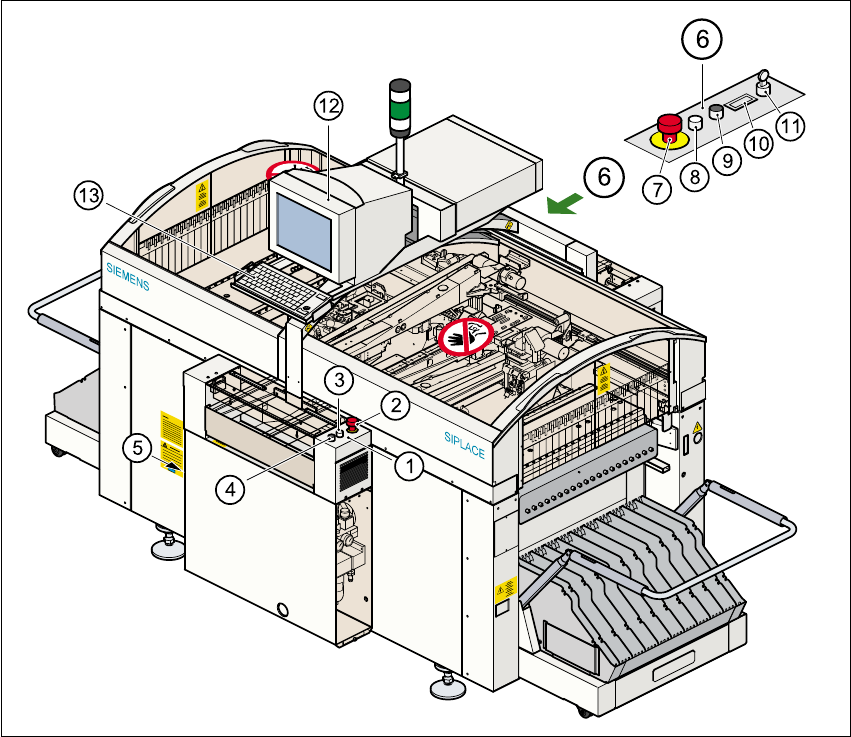
Fig. 1.11 - 1 Overview of the modules - controls
(1) Operator panel, input conveyor side (2) Emerg. stop mushroom-head push-button
(3) Start button (white) (4) Stop button (black)
(5) Main switch (6) Operator panel, output conveyor side
(7) Emerg. stop mushroom-head push-button (8) Start button (white)
(9) Stop button (black) (10) Component counter
(11) Key switch (12) Touchscreen monitor
(13) Keyboard with trackball 1

1 Introduction SIPLACE 80S-20/F4 User Manual
1.11 Overview of the modules - controls Software version SR.407.xx 01/2001 US Edition
50
1.11.2 Description
All the controls can be reached by a 1.60 m tall person. 1
Main switch 1
The main switch is used to switch the power supply to the machine on and off. 1
RISK OF DEATH
Some parts inside the placement machine carry potentially lethal voltages - even when switched
off at the main switch. 1
Key switch 1
In normal mode, the key switch is set to "0". The key should be removed and kept in a safe place.
It must only be turned to position "I" (set-up mode) by authorized personnel, and then only for cer-
tain maintenance and servicing work. 1
Stop button 1
This button is used to stop the placement machine. 1
Start button 1
This button starts the machine after it has been switched on, or after faults have been eliminated. 1
Emergency stop mushroom-head push-button 1
The emergency stop mushroom-head push-button latches into place when it is pressed. The
power supply for the gantry axes, component tables, conveyor belts, and cutting devices is inter-
rupted, and the voltage to the star axes of the placement heads is reduced. The button must be
turned to release it. 1
Component counter 1
The component counter displays the number of components processed. 1
Station computer, monitor and keyboard 1
The station computer, monitor and keyboard are mounted on a rotating console on the placement
machine’s central cross-beam. The station computer is a desktop model with a Pentium proces-
sor. The operating system is WINDOWS NT 4.0. The SIPLACE graphical user interface, which is
based on the Windows standard, is used to operate and monitor the machine. A color touchscreen
monitor with a resolution of 640 x 480 pixels provides the screen display. Both the keyboard and

SIPLACE 80S-20/F4 User Manual 1 Introduction
Software version SR.407.xx 01/2001 US Edition 1.11 Overview of the modules - controls
51
the touchscreen can be used to enter data. The ultra-flat IBM-compatible PC keyboard incorpo-
rates a trackball for controlling the mouse. 1
Indicator lamp 1
The sequence of colors is white - green – white. This lamp is used to signal operating states and
malfunctions of the placement machine. 1
Component barcode reader 1
There is a compartment for a Datalogic DL 910 component barcode reader between the monitor
and keyboard. The barcode reader enables the components to be set up and topped up quickly
and reliably. 1
1.11.3 Ergonomic arrangement of the controls
Figure 1.11 - 1 on page 49 provides an overview of the position of the controls, which are subdi-
vided into the following groups: 1
Operating panel on the PCB input conveyor side with 1
– Start button
– Stop button
– Emergency stop mushroom-head push-button
– Main switch (on the left-hand side)
Operating panel on the PCB output conveyor side with 1
– Emergency stop mushroom-head push-button
– Start button
– Stop button
– Component counter
– Key switch
Console on the central cross-beam with 1
– Station computer
– Touchscreen monitor
– Keyboard and
– Component barcode reader (option)