80S-20用户手册 - 第504页
11 Station extensions /Hardware SIPLACE 80S-20 /F4 User Manual 11.9 Flux dispenser unit Software version S R.407.xx 01/2001 US Edition 504 1 1 .9 Flux dispenser unit 1 1.9.1 Overview Reliable p rocessin g of flip- chip c…

SIPLACE 80S-20/F4 User Manual 11 Station extensions /Hardware
Software version SR.407.xx 01/2001 US Edition 11.8 Coplanarity laser module (80F4)
503
11.8.5 Data entry
– Enter the coplanarity measurement under ‘Handling data’ in the package form editor (see sec-
tion 5.4.4 of the SIPLACE UNIX line computer user manual).
– Enter the maximum deviation from coplanarity (see max. component height tolerance, section
5.2.5 ‘NU editor functions’ of the SIPLACE UNIX line computer user manual).
PLEASE NOTE
You can activate or deactivate the coplanarity laser module from the ‘"Options" menu
’ (see section
3.3.2.3
of this user manual). The coplanarity measurement can be switched off or on for those
components for which the coplanarity measurement is set in the package form data. 11

11 Station extensions /Hardware SIPLACE 80S-20/F4 User Manual
11.9 Flux dispenser unit Software version SR.407.xx 01/2001 US Edition
504
11.9 Flux dispenser unit
11.9.1 Overview
Reliable processing of flip-chip components requires a flux to be applied before the component is
placed. This ensures that the subsequent soldering process will be successful. 11
Once the Pick&Place head has picked up the flip-chip component, and a position measurement
has been carried out, the flux is dispensed at the placement position on the PCB. The volume of
flux to be dispensed can be entered for specific package forms. 11
The Pick&Place head inserts the flip-chip component as soon as the flux has been dispensed.
The Pick&Place head hold the flip-chip component in position on the PCB for a programmable,
package form-specific time. This causes the component to dry onto the flux, thus preventing it
from “floating away”. 11
Once all the flip-chip components have been placed, the PCB conveyor is activated after a pro-
grammable waiting time in order to remove the PCB. 11
11.9.2 Technical data
11
Dispensing volume 2 µl - 100 µl
Smallest dosing increment 1 µl
Syringe volume 1 ml
Tank volume 100 ml
Volume to be dispensed at the mounting location Depends on the flip-chip size, and the wetting prop-
erties of both flux and substrate material.
Flip-chip holding time after placement 0 to 5 sec
Holding time increment 0.01 sec
Minimum waiting time before PCB is transported 0 to 40 sec
Waiting time increment 1 sec
Dispensing cycle time 1.5 sec, including positioning
Rinse cycle 1 to 10 x syringe content
Filling level 1 Warning
Filling level 2 Empty, i.e. machine stopped
Positioning accuracy of the dispensing needle ± 0.05 mm
SIPLACE 80S-20/F4 User Manual 11 Station extensions /Hardware
Software version SR.407.xx 01/2001 US Edition 11.9 Flux dispenser unit
505
11.9.3 Functional description
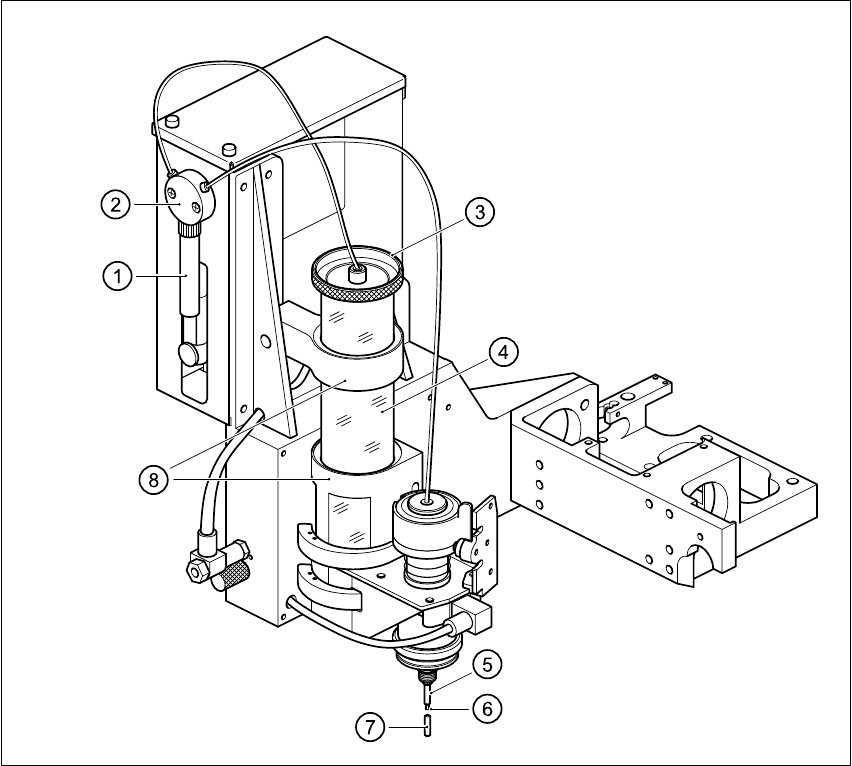
The centrifugal tube (3) is used as a reservoir, and is filled with flux. A pump sucks the flux via the
valve (2) up into the syringe (1). The syringe (1) then dispenses the set volume of flux, via the
valve and the tip of the dispensing needle (6), onto the placement position. 11
11
Fig. 11.9 - 1 Fluxing overview
(1) Syringe (2) Valve
(3) Cover of reservoir (4) Reservoir (centrifugal tube)
(5) Centering nozzle (6) Tip of dispensing needle
(7) Press-fit cap (8) Retainer