80S-20用户手册 - 第513页
SIPLACE 80S-20/F4 User Manual 11 Station extensions /Hardware Software version SR.407.xx 01/2001 US Edition 11.9 Flux dispenser unit 513 1 1.9.7.2 Editing the package form list Å Se lect the “ Package form li st ” menu i…
11 Station extensions /Hardware SIPLACE 80S-20/F4 User Manual
11.9 Flux dispenser unit Software version SR.407.xx 01/2001 US Edition
512
Å Push the flux dispenser against the side stop, and tighten the fixing screws.
Å Attach the rear panel.
11.9.7 User interface
PLEASE NOTE
Before the flip-chip component can be placed and the flux can be applied, a placement program
with flip-chip component must be created on the line computer and sent to the station computers
(see the UNIX user manual).
The Fluxing option must have been activated in the machine options on the station computer.
See Section 3.3.2.3 "Options" menu of the user manual. 11
11.9.7.1 Package form list and parameters
Before the flux can be applied to a PCB for placing flip-chips, process data about the flip-chip must
be entered in a list, and general parameters about the flux dispenser must be entered on the sta-
tion computer. 11
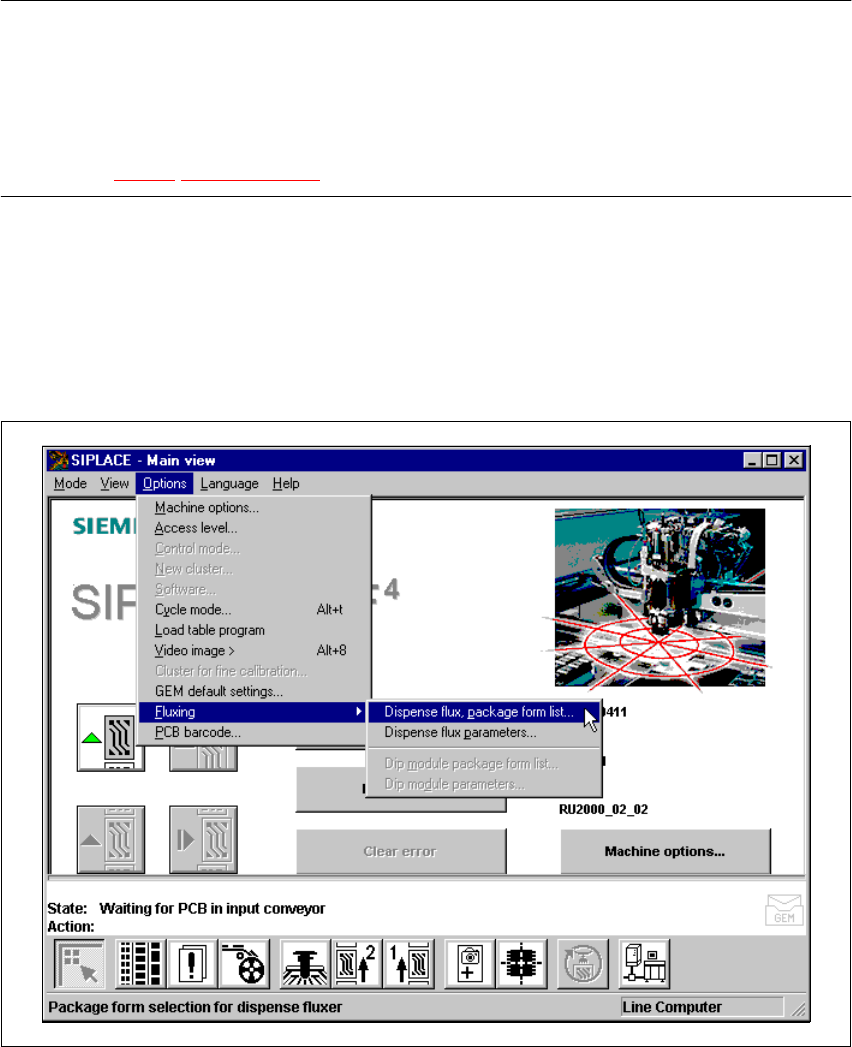
Å Select the Fluxing submenu from the Options menu in the menu bar.
Fig. 11.9 - 6 Fluxing option
SIPLACE 80S-20/F4 User Manual 11 Station extensions /Hardware
Software version SR.407.xx 01/2001 US Edition 11.9 Flux dispenser unit
513
11.9.7.2 Editing the package form list
Å Select the “Package form list” menu in order to edit the data for the flip-chip component to be
placed.
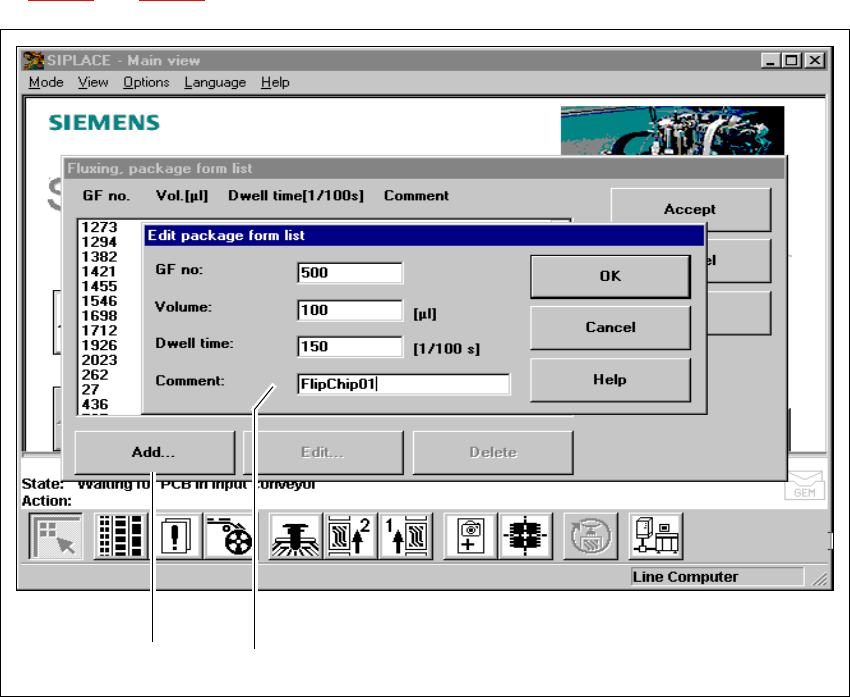
Å You can use this menu to add and edit flip-chip components together with their GF no. See Fig.
11.9 - 7
and 11.9 - 8.
Fig. 11.9 - 7 Fluxing package form list
(1) ‘Add’ button
(2) Input boxes
11
Å Click on the Add button in order to describe a new component for fluxing, and enter the data
in the input boxes.
Å Enter the following data:
GF no: 11
– The package form number of the component
– Package form numbers from 1 to 32000 can be used.
211 111

11 Station extensions /Hardware SIPLACE 80S-20/F4 User Manual
11.9 Flux dispenser unit Software version SR.407.xx 01/2001 US Edition
514
Volume: 11
– The volume of flux to be applied for the current component in (µl).
– You can enter flux volumes from 1 µl to 100 µl.
– We recommend the following values as a guideline:
6 mm x 6 mm component => 8 µl flux
10 mm x 10 mm component => 10-15 µl flux
Holding time: 11
– The time for which the component must be held in the flux after placement.
– This may be set to 0 to 500/100 sec, which corresponds to 0 to 5 seconds.
Comment: 11
– Here you can enter a comment about the component.
11
Å Click on OK to confirm your input.
Å Click on Accept to save the edited package form list.
PLEASE NOTE
You can enter up to 25 package forms on the station computer. 11
Å To edit a component, simply highlight the line containing that component (see Fig. 11.9 - 8).
Å Click on the Edit button in order to edit an existing package form.