80S-20用户手册 - 第539页
SIPLACE 80S -20/F4 User Manual 12 S tation extensions / software Software version SR.407.xx 01/2001 US Edition 12.2 GEM interface 539 Spool f ull acti on 12 – Overwrit e If there is no m ore space av ailable in the s poo…

12 Station extensions / software SIPLACE 80S-20/F4 User Manual
12.2 GEM interface Software version SR.407.xx 01/2001 US Edition
538
Possible settings: 12
Connect at power-up 12
(See also section 12.2.2.5) 12
– Yes
When the station is switched on, the station computer attempts to connect to the host com-
puter.
– No
When the station is switched on, no connection to the host computer is made. However, the
operator can establish the connection manually in the "State view" (see also section 12.2.2.5
).
Control 12
(See also section 12.2.2.5) 12
– Off-line
It is not possible to send or receive messages.
– Local
In the "Placement Program" view, the user can "upload" placement programs from the station
computer to the host computer (See also section 12.2.2.6
).
No placement programs can be downloaded from the host computer to the station computer.
– Remote
In the "Placement Program" view, the user can upload placement programs from the station
computer to the host computer and "download" from the host computer to the station computer.
Spooling 12
(See also section 12.2.2.5) 12
– Yes
If the connection to the host computer is lost, the station will collect in a spooling file all mes-
sages intended for the host computer. Once the connection is re-established, the host can pick
up these messages from the station. The quantity of messages which can be stored is limited
by the size of the spooling file (20 MB).
– No
If the connection to the host computer is lost, all messages intended for the host computer will
be lost.

SIPLACE 80S-20/F4 User Manual 12 Station extensions / software
Software version SR.407.xx 01/2001 US Edition 12.2 GEM interface
539
Spool full action 12
– Overwrite
If there is no more space available in the spooling file, the oldest, stored message is overwritten
by the latest, current message.
– Ignore message
If there is no more space available in the spooling file, all new incoming messages will be dis-
carded
– Limit monitoring
Not currently relevant.
12
Å Click the Accept button to save the settings.
Å Click the SECS Parameters... button if you want to modify the SECS parameters (see also
section 12.2.2.3
).
12 Station extensions / software SIPLACE 80S-20/F4 User Manual
12.2 GEM interface Software version SR.407.xx 01/2001 US Edition
540
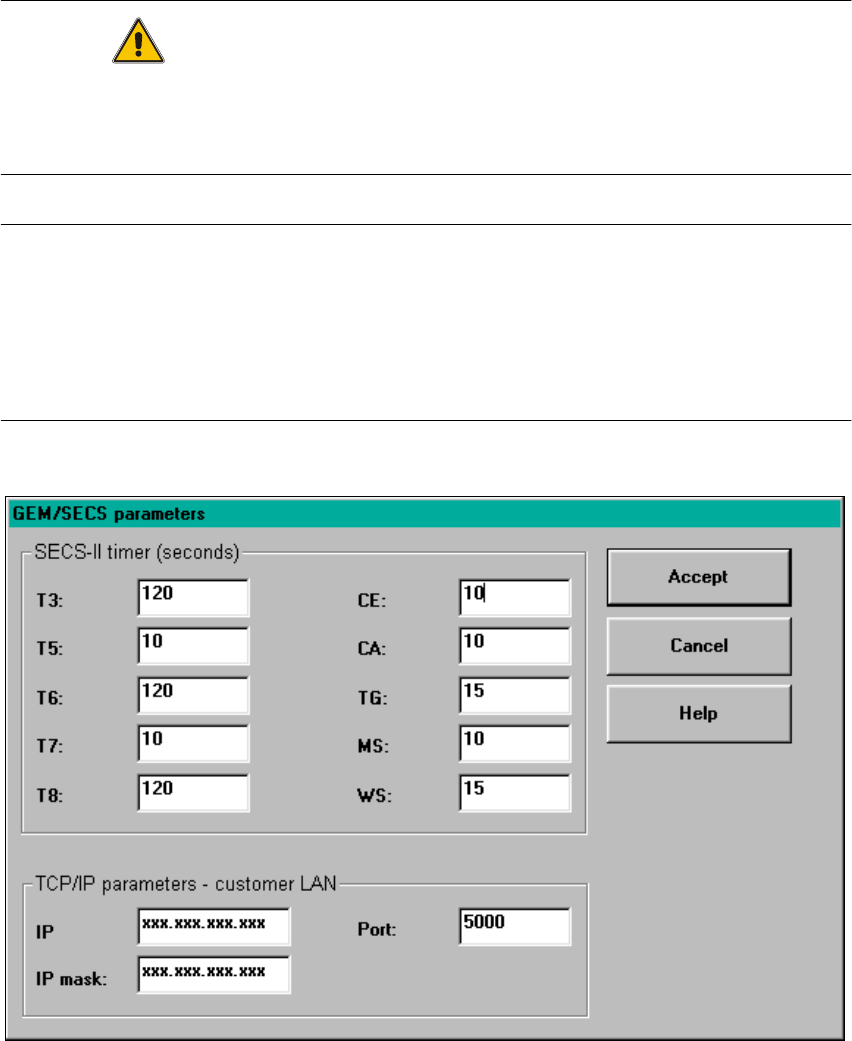
12.2.2.3 Setting the GEM/SECS parameters
CAUTION
The parameters illustrated in the figure below have been tested and are recommended.
They must be set as defaults in order to optimize transfer from the host computer to the line com-
puter. 12
NOTES
Changing the parameters has the following effects on the day-to-day operation of the
GEM interface:
When a timeout value or the TCP/IP port number is changed, the GEM link to the host computer
is briefly interrupted. The GEM software is closed down when the IP address or IP screen is
changed. The GEM software cannot be used until the station is switched on again. 12
12
Fig. 12.2 - 3 "GEM/SECS parameters" window