EN 3.pdf - 第134页
Model DECAN Series Company SAMSUNG TECHWIN Module 3.9 DOCKING CART & FEEDER BASE T otal Pages 11 T able of Contents [DOCKING CART O PERATION CHE CK] ............................................................ 2 [FEE…
Model
DECAN Series
Company
SAMSUNG TECHWIN
Module
3.8 IT, LTS
Version
01
Title
IT FUNCTION INSTALLATION
(DEVICE NET DRIVER)
Page
3-8-16
Note
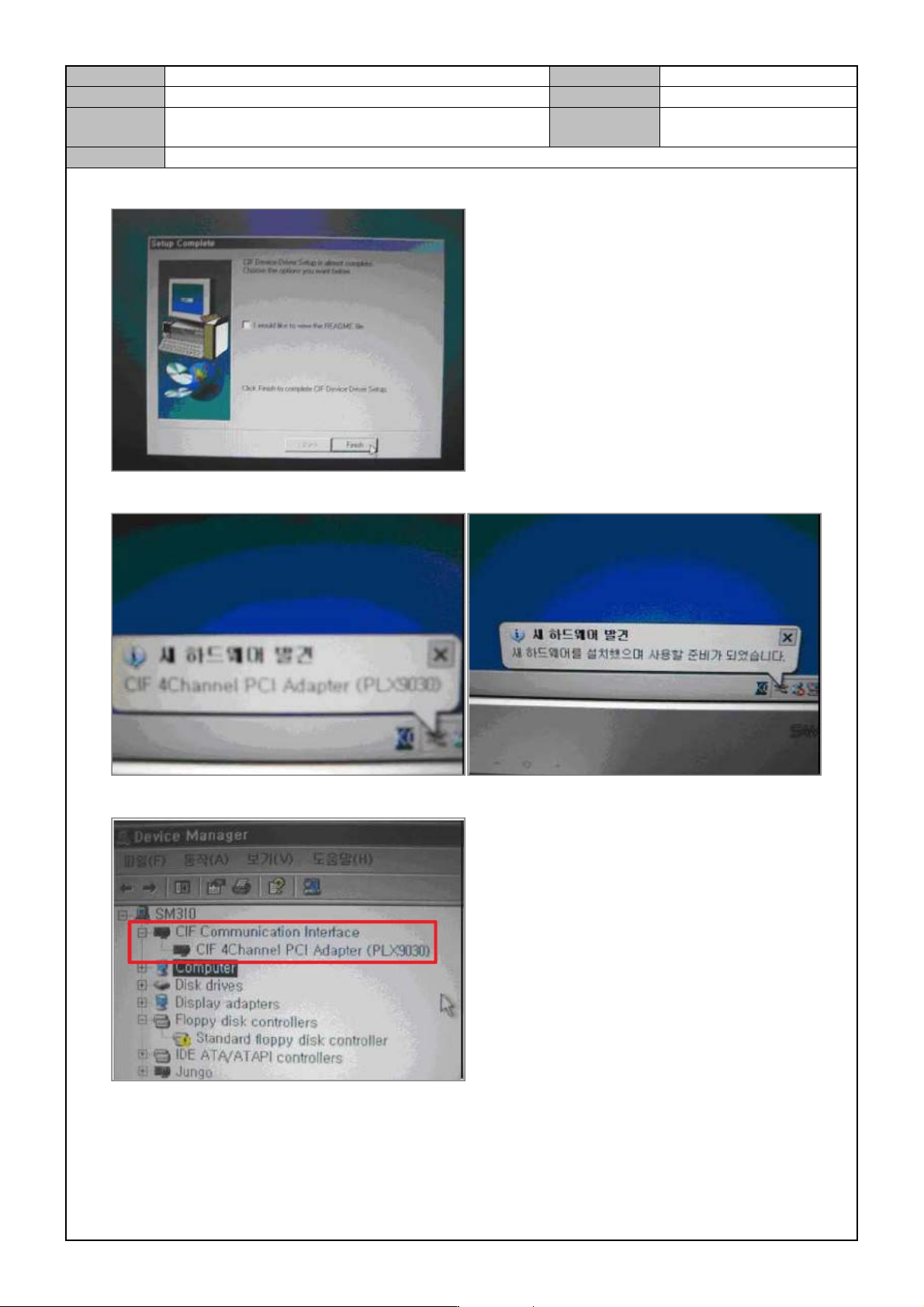
5. Press [Finish].
PC will automatically detect the Hardware and install the driver.
6. In Device Manager, check <CIF Communication Interface - CIF 4Channel PCI Adapter (PLX9030)> .
Model
DECAN Series
Company
SAMSUNG TECHWIN
Module
3.9 DOCKING CART & FEEDER BASE
Total Pages
11
Table of Contents
[DOCKING CART OPERATION CHECK] ............................................................ 2
[FEEDER BASE SLOT SETTING] ....................................................................... 4
[FEEDER BASE SYSTEM OPTION CHANGE] ................................................... 6
[FEEDER CHAGE LOCATION CHANGE] ........................................................... 7
[FEEDER UNLOCK SESNOR SETTING] ............................................................ 8
[FEEDER BASE ASSEMBLY] ........................................................................... 10
Model
DECAN Series
Company
SAMSUNG TECHWIN
Module
3.9 DOCKING CART & FEEDER BASE
Version
01
Title
DOCKING CART OPERATION CHECK
Page
3-9-2
Note
[DOCKING CART OPERATION CHECK]
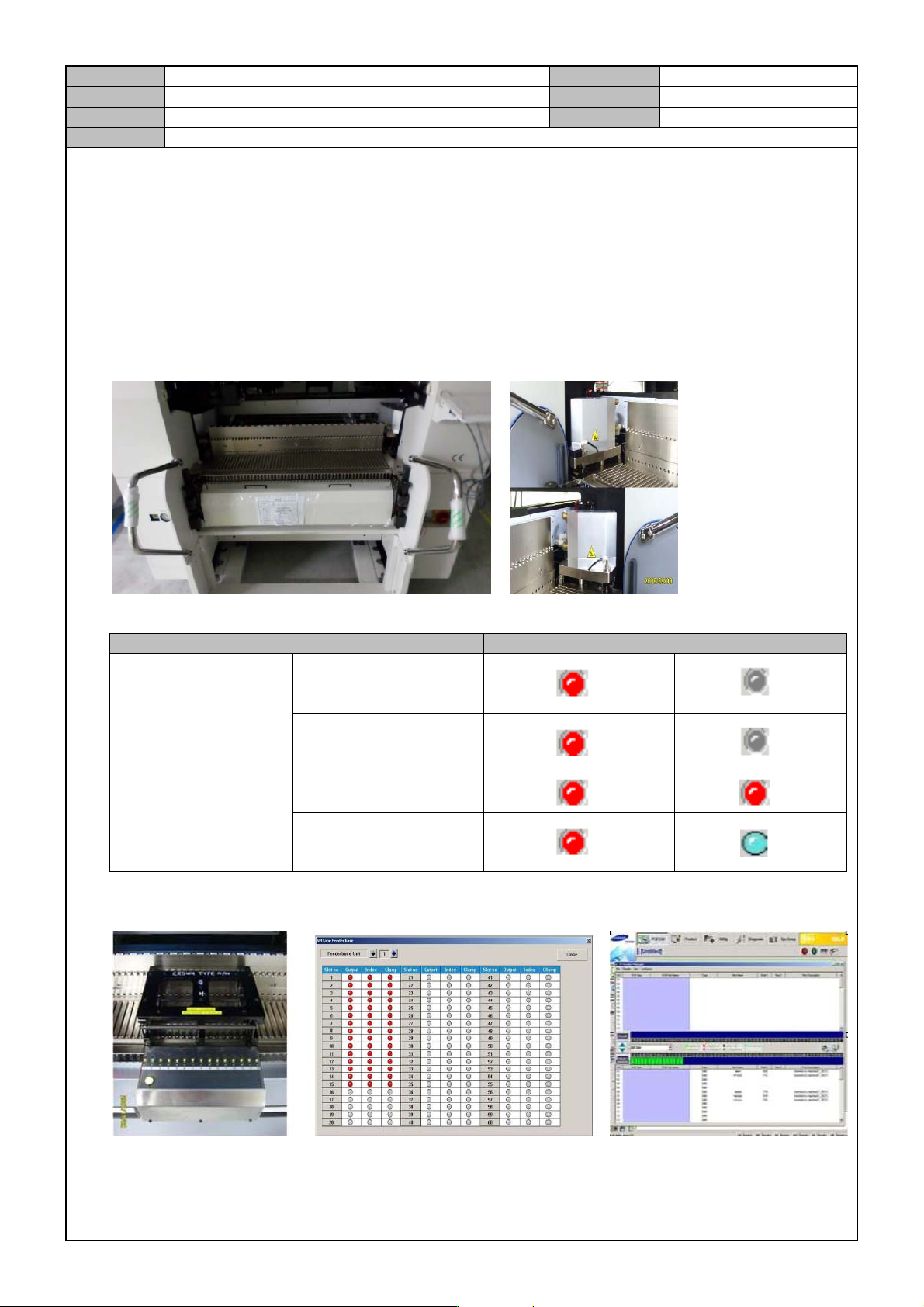
1. Check if the <Diagnosis> → <F2(I/O)> → <Sys.Setup> → <F4(Option)> → <Feeder Base System Option
> menu is set to <SM Docking 56>.
2. In < Feeder Base I/O>, use a feeder tool to check the I/O of < Feeder Slot #1~#56>.
3. When the Docking Cart is mounted in the equipment, see if the distance to the block is 20mm.
4. When moving up/down the mounted Docking Cart, see if horizontal levelness is maintained.
5. Check sensor IO depending on the mounting of the Docking Cart.
Classification SENSOR STATUS
IN PUT SENSOR
FRONT
LEFT/RIGHT
DOCKING CART
REAR
LEFT/RIGHT
DOCKING CART
OUT PUT SENSOR
FRONT/REAR DOCK
CART SOL_1_AIR
FRONT/REAR DOCK
CART SOL_1_UD
6. Using a Feeder I/O tool, turn on the feeder power and see if the IO signals such as <Output>,<Index> and
<Clamp> are normal.