EN 3.pdf - 第51页
Model DECAN Series Company SAMSUNG TECHWIN Module 3.3 BUT V ersion 01 Tit le BUT DETECTION SENSOR REPLACEMENT Page 3-3-4 Note 6. Replace with a new sensor . 7. Main Switch ON 8. In the MMI's <Diagnosis> <IO…
Model
DECAN Series
Company
SAMSUNG TECHWIN
Module
3.3 BUT
Version
01
Title
BUT DETECTION SENSOR REPLACEMENT
Page
3-3-3
Note
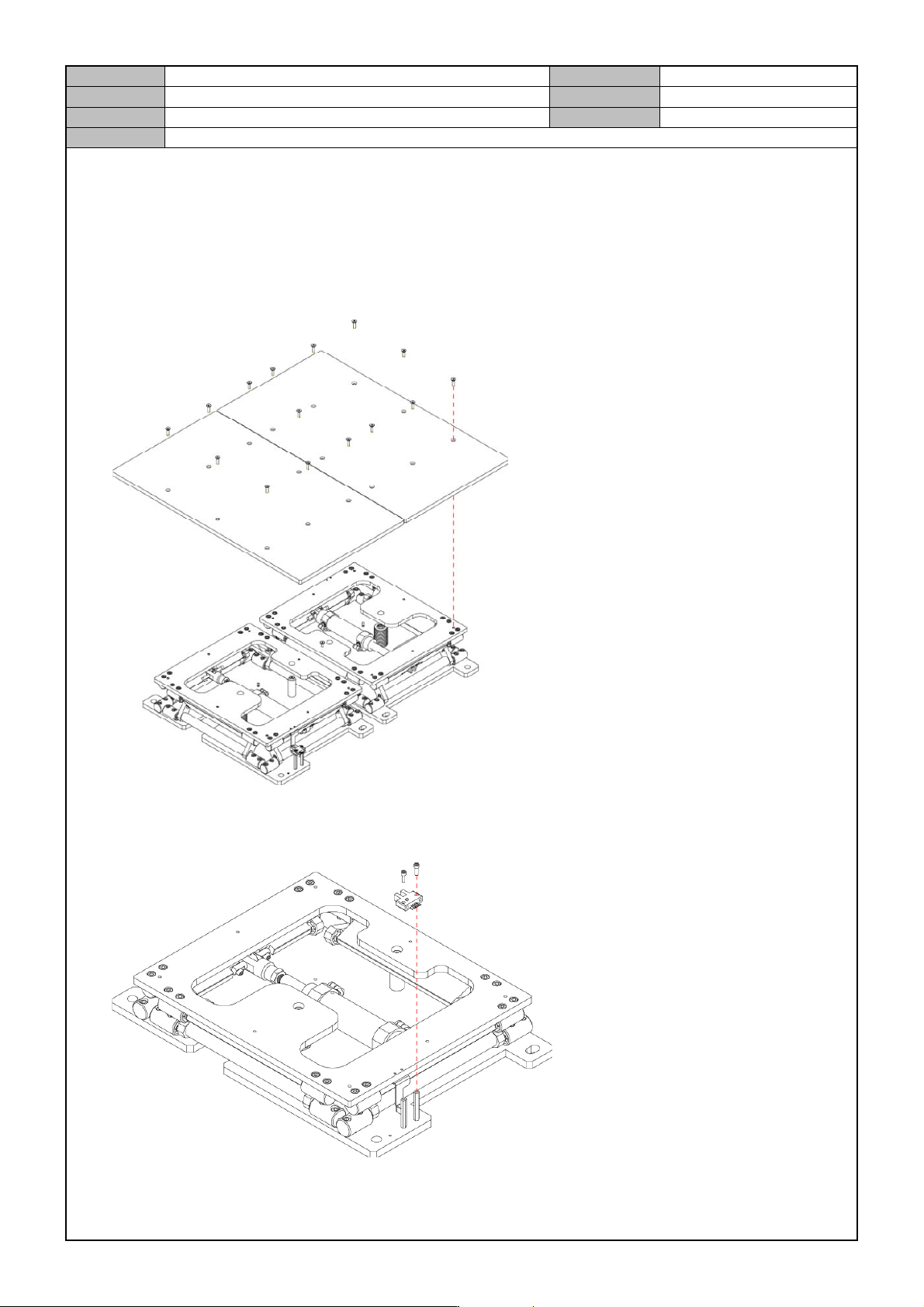
[BUT DETECTION SENSOR REPLACEMENT]
1. Widen the conveyor to the maximum width.
2. Terminate the PC and turn off the main switch.
3. Remove the fixing bolts and separate the Back up plate.
4. Separate the cable connected to the sensor.
5. Release the fixing bolts for the Sensor and separate the Sensor.

Model
DECAN Series
Company
SAMSUNG TECHWIN
Module
3.3 BUT
Version
01
Title
BUT DETECTION SENSOR REPLACEMENT
Page
3-3-4
Note
6. Replace with a new sensor.
7. Main Switch ON
8. In the MMI's <Diagnosis> <IO> menu, check operation of the <BUT I/O>.

Model
DECAN Series
Company
SAMSUNG TECHWIN
Module
3.4 CAMERA
Total Pages
12
Table of Contents
[CAMERA LIGHTING CHECK] ............................................................................ 2
[FIDUCIAL CAMERA OPTION SETTING] ........................................................... 5
[STAGE CAMERA ENABLE] ............................................................................... 6
[FIDUCIAL CAMERA REPLACEMENT] .............................................................. 8
[FIDUCIAL CAMERA OUTER LIGHTING LED REPLACEMENT] ..................... 10
[STAGE CAMERA MOUNTING OPTION (L2)] .................................................. 12