00196715-01_IM_SSW_704_DE_EN.pdf - 第12页
Installation Manual, Station Software Version 704.01 04/2010 Edition Flow chart: Upgrading from 60x software versions 12 of 60

Installation Manual, Station Software Version 704.01 04/2010 Edition
-
Removing the tables
- Switching on the machine again
- Performing an eSW download (see flowchart)
- Performing complete calibration with PCB and head mapping
Note:
- It is also possible to send the mapping files that you have saved before to Siemens
Service. The files will be converted and resent to you. If you re-import the converted
mapping files, no PCB/head mapping has to be performed.
- Starting the production
11 of 60
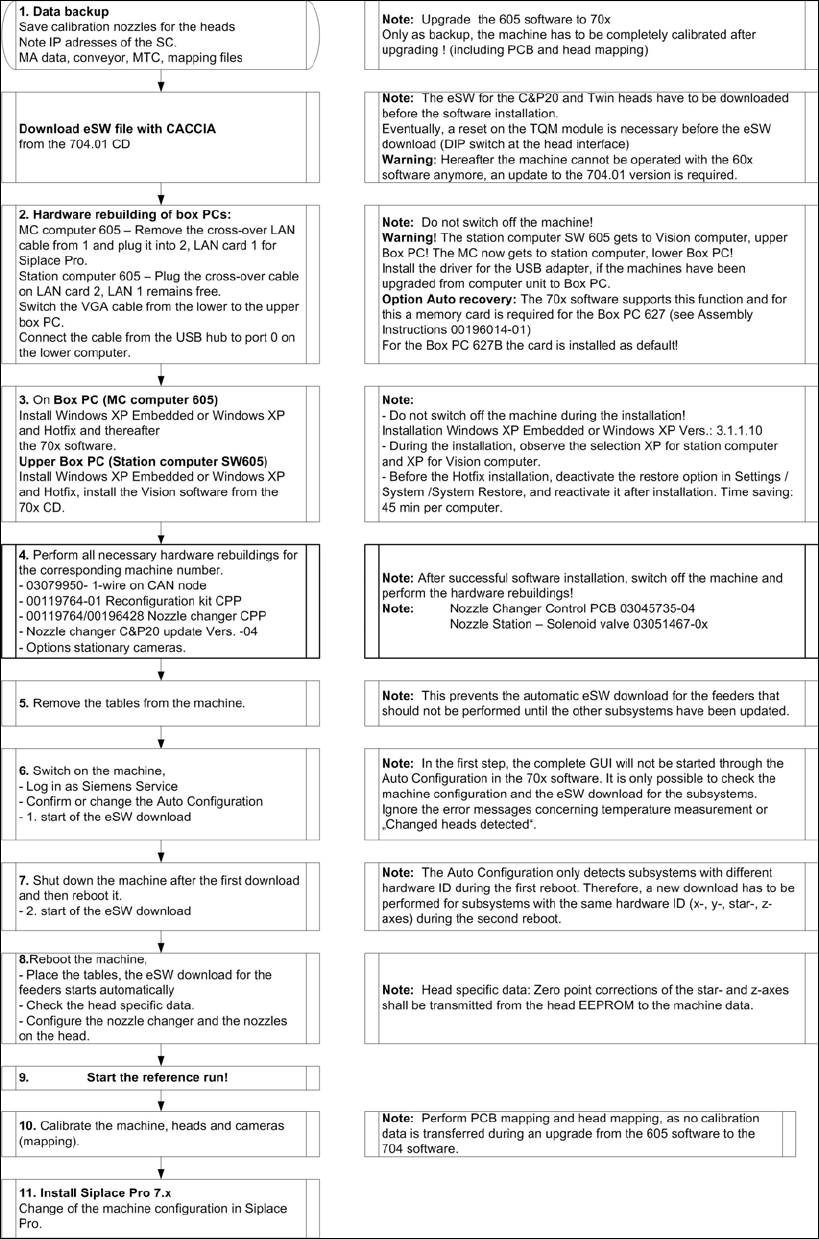
Installation Manual, Station Software Version 704.01 04/2010 Edition
Flowchart: Upgrading from 60x software versions
12 of 60

Installation Manual, Station Software Version 704.01 04/2010 Edition
4 Requirements
4.1 SIPLACE X- and SX-series software components
4.1.1 Station
The station uses one of the following operating system configurations on the machine and Vision
computer(s):
- Microsoft Windows XP Embedded with Service Pack 2
- Microsoft Windows XP Professional (incl. Service Pack 3 and most recent hotfixes)
The machine computer and Vision computer software can optionally be used in one-computer or two-
computer operation.
4.1.2 Machine components
The following versions of other machine components are required for the station software to function
correctly:
SIPLACE station software SIPLACE Vision SIPLACE Pro
Version 704.01 Version 421 Version 8.0
Caution:
The functional statuses of the station computer, Vision computer and SIPLACE Pro software
must be compatible, as specified above. Another configuration is not supported.
13 of 60