2OM-1088-002.pdf - 第104页
Tg0699-PM-D2 0207-001 Chapter 1 2-45 2.3 "Print" T ab *5 Squeegee Select Push the text box twice. The text box changes to a combo box. Push the down arrow to open the drop-down list. Select "270", &qu…
Tg0699-PM-D2
0207-001 Chapter 1 2-44
2.3 "Print" Tab
2.3 "Print" Tab
••
••
• Sheet Layout
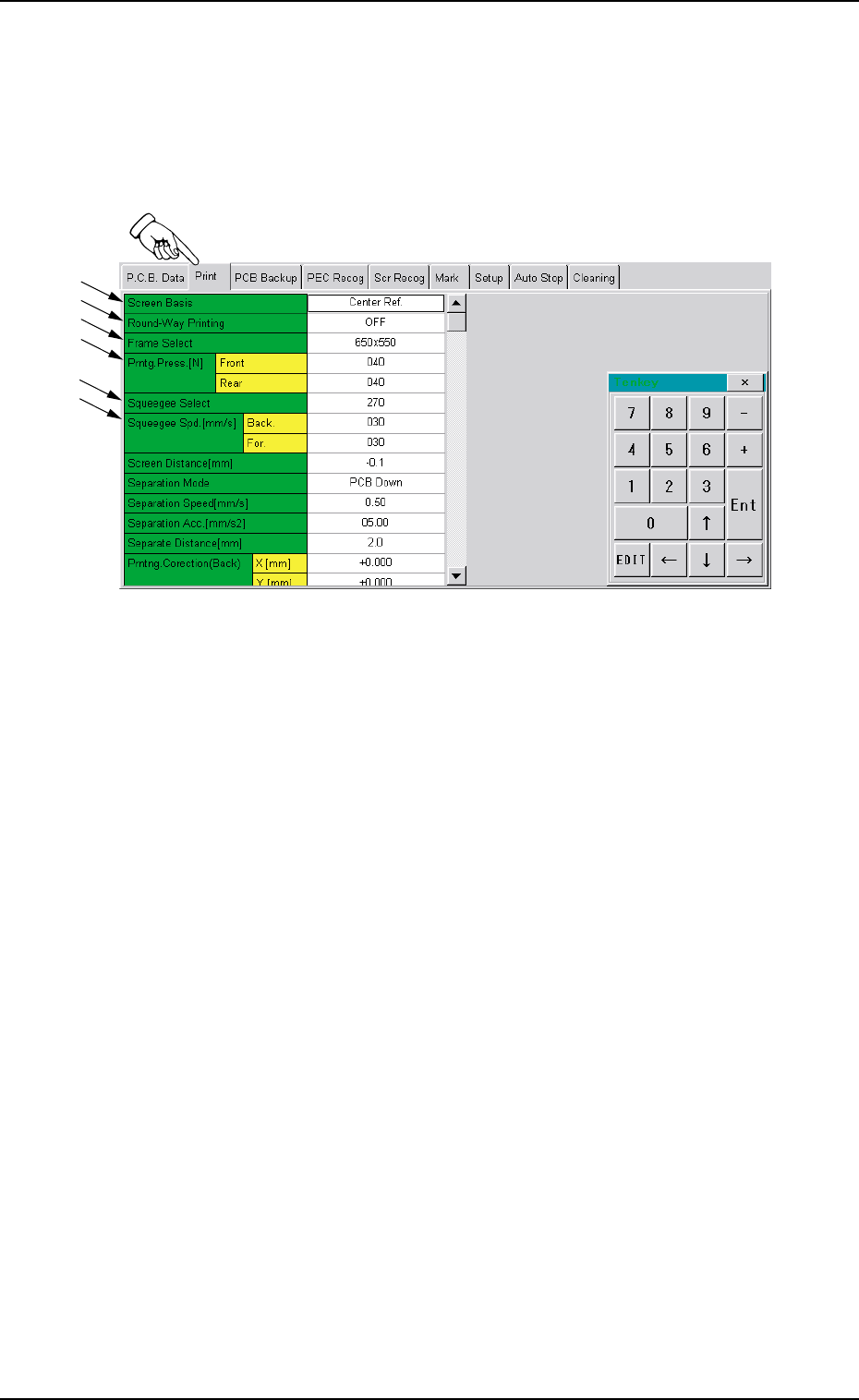
When you push "Print" tab in the "Pattern Program" edit window,
the following tab sheet appears.
Fig. 3B87 "Print" Tab Sheet (1)
• Sheet Composition
*1 Screen Basis
Push the text box twice. The text box changes to a combo box.
Push the down arrow to open the drop-down list. Select "Center
Ref.", " Front Ref.", or " Rear Ref." from the list box.
*2 Round-Way Printing
Push the text box twice. The text box changes to a combo box.
Push the down arrow to open the drop-down list. Select "OFF" or
"ON" from the list.
*3 Frame Select
Select the screen frame size.
Press the text box to indicate the down arrow mark and select
"650 × 550", "550 × 550", "600 × 550", "550 × 650", "720 × 720",
"736 × 736", "750 × 650" or "650 × 750".
*4 Prntg. Press. [N]
Make the ten-key window appear and enter values in the "Front"
and "Rear" text boxes.
*1
*2
*3
*4
*5
*6
Tg0699-PM-D2
0207-001 Chapter 1 2-45
2.3 "Print" Tab
*5 Squeegee Select
Push the text box twice. The text box changes to a combo box.
Push the down arrow to open the drop-down list. Select "270",
"350" or "480" from the drop-down list.
*6 Squeegee Spd.
Make the ten-key window appear and enter values in the "Back."
and "For." text boxes.
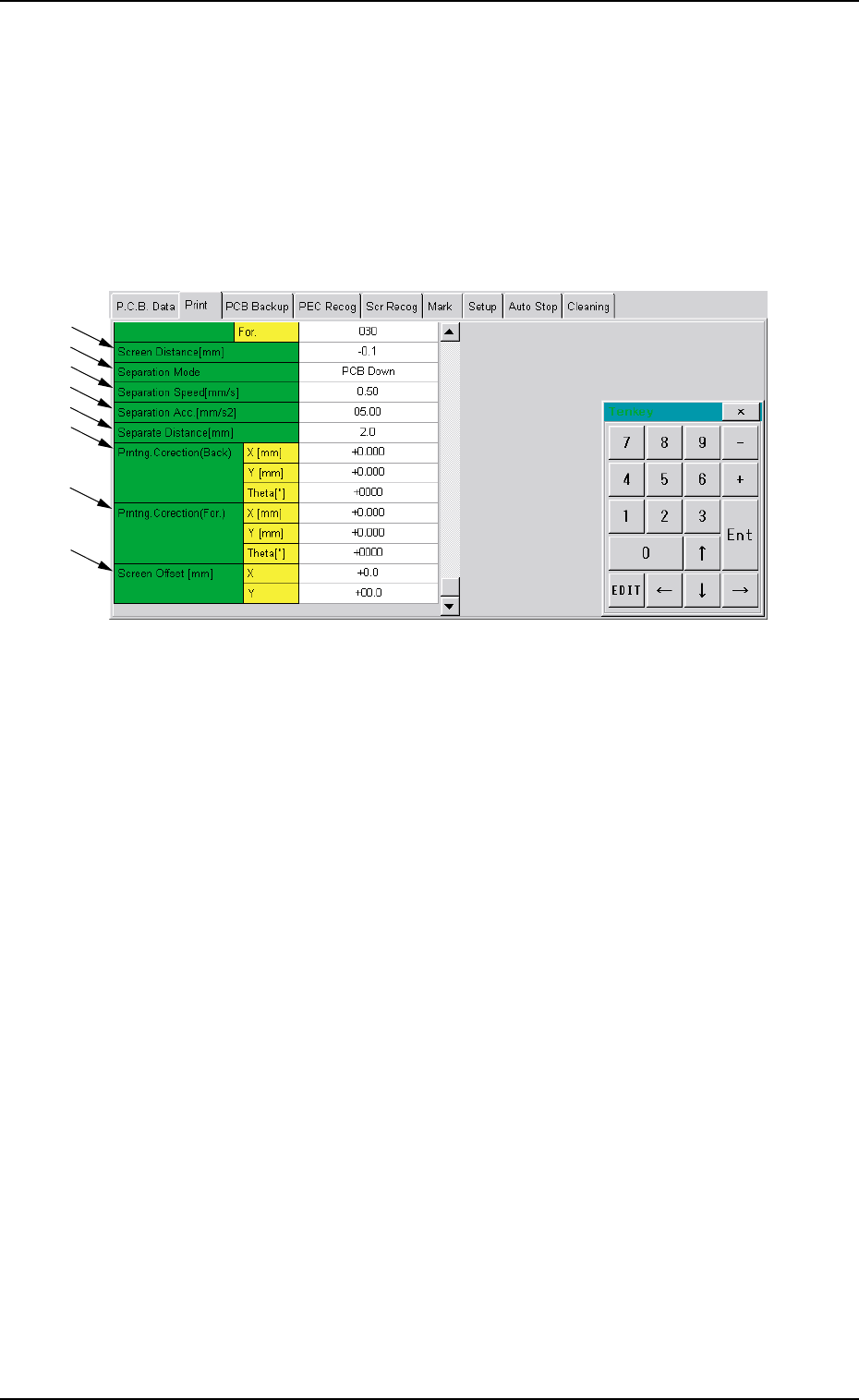
Fig. 3B88 "Print" Tab Sheet (2)
*7 Screen Distance
Make the ten-key window appear and enter a value in the text
box.
*8 Separation Mode
Push the text box twice. The text box changes to a combo box.
Push the down arrow to open the drop-down list. Select "PCB
Down" or "Squeegee Up" from the drop-down list.
*9 Separation Speed [mm/s]
Make the ten-key window appear and enter a value in the text
box.
*10 Separation Acc. [mm/s2]
Make the ten-key window appear and enter a value in the text
box.
*11 Separate Distance [mm]
Make the ten-key window appear and enter a value in the text
box.
*7
*8
*9
*10
*11
*12
*13
*14

Tg0699-PM-D2
0207-001 Chapter 1 2-46
2.3 "Print" Tab
*12 Prntng. Correction (Back.)
Make the ten-key window appear and enter values in the "X
[mm]", "Y [mm]", and "θ [ " ]" text boxes.
*13 Prntng. Correction (For.)
Make the ten-key window appear and enter values in the "X
[mm]", "Y [mm]", and "θ [ " ]" text boxes.
*14 Screen Offset [mm]
Make the ten-key window appear and enter values in the text
boxes.