2OM-1088-002.pdf - 第107页
Tg0699-PM-D2 0207-001 Chapter 1 2-48 2.4 "PCB Backup" T ab *4 V acuum Rel. W ait T ime [sec] Make the ten-key window appear and enter a value in the text box. The value can be changed only when "V acuum Pl…
Tg0699-PM-D2
2.4 "PCB Backup" Tab
0207-001 Chapter 1 2-47
2.4 "PCB Backup" Tab
This tab sheet can be used to specify how to support a P.C.B.
••
••
• Sheet Layout
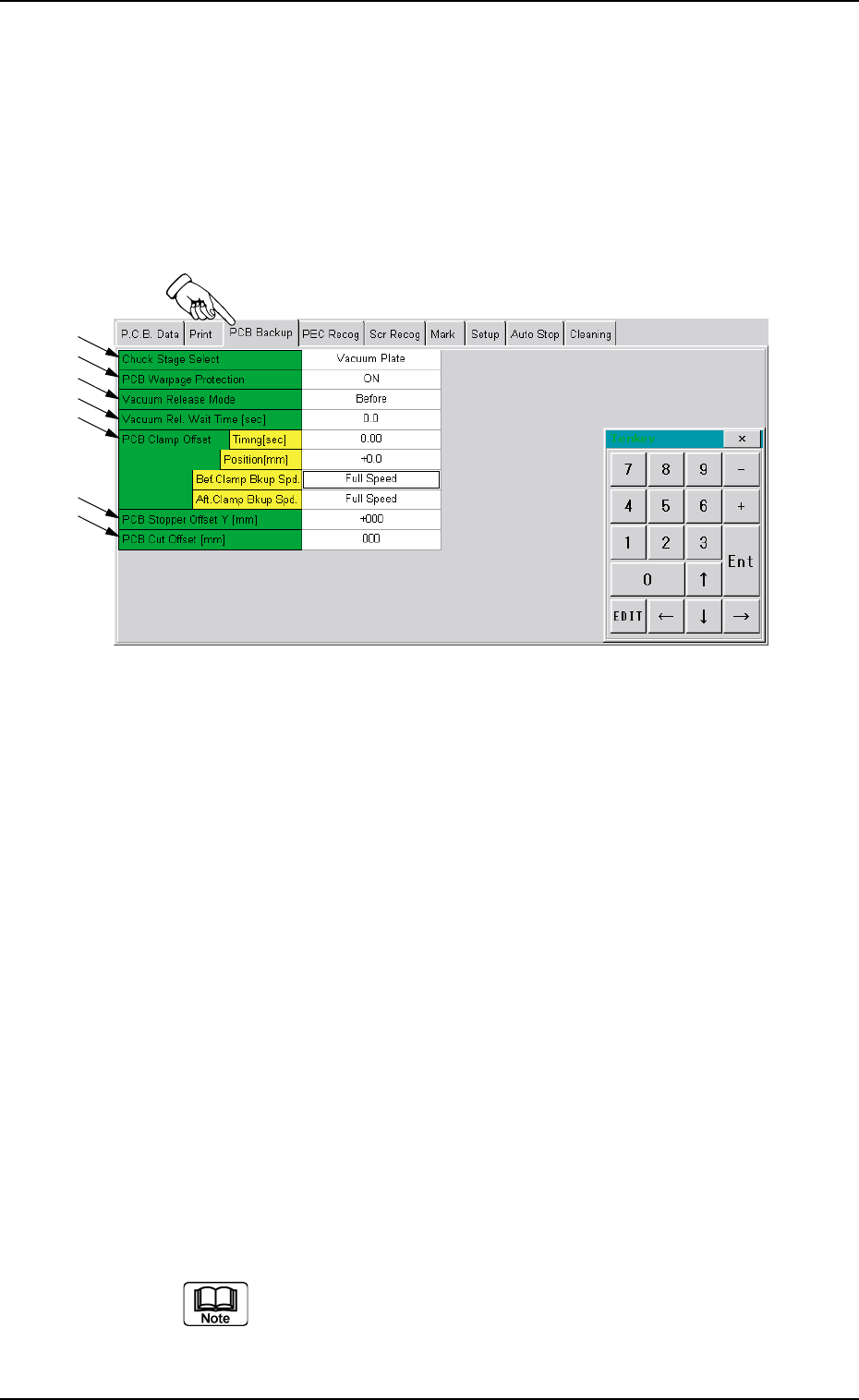
When you push the "PCB Backup" tab in the "Pattern Program"
edit window, the following tab sheet appears.
Fig. 3B89 "PCB Backup" Tab Sheet
••
••
• Sheet Composition
*1 Chuck Stage Select
Push the text box twice. The text box changes to a combo box.
Push the down arrow to open the drop-down list. Select "Backup
Jig", "Support Pin", "Vacuum Pick-up" or "Vacuum Pick-up (No
clamp)" from the drop-down list.
*2 PCB Warpage Protection
Push the text box twice. The text box changes to a combo box.
Push the down arrow to open the drop-down list. Select "OFF" or
"ON" from the drop-down list.
*3 Vacuum Release Mode
Push the text box twice. The text box changes to a combo box.
Push the down arrow to open the drop-down list. Select "Before"
or "After" from the drop-down list.
The value can be changed only when "Vacuum Plate" is
selected in the "Chuck Stage Select" text box *1.
*1
*7
*6
*4
*5
*3
*2

Tg0699-PM-D2
0207-001 Chapter 1 2-48
2.4 "PCB Backup" Tab
*4 Vacuum Rel. Wait Time [sec]
Make the ten-key window appear and enter a value in the text
box.
The value can be changed only when "Vacuum Plate" is se-
lected in the "Chuck Stage Select" text box *1.
*5 PCB Clamp Offset
Timing [sec] : Make the tenkey window appear and
enter a value in the text box.
Position [mm] : Make the tenkey window appear and
enter a value in the text box.
Bef.Clamp Bkup Spd. : The ascending speed of the backup
table can be set in the range of 10
steps (Full Speed to 90% Down) be-
fore the P.C.B. is clamped.
Aft.Clamp Bkup Spd. : The ascending speed of the backup
table can be set in the range of 10
steps (Full Speed to 90% Down) after
the P.C.B. is clamped.
*6 PCB Stopper Offset Y [mm]
Make the ten-key window appear and enter a value in the text
box.
*7 PCB Cut Offset [mm]
Make the ten-key window appear and enter a parameter in the
text box.
Tg0699-PM-D2
2.5 "PEC Recog" Tab
0207-001 Chapter 1 2-49
2.5 "PEC Recog" Tab
••
••
• Sheet Layout
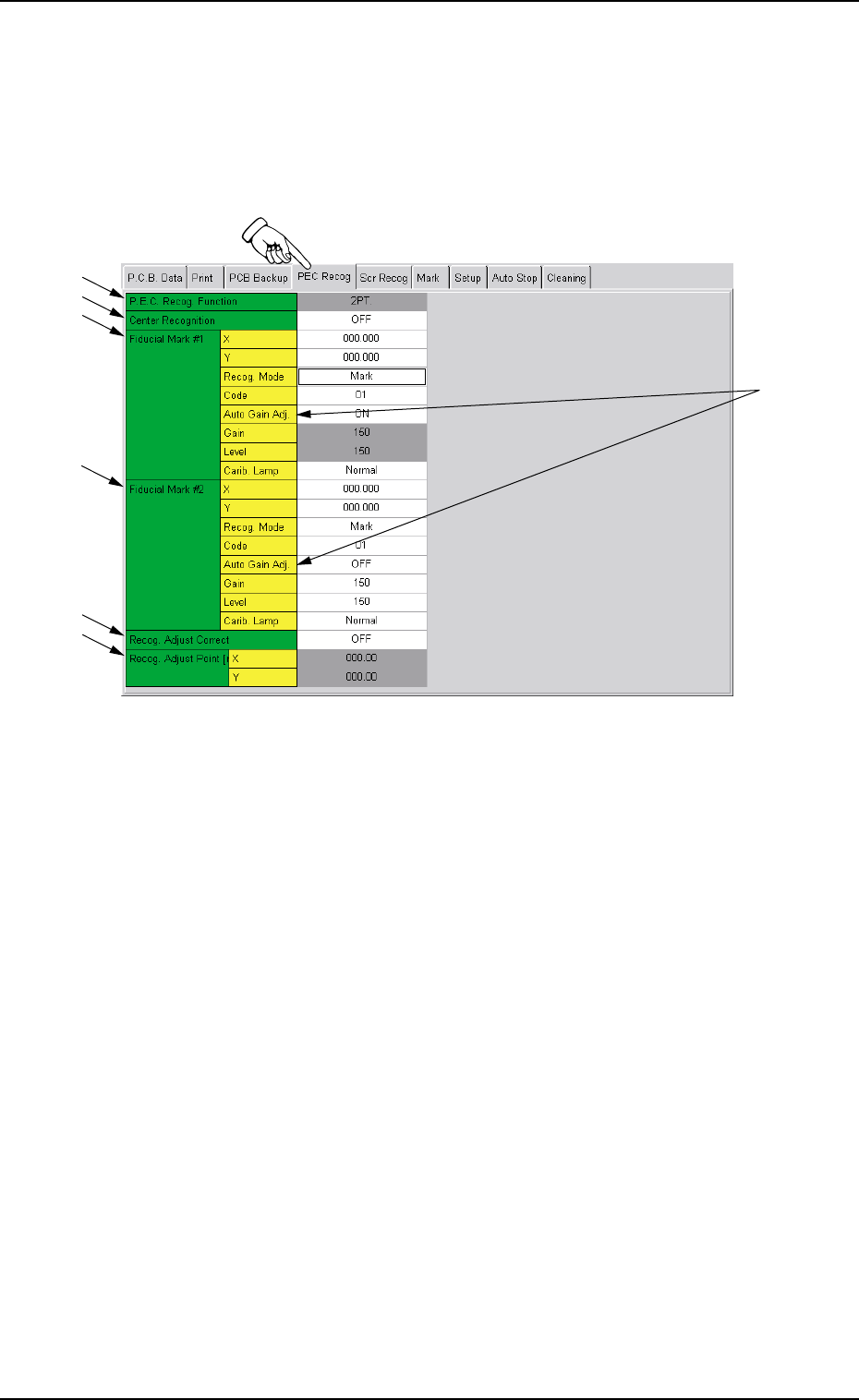
When you push the "PEC Recog" tab in the "Pattern Program" edit
window, the following tab sheet appears.
Fig. 3B90 "PEC Recog" Tab Sheet
••
••
• Sheet Composition
*1 P.E.C. Recog. Function
Only "2-Point Recognition" is performed.
*2 Center Recognition
Push the text box twice. The text box changes to a combo box.
Push the down arrow to open the drop-down list. Select "OFF" or
"ON" from the drop-down list.
*3 Fiducial Mark #1
Make the ten-key window appear and input the values for X
(horizontal), Y (vertical), Code, Gain (only when the automatic
gain adjustment is not used) and Level (only when the automatic
gain adjustment is not used).
*1
*2
*3
*4
*5
*6
*7