2OM-1088-002.pdf - 第110页
Tg0699-PM-D2 2.6 "Scr Recog" T ab 0207-001 Chapter 1 2-51 *1 *2 *3 *4 *5 2.6 "Scr Recog" T ab • • • • • Sheet Layout When you push "Scr Recog" tab in the "Pattern Program" edit win…

Tg0699-PM-D2
2.5 "PEC Recog" Tab
0207-001 Chapter 1 2-50
*4 Fiducial Mark #2
Make the ten-key window appear and input the values for X
(horizontal), Y (vertical), Code, Gain (only when the automatic
gain adjustment is not used) and Level (only when the automatic
gain adjustment is not used).
*5 Recog. Adjust Correct
Push the text box twice. The text box changes to a combo box.
Push the down arrow to open the drop-down list. Select "OFF" or
"ON" from the drop-down list.
*6 Recog. Adjust Point
Make the ten-key window appear and enter values (coordinates)
in the "X (horizontal)" and "Y (vertical)" text boxes.
When the [ ] button is pressed on the tool bar, the
[Extended] tool bar is indicated.
When the [RP.Cpy] button is pressed on the [Extended]
tool bar, the PCB recognition coordinate data can be
transmitted to the screen recognition coordinate data.
*7 Auto Gain Adj.
Press the text box twice to show the lower direction arrow. Then,
select "ON" or "OFF" in the drop down list. Normally, select
"ON".
Tg0699-PM-D2
2.6 "Scr Recog" Tab
0207-001 Chapter 1 2-51
*1
*2
*3
*4
*5
2.6 "Scr Recog" Tab
••
••
• Sheet Layout
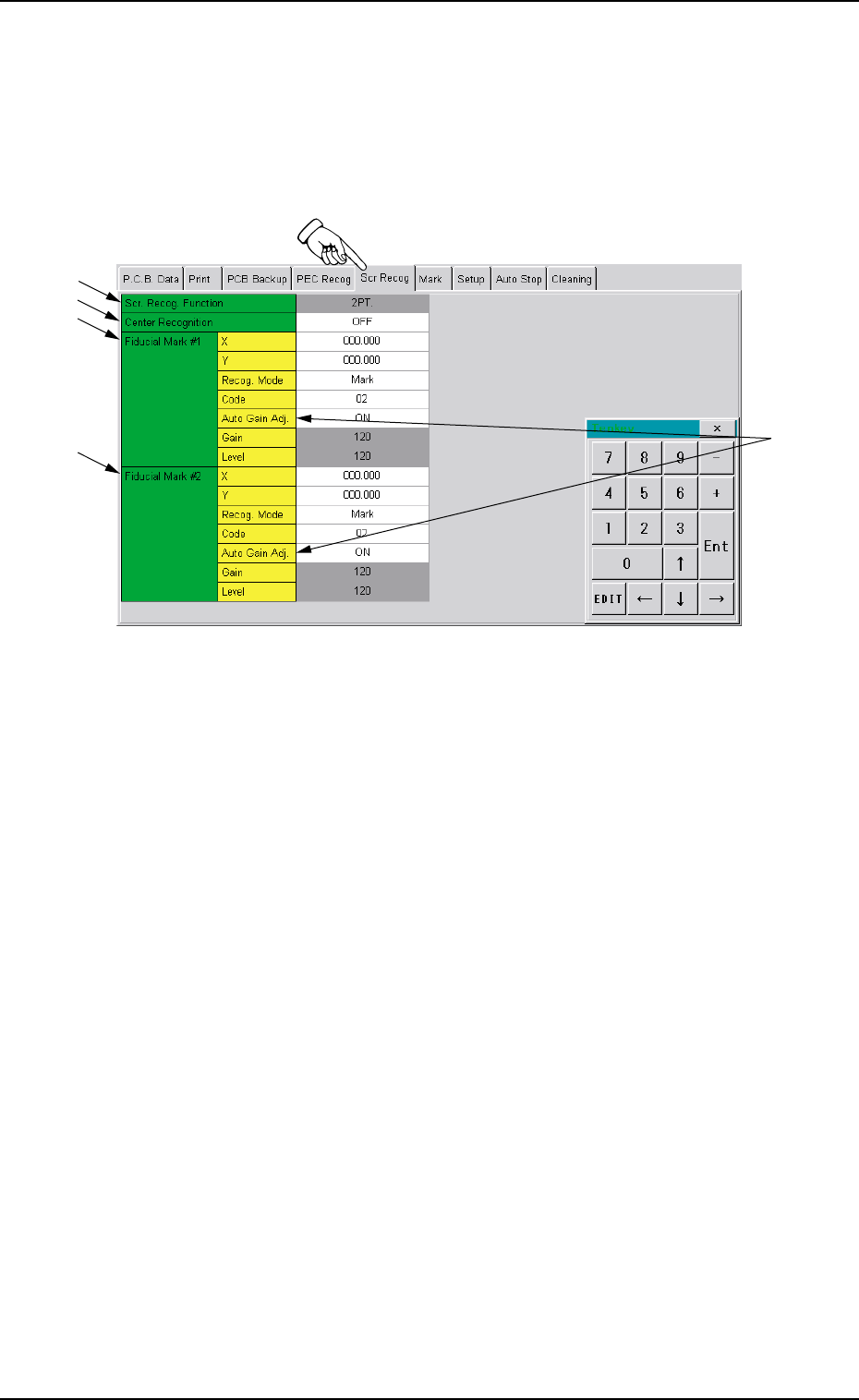
When you push "Scr Recog" tab in the "Pattern Program" edit win-
dow, the following tab sheet appears.
Fig. 3B91 "Scr Recog" Tab Sheet
••
••
• Sheet Composition
*1 Scr. Recog. Function
Only "2-Point Recognition" is performed.
*2 Center Recognition
Push the text box twice. The text box changes to a combo box.
Push the down arrow to open the drop-down list. Select "OFF" or
"ON" from the drop-down list.
*3 Fiducial Mark #1
Make the ten-key window appear and input the values for X
(horizontal), Y (vertical), Code, Gain (only when the automatic
gain adjustment is not used) and Level (only when the automatic
gain adjustment is not used).

Tg0699-PM-D2
*4 Fiducial Mark #2
Make the ten-key window appear and input the values for X
(horizontal), Y (vertical), Code, Gain (only when the automatic
gain adjustment is not used) and Level (only when the automatic
gain adjustment is not used).
When the " " button is pressed on the tool bar, the
[Extended] tool bar is indicated.
When the [RP.Cpy] button is pressed on the [Extended]
tool bar, the PCB recognition coordinate data can be
transmitted to the screen recognition coordinate data.
*5 Auto Gain Adj.
Press the text box twice to show the lower direction arrow. Then,
select "ON" or "OFF" in the drop down list. Normally, select
"ON".
2.6 "Scr Recog" Tab
0207-001 Chapter 1 2-52