2OM-1088-002.pdf - 第138页
Tg0699-PM-D2 *3 P .C.B. Process Time When the operation mode is "PRINT", the system measures the period of time during which a P .C.B. is transferred onto the L conveyor and the machine completes its printing o…
Tg0699-PM-D2
0207-001 Chapter 1 3-20
3.3 "Product" Tab
3.3 "Product" Tab
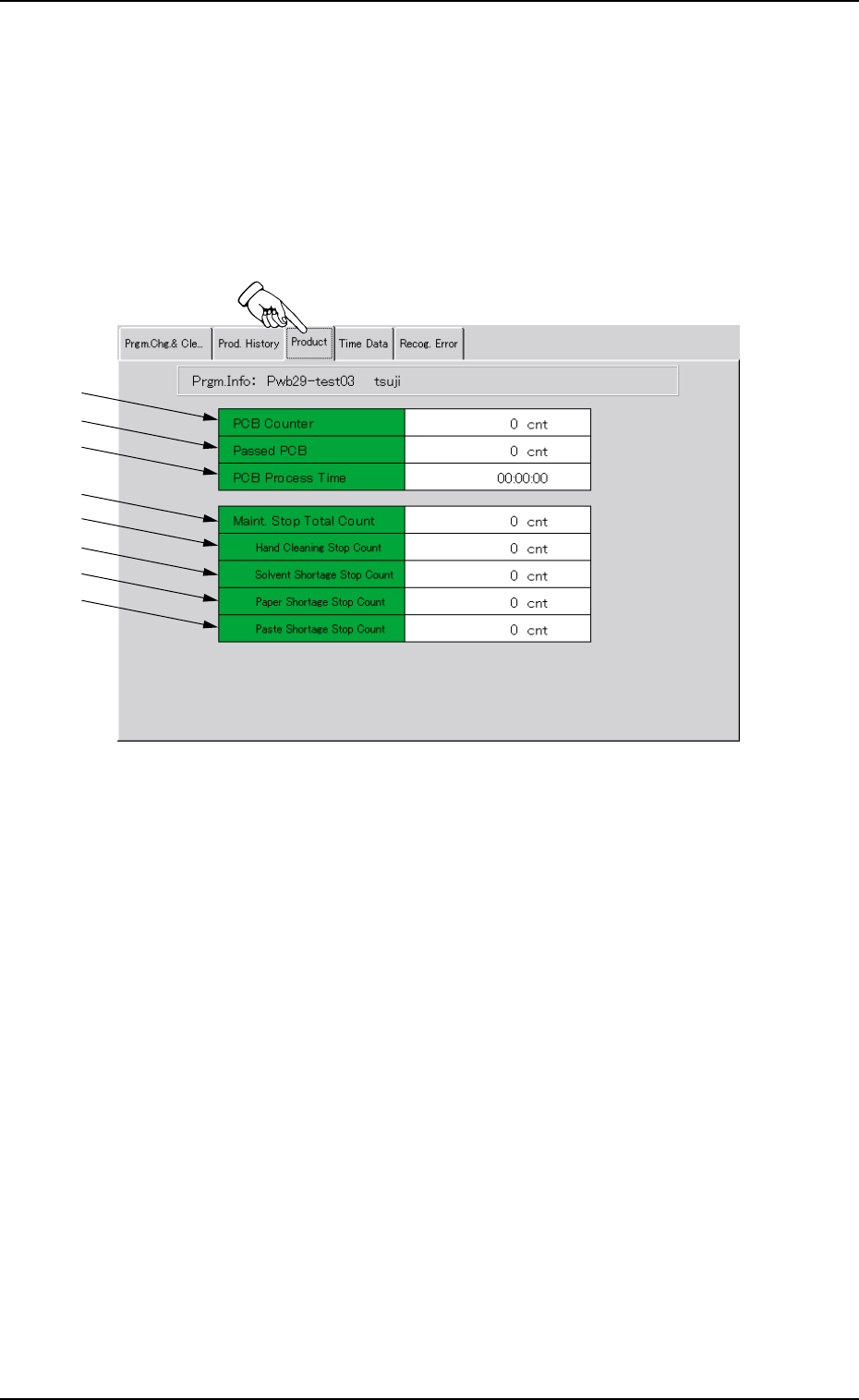
Displayed is the production data (results) of the current model.
••
••
• Sheet Layout
When the "Product" tab is pressed in the "PRGM. MNG. DATA"
window (submenu), the following tab sheet appears.
*1
*2
*3
*4
*5
*6
*7
*8
Fig. 3C15 "Product" Tab Sheet
••
••
• Sheet Composition
*1 PCB Counter
This indicates the number of produced P.C.B.’s in "PRINT" mode
(operation mode).
The system counts the number of times the table was zeroed
after the end of each printing and the result is regarded as the
number of produced P.C.B.’s.
*2 Passed PCB
This indicates the number of P.C.B.’s that have been transferred
without being printed in the "PASS" mode (operation mode).
The system counts the number of times the P.C.B.’s were trans-
ferred from the table to the R conveyor and the result is re-
garded as the number of passed P.C.B.’s.
Tg0699-PM-D2
*3 P.C.B. Process Time
When the operation mode is "PRINT", the system measures the
period of time during which a P.C.B. is transferred onto the L
conveyor and the machine completes its printing operation and
the shortest value is displayed.
The P.C.B.’s produced through the semi-automatic
operation are excluded.
*4 Maint. Stop Total Count
This indicates the total number of times the machine has
stopped for maintenance operations (described below in *5
through *7).
Displayed is the total number of *5 through *7.
*5 Hand Cleaning Stop Count
This indicates the number of times the machine has stopped for
manual cleaning operations.
*6 Solvent Shortage Stop Count
This indicates the total number of times the machine was
stopped because it was detected that only a little amount of
cleaning solvent remained.
*7 Paper Shortage Stop Count
This indicates the total number of times the machine was
stopped because it was detected that the machine became
empty of cleaning paper.
*8 Paste Shortage Stop Count
This indicates the total number of times the machine was
stopped because the number of P.C.B.’s (Paste Empty Stop
(PCB)) reached the specified value.
When the paste detection sensor (option) is used, the
machine stops because the sensor detects that the
machine is empty of paste. The number of times the
machine has stopped due to this is also added to the
above cumulative data.
0207-001 Chapter 1 3-21
3.3 "Product" Tab
Tg0699-PM-D2
0207-001 Chapter 1 3-22
3.4 "Time Data" Tab
*1
*2
*3
*4
*5
*6
*7
*8
*9
*10
*11
*12
*13
*14
*15
*16
*17
3.4 "Time Data" Tab
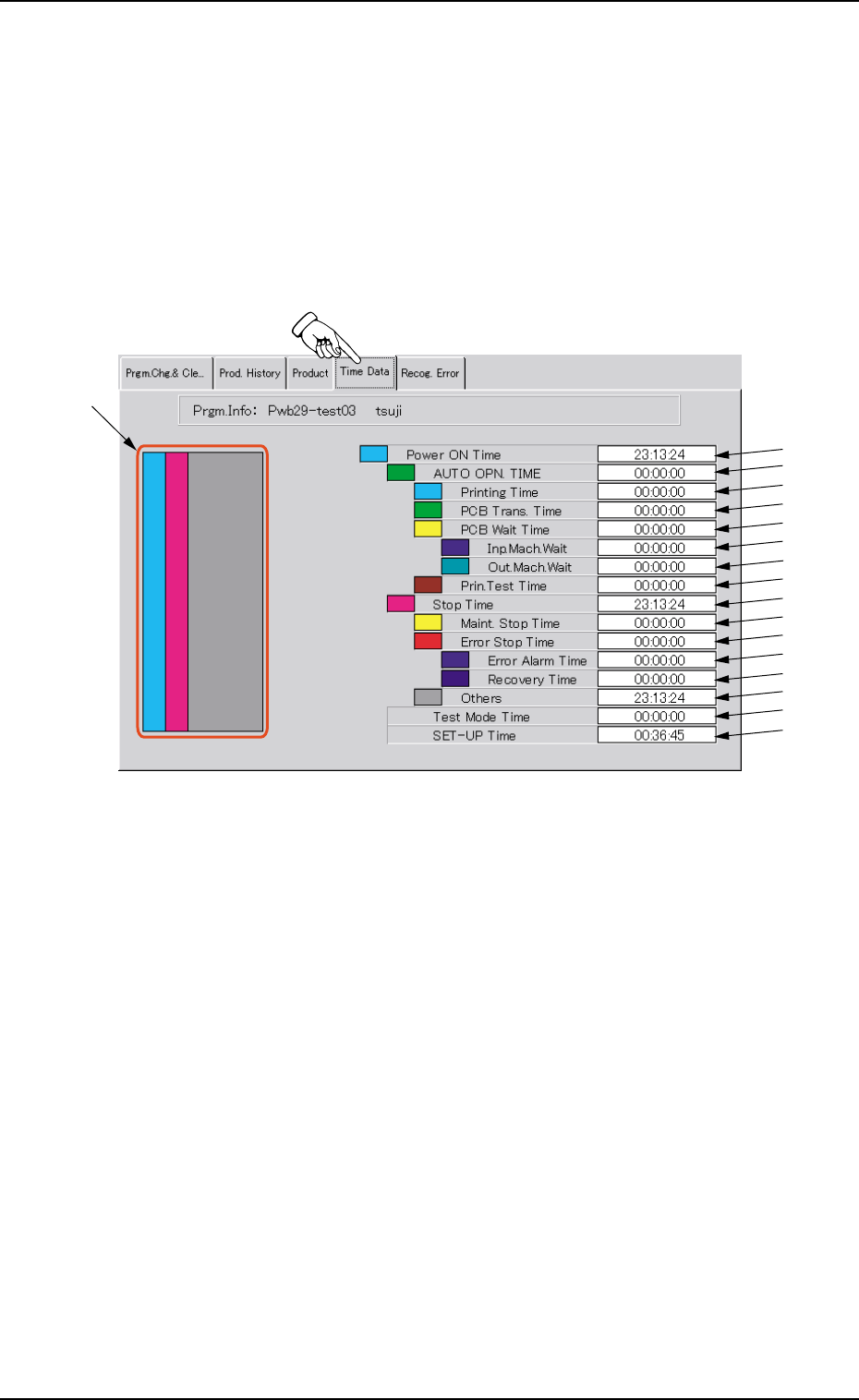
Displayed is the time data of machine performance on the current
model.
••
••
• Sheet Layout
When the "Time Data" tab is pressed in the "PRGM. MNG. DATA"
window (submenu), the following tab sheet appears.
Fig. 3C16 "Time Data" Tab Sheet
••
••
• Sheet Composition
*1 Ratio Chart of Operation Time
Each time ratio based on "Power ON Time" (described below in
*2) is classified by colors and charted by columns. The colors in
the chart correspond to those indicated before each name.
Each time ratio is updated every 5 seconds.
*2 Power ON Time
This indicates the cumulative period of time ("*3 AUTO OPN.
TIME" + "*10 Stop Time") during which the control power was
ON.
*3 AUTO OPN. TIME
This indicates the cumulative period of time ("*4 Printing Time" +
"*5 PCB Trans. Time" + "*6 PCB Wait Time" + "*9 Print. Test
Time") during which the object P.C.B.’s were produced.