2OM-1088-002.pdf - 第337页
Tg0699-PM-D2 6. Monthly Maintenance 0207-001 Chapter 3 1-18 X-Axis Linear Guide Clean the guide with an oiled rag. Note : Remove waste thread if any . Clean the guide using the following procedure. 1. Press the "T a…
Tg0699-PM-D2
6. Monthly Maintenance
DE1: DAPHNE EPONEX GREASE No. 1
6. Monthly Maintenance
Table 5A6
Maintenance Spots
Description
Grease
Cleaning
Check
Tools,
Nozzles,
etc.
Table Section X-Axis Linear 5A20 Cleaning DE1 Oiled Rag
Guide
Z-Axis Guide 5A21 Cleaning DE1 Brush
Bushing
θ-Axis Linear 5A22 Cleaning DE1 Oiled Rag
Guide
P.C.B. Chuck Linear Guide for 5A23 Cleaning DE1 Oiled Rag
Section Chute Width
Adjustment
Backup Table 5A23 Cleaning DE1 Oiled Rag
Z-Axis Guide
Bushing
Linear Guide 5A24 Cleaning DE1 Brush
for P.C.B. Clamping
Spline for Chute 5A25 Lubrication DE1 Oiled Rag
Width Adjustment
P.E.C. X-Axis Linear 5A26 Cleaning DE1 Oiled Rag
Recognition Guide
Section Y-Axis Linear Guide 5A27 Cleaning DE1 Oiled Rag
Squeegee Y-Axis Linear Guide 5A28 Cleaning DE1 Oiled Rag
Head Section X-Axis Linear Guide 5A29 Cleaning DE1 Oiled Rag
Guide Bushing for 5A30 Cleaning DE1 Oiled Rag
Squeegee Up/Down
Movement
Screen Holder Screen Y-Axis 5A31 Cleaning DE1 Oiled Rag
Section Linear Guide
L Conveyor Spline Shaft for 5A32 Cleaning DE1 Oiled Rag
Section Width Adjustment
Ball Screw for 5A32 Cleaning DE1 Oiled Rag
Width Adjustment
Guide Bushing for 5A32 Cleaning DE1 Oiled Rag
Width Adjustment
R Conveyor Spline Shaft for 5A33 Cleaning DE1 Oiled Rag
Section Width Adjustment
Ball Screw for 5A33 Cleaning DE1 Oiled Rag
Width Adjustment
Guide Bushing for 5A33 Cleaning DE1 Oiled Rag
Width Adjustment
0509-002 Chapter 3 1-17
Block Name Detailed Name
Fig.
No.
Tg0699-PM-D2
6. Monthly Maintenance
0207-001 Chapter 3 1-18
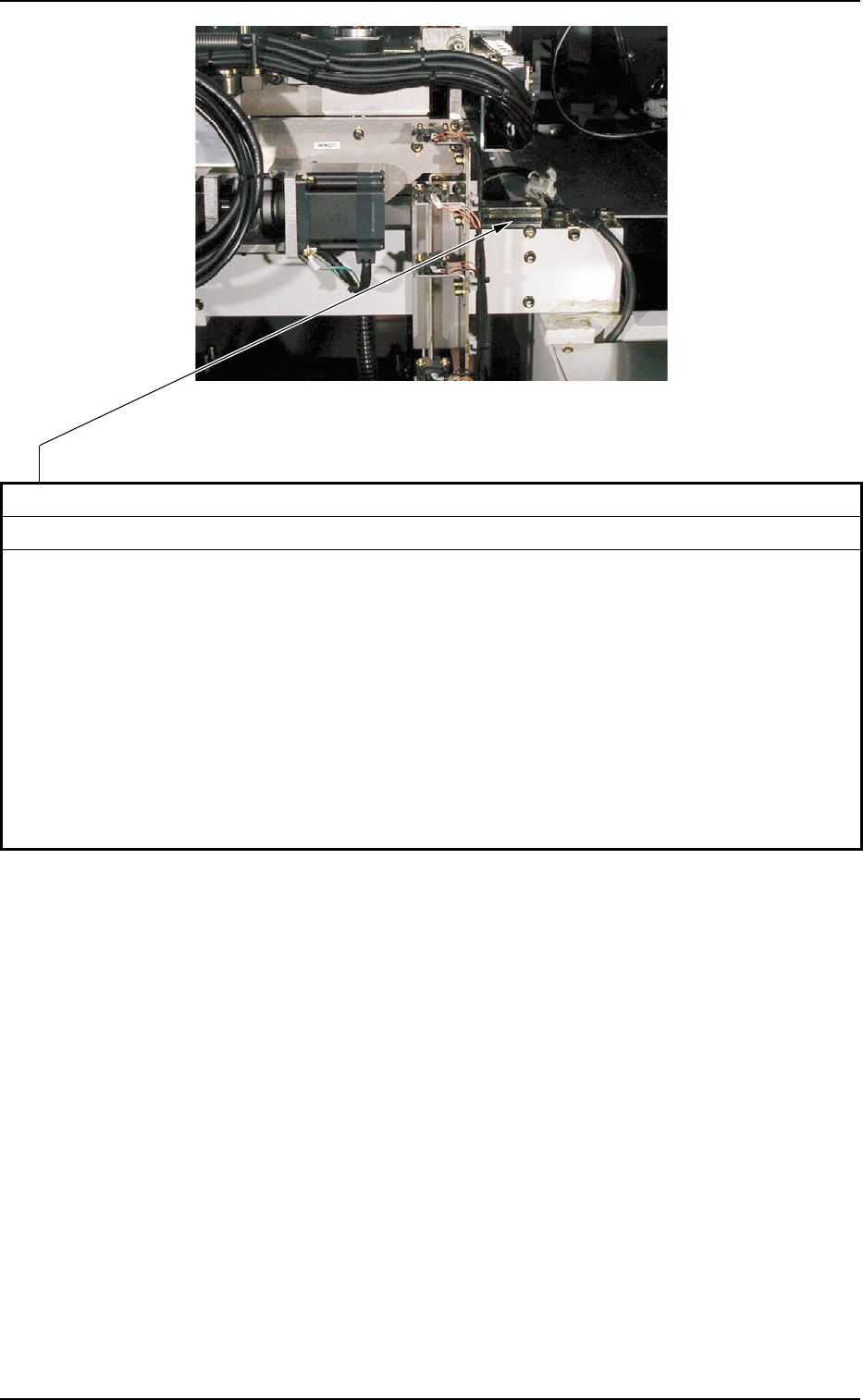
X-Axis Linear Guide
Clean the guide with an oiled rag.
Note : Remove waste thread if any.
Clean the guide using the following procedure.
1. Press the "Table Section" tab on the "MNL OPN." submenu window in the "SPECIAL SEL"
menu.
2. Press the [Table Up (Trans - Retrt. - Correct - Prn.Pos.)] button to lift the table.
3. Starting from the front side, clean the linear guides located on the right and left at the front
and rear sides of the machine.
4. Press the [Chg. Pos. Move (Start)] button on the "Cleaning Chg." tab on the "Setup"
submenu window in the "AUTO OPN" menu to secure the working space.
5. Starting from the rear side, clean the linear guide located in the center at the rear side of
the machine.
Cleaning
Fig. 5A20 Table Section
Tg0699-PM-D2
6. Monthly Maintenance
0207-001 Chapter 3 1-19
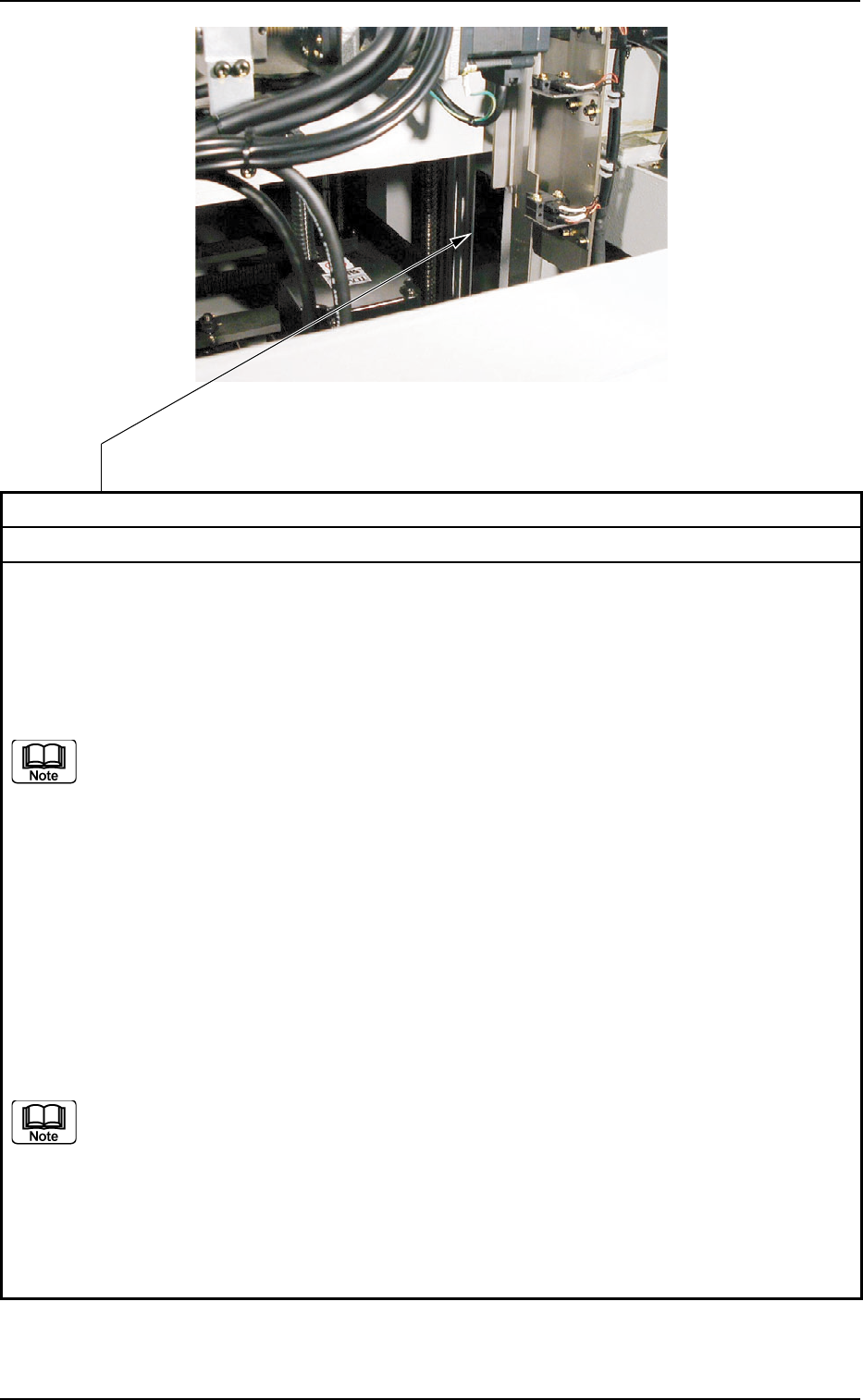
Z-Axis Guide Bushing
Clean the Bushing with an oiled rag.
Note : Remove waste thread if any.
Clean the guide using the following procedure.
Rear Reference :
Press the [Table Up (Trans - Retrt. - Correct - Prn.Pos.)] button on the "Table Section" tab on
the "MNL OPN" submenu window in the "SPECIAL SEL." menu to lift the table. Then, clean
the bushing starting from the front side, using a brush.
(a) For the guide bushing section upper than the flange, press the [PCB Backup
UP/DOWN (Origin - Start - End)] button on the "MNL OPN" submenu window in
the "SPECIAL SEL." menu to lift the PCB backup jig section and clean it.
(b) For the guide bushing section lower than the flange, press the [PCB Backup
UP/DOWN (Origin - Start - End)] button on the "MNL OPN" submenu window in
the "SPECIAL SEL." menu to lower the PCB backup jig section and clean it.
Front Reference :
Press the [Table Up] button on the "Table Section" tab on the "MNL OPN" submenu window in
the "SPECIAL SEL." menu to lift the table and clean the bushing using a brush.
• Starting from the front side, clean the guide bushings on the right and left at the front side of
the machine.
• Starting from the rear side, clean the guide bushings at the center on the rear side.
Secure the working space by pressing the [Chg. Pos. Move (Start)] button on the "Cleaning
Chg." tab on the "PRODUCT CHG." submenu window in the "AUTO OPN" menu, and then
clean the guide bushing.
(a) For the guide bush section upper than the flange, press the [PCB Backup
UP/DOWN (Origin - Start - End)] button on the "Table Section" tab on the "MNL
OPN" submenu window in the "SPECIAL SEL." menu to lift the PCB backup jig
section and clean it.
(b) For the guide bush section lower than the flange, press the [PCB Backup
UP/DOWN (Origin - Start - End)] button on the "Table Section" tab on the "MNL
OPN" submenu window in the "SPECIAL SEL." menu to lower the PCB backup
jig section and clean it.
Cleaning
Fig. 5A21 Table Section