2OM-1088-002.pdf - 第75页
Tg0699-PM-D2 (4) Fiducial Mark #2 X (horizontal) and Y (vertical) Set the coordinates of the second fiducial mark. Unit : mm Recog. Mode Select the recognition mode. Mark : This recognition mode uses fiducial marks. Mode…

Tg0699-PM-D2
(3) Fiducial Mark #1
X (horizontal) and Y (vertical)
Set the coordinates of the first fiducial mark.
Unit : mm
Recog. Mode
Select the recognition mode.
Mark :
This recognition mode uses fiducial marks.
Model :
The image taken with the recognition camera is regis-
tered as "Model" using the "Position Teaching" tab. This
mode uses the "Model" in place of fiducial marks.
Model + Mark :
This mode recognizes the image in the center of the
model as in the mark mode, after rough positioning with
the model mode.
Code
Set the code No. of the first fiducial mark for screen recogni-
tion.
Auto Gain Adj.
Select whether or not the automatic gain is adjusted when the
Screen recognition is tested.
ON : The automatic gain adjustment is performed.
OFF : No automatic gain adjustment is performed.
Gain, Level
This sets the amplification rate, when the signal of the image
(taken by the recognition camera) is converted to image data
showing brightness.
• When the gain is decreased, the contrast becomes
greater.
• When the level is decreased, all of the brightness be-
comes greater.
0207-001 Chapter 1 2-15
1.2 Operation Data
X (Horizontal)
Y (Vertical)
000.000
000.000
Recog. Mode
Mark
Fig.3B38
Code
01
Auto Gain Adj.
OFF
Gain
150
Level
150
Galib. Lamp
Normal

Tg0699-PM-D2
(4) Fiducial Mark #2
X (horizontal) and Y (vertical)
Set the coordinates of the second fiducial mark.
Unit : mm
Recog. Mode
Select the recognition mode.
Mark :
This recognition mode uses fiducial marks.
Model :
The image taken with the recognition camera is regis-
tered as "Model" using the "Position Teaching" tab. This
mode uses the "Model" in place of fiducial marks.
Model + Mark :
This mode recognizes the image in the center of the
model as in the mark mode, after rough positioning with
the model mode.
Code
Set the code No. of the second fiducial mark for screen recog-
nition.
Auto Gain Adj.
Select whether or not the automatic gain is adjusted when the
Screen recognition is tested.
ON : The automatic gain adjustment is performed.
OFF : No automatic gain adjustment is performed.
Gain, Level
This sets the amplification rate, when the signal of the image
(taken by the recognition camera) is converted to image data
showing brightness.
• When the gain is decreased, the contrast becomes
greater.
• When the level is decreased, all of the brightness be-
comes greater.
0207-001 Chapter 1 2-16
1.2 Operation Data
X (Horizontal)
Y (Vertical)
000.000
000.000
Recog. Mode
Mark
Fig.3B39
Code
01
Auto Gain Adj.
OFF
Gain
150
Level
150
Galib. Lamp
Normal
Tg0699-PM-D2
1.2.6 Mark Data
Ther fiducial mark data can be edited.
(1) Code
The mark codes correspond to the code Nos. of the fiducial
marks used in the P.E.C. and screen recognition functions.
10 types of mark codes can be registered for each pattern pro-
gram.
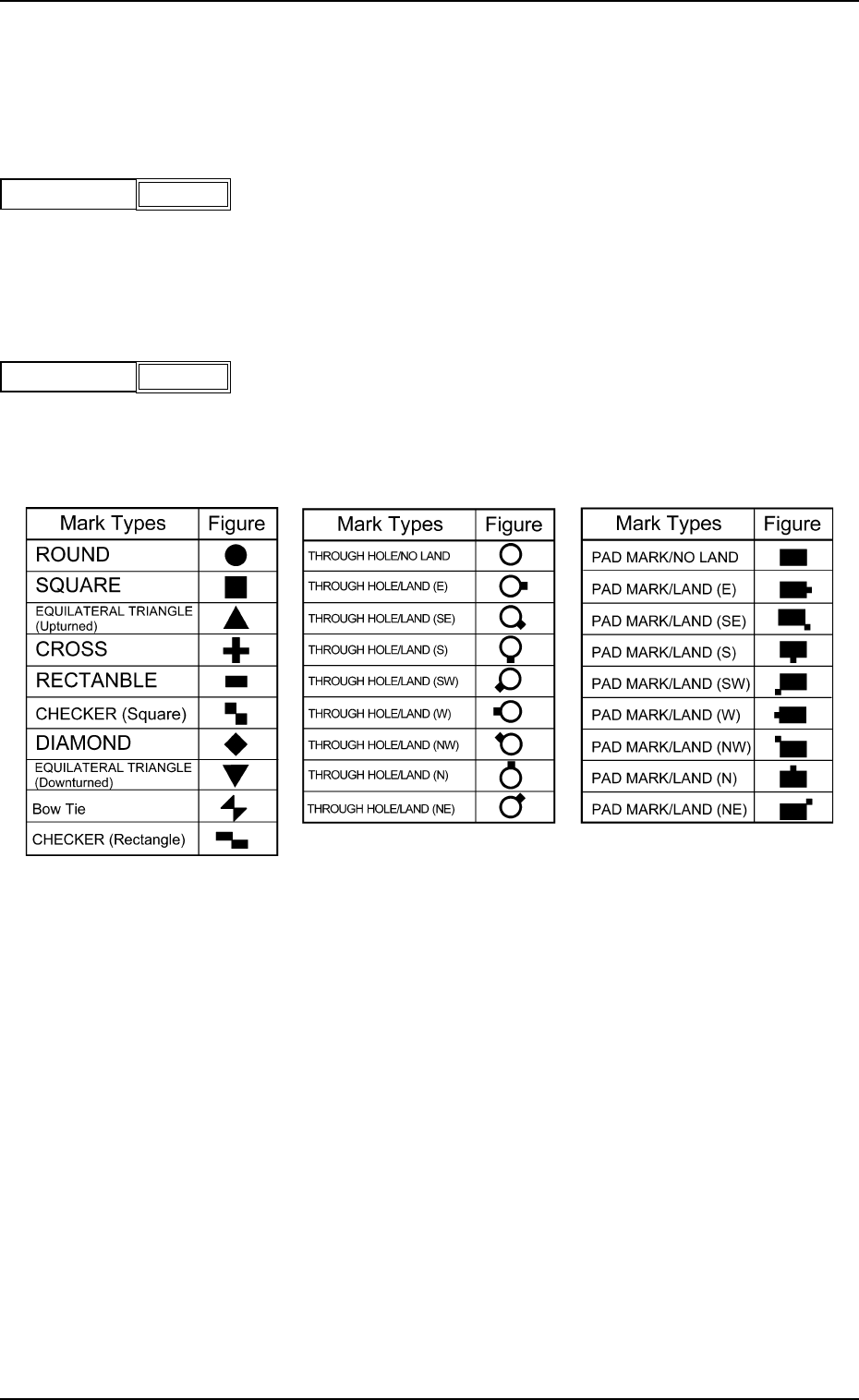
(2) Figure
The following options can be selected as shapes of fiducial
marks.
Mark Types
Table 3B1
0207-001 Chapter 1 2-17
1.2 Operation Data
CODE
1
Fig.3B40
FIGURE
Circle
Fig.3B41