00198442-04_UM_TX-V2_EN.pdf - 第179页
Instruction manual SIPLACE TX 4 Setting up and commissioning From software version 714.0 12/2020 4.2 Configuration when delive red 179 4 Fig. 4.2 - 4 Contact surfaces - Forks parallel to the direction of PCB transport on…
4 Setting up and commissioning Instruction manual SIPLACE TX
4.2 Configuration when delivered From software version 714.0 12/2020
178
4.2.6 Lifting the placement machine off the pallet
4
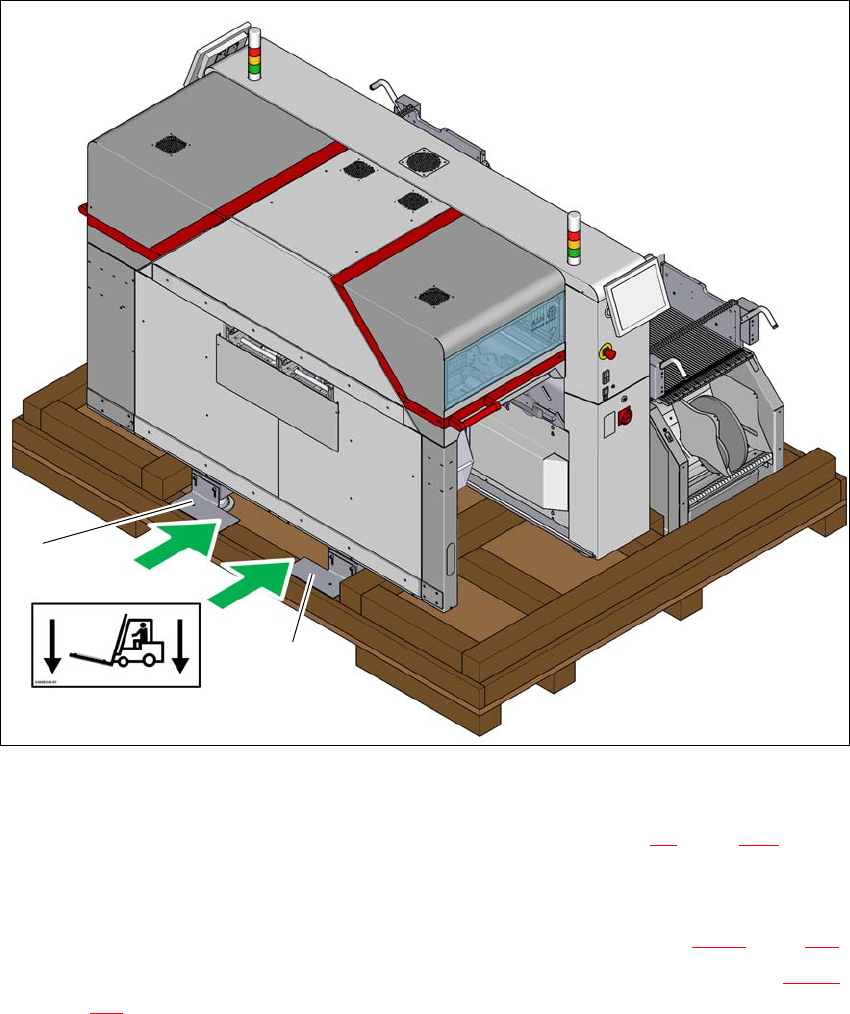
Fig. 4.2 - 3 Contact points for transportation with the fork-lift
(1) Shipping braces with steel spacer
During transportation, always follow the safety instructions in section 4.1, page 171).
Loosen the two shipping braces (1) on the pallet. The two braces and the steel spacers re-
main fitted to the placement machine.
Loosen and remove the shipping braces on the opposite side (item 2 in fig. 4.2 - 1, page 175).
The placement machine may ONLY be lifted with a fork-lift on the side (item A in fig. 4.2 - 3,
page 178
) on which the output end of the machine is located.
(A)
1
1
Instruction manual SIPLACE TX 4 Setting up and commissioning
From software version 714.0 12/2020 4.2 Configuration when delivered
179
4
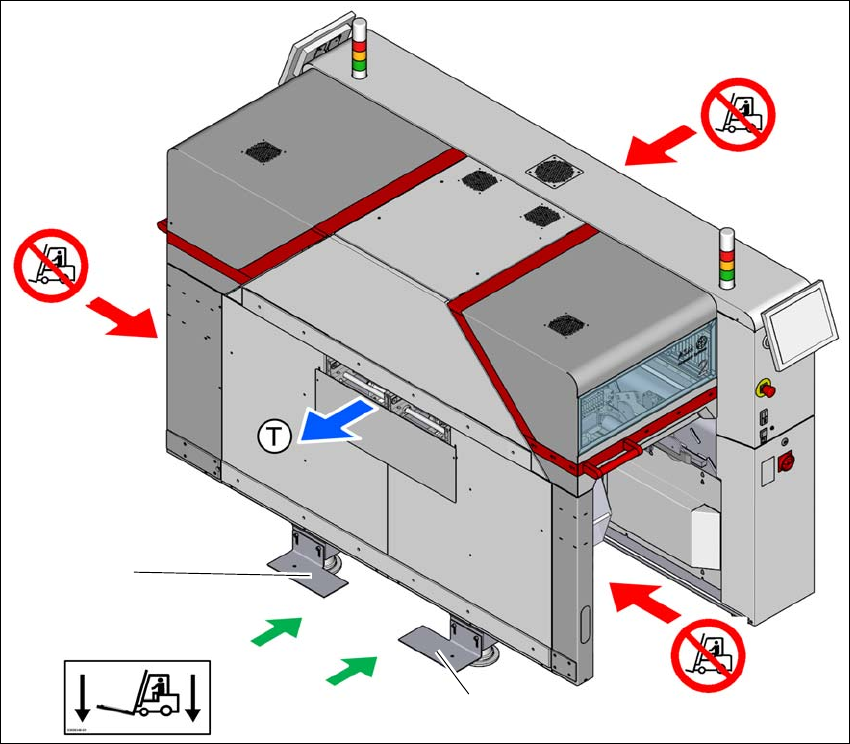
Fig. 4.2 - 4 Contact surfaces - Forks parallel to the direction of PCB transport on the output side
(T) Direction of travel for PCB conveyor
(1) Fork-lift forks between the machine feet
(2) Never lift the placement machine at the input side! Risk of tilting!
(3) Never lift the placement machine at the component trolley locations with a fork-lift! Risk of tilt-
ing!
(4) Shipping braces with steel spacer
Position the fork-lift at cross-angles to the direction of conveyor transport (at the output end).
Open the forks until the forks are between the two placement machine feet and the contact
surfaces of the placement machine lie evenly on the forks.
Push the forks between the contact surfaces of the placement machine (machine frame) and
over the steel spacers for the shipping braces. The steel spacers are used as an additional
safety measure to prevent the placement machine from tilting.
Push the forks fully under the placement machine, so that these are positioned properly on
the machine frame of the opposite side.
(2)
(1)
(3)
(3)
(4)
(4)

4 Setting up and commissioning Instruction manual SIPLACE TX
4.2 Configuration when delivered From software version 714.0 12/2020
180
Lift the placement machine off the pallet.
Transport the placement machine to its target position in your production environment.
Place the placement machine in the line (see section 4.5.5, page 199).
4.2.7 Delivery configuration for placement machine
The placement machine is configured as follows when delivered:
– The lanes of the dual conveyor are set to a width of 210 mm. This width setting will be import-
ant when fine-tuning the placement machine.
– Both monitors are dismantled.
– Both indicator lamps are dismantled.
– All gantry axes are fixed with shipping braces (see section 4.6
, page 211).