00198442-04_UM_TX-V2_EN.pdf - 第205页
Instruction manual SIPLACE TX 4 Setting up and commissioning From software version 714.0 12/2020 4.5 Setting up the placement machine 205 4 4 Loosen the three oth er placem ent machine feet (2) in the same w ay . Use…
4 Setting up and commissioning Instruction manual SIPLACE TX
4.5 Setting up the placement machine From software version 714.0 12/2020
204
4.5.7 Setting the conveyor height
The placement machine stands on four machine feet.
4
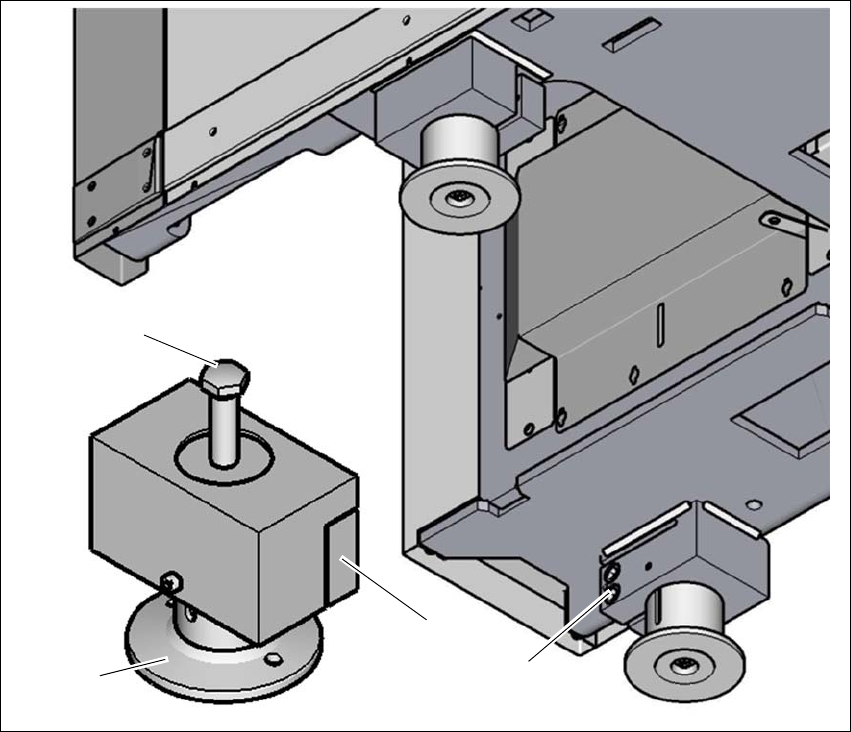
Fig. 4.5 - 5 Setting the PCB conveyor height
(1) Setting screw for height adjustment
(2) Machine foot
(3) Clamping
(4) Two clamping screws
Loosen the two clamping screws (4), using the attachable ratchet and the hexagonal screw-
driver bit, size 14.
4
(1)
(4)
(3)
(2)

Instruction manual SIPLACE TX 4 Setting up and commissioning
From software version 714.0 12/2020 4.5 Setting up the placement machine
205
4
4
Loosen the three other placement machine feet (2) in the same way.
Use the 18 mm open-end wrench, to change the height of the placement machine feet (2)
with the setting screw (1), in order to reach the relevant conveyor height.
4
Adjust the placement machine (see section 4.5.7.1, page 206).
WARNING
Only loosen the clamping screws with the attachable ratchet
The clamping screws may not be loosened using the torque wrench. There is a risk of
causing injuries.
To loosen the clamping screws, only use the attachable ratchet with the appropriate
extension.
WARNING
Perform work only with the bump cap and protective gloves.
There is a risk of causing injuries to the head and hands.
Only perform work with the bump cap and protective gloves.
PLEASE NOTE
Position of setting screws for height adjustment
On the output side, the setting screws are next to the component inserts.
On the input side, the setting screws are concealed, under the power supply unit. If the
optional vacuum pump is fitted, the other setting screw is hidden by the vacuum pump
and is located below this.
4 Setting up and commissioning Instruction manual SIPLACE TX
4.5 Setting up the placement machine From software version 714.0 12/2020
206
4.5.7.1 Adjusting the placement machine
4
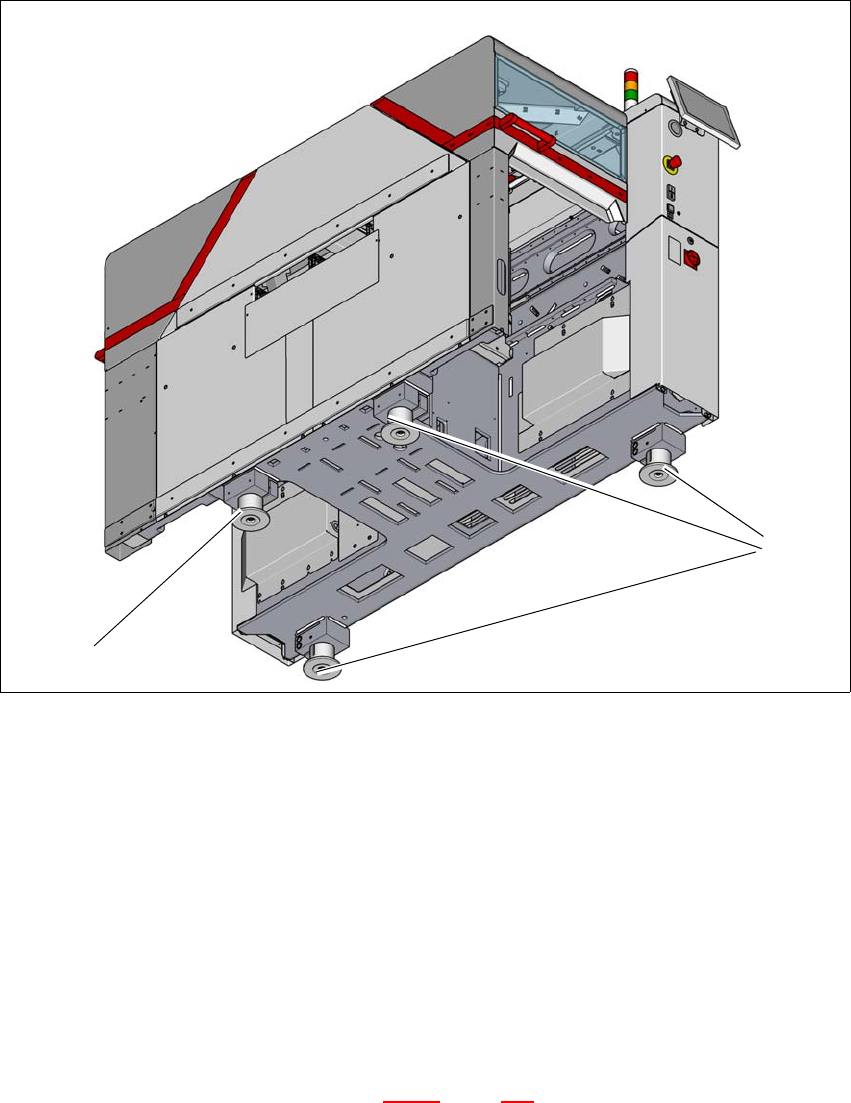
Fig. 4.5 - 6 Adjusting the placement machine
Place the placement machine spirit level (measuring accuracy of 0.02 mm) on the unclamped
lifting table and measure in the X and Y directions.
Align the placement machine in the X and Y direction, using the machine spirit level, at the
three machine feet (1). The maximum permissible deviation is 0.10 mm/m.
Then fix the fourth machine foot (2) so that it is firmly on the ground.
Check the load-bearing strength of the 4 placement machine feet. The 4 placement machine
feet must all touch the ground and be evenly loaded.
The setting screws for adjusting the height of the placement machine feet must be positioned
in a load-bearing state, once the placement machine has been aligned.
Use the torque wrench to tighten the clamping screws (torque of 130 Nm) for the four place-
ment machine feet. (See also diagram 4.5 - 5
, page 204)
Hit the feet with a hammer to check the load-bearing strength of the placement machine feet.
Use the spirit level to check that the placement machine is accurately aligned.
(2)
(1)