00198442-04_UM_TX-V2_EN.pdf - 第279页
Instruction manual SIPLACE TX 6 Station exte nsions From software version 714.0 12/2020 6.1 Nozzle changer 279 6.1.2.6 Configuration example with SIPLACE CPP The locations 1 and 2 can each acc ommodate a short nozzle cha…

6 Station extensions Instruction manual SIPLACE TX
6.1 Nozzle changer From software version 714.0 12/2020
278
6.1.2.5 Technical data
6
Nozzle changer for the SIPLACE MultiStar
Number of magazines per location
*a
SIPLACE TX1/ TX2 / TX2 m 6
SIPLACE TX2i 6
4
3
Max. number of nozzle garages per location
SIPLACE TX1 / TX2 / TX2 m 6
SIPLACE TX2i 6
80
60
Standard configuration per location
SIPLACE TX1 / TX2 / TX2 m 6
6
6
SIPLACE TX2i 6
3 magazines with 60 x 20xx nozzle garages
1 magazine with 9 x 28xx nozzle garages
2 magazines with 40 x 20xx nozzle garages
1 magazine with 9 x 28xx nozzle garages
Nozzle types 20xx, 28xx
*)a All magazines in the nozzle changer must be configured.
Instruction manual SIPLACE TX 6 Station extensions
From software version 714.0 12/2020 6.1 Nozzle changer
279
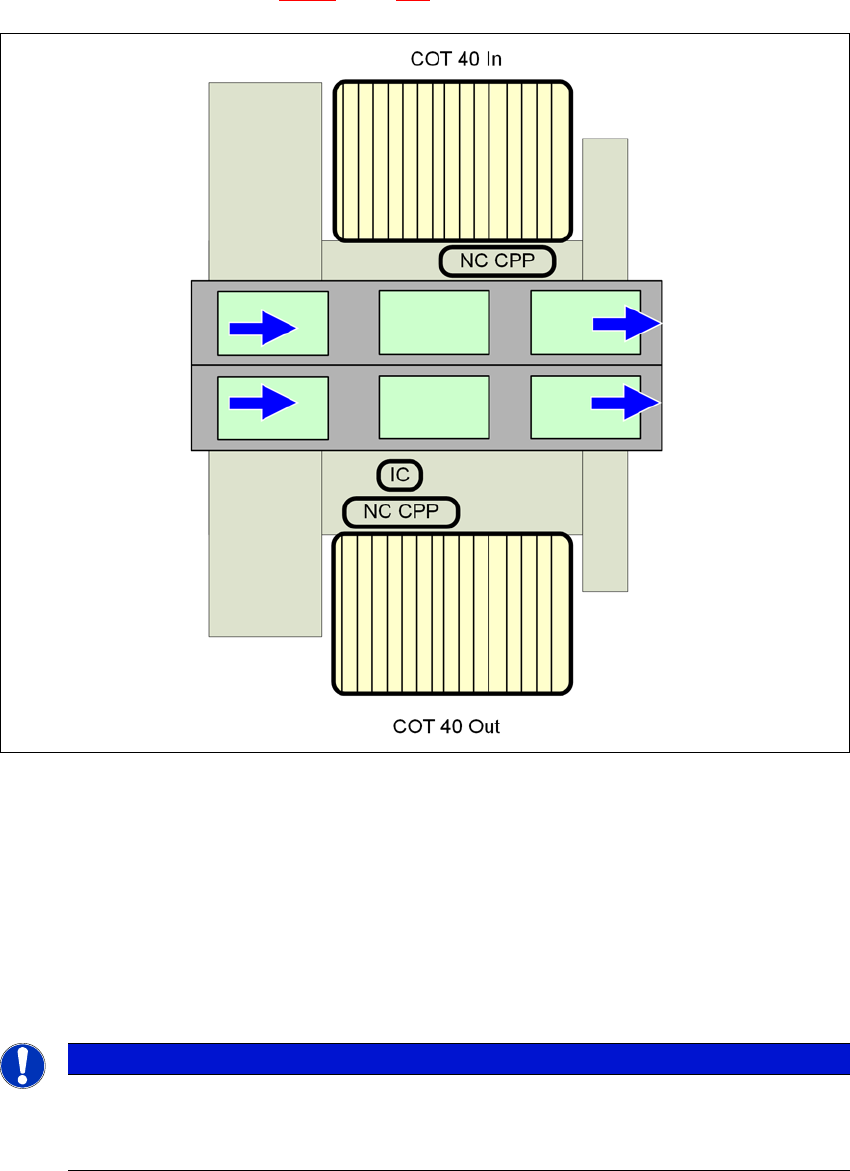
6.1.2.6 Configuration example with SIPLACE CPP
The locations 1 and 2 can each accommodate a short nozzle changer with four magazines each
for the CPP head (item 1 in fig. 6.1 - 8
, page 279).
6
Fig. 6.1 - 8 Position of nozzle changer for the SIPLACE MultiStar - configuration example (SIPLACE TX1/TX2)
6
6
NC CPP
Nozzle changer for the CPP with 4 magazines
COT 40 In
Component trolley in the innermost position
COT 40 Out
Component trolley in the outermost position
IC
Stationary camera
PLEASE NOTE
The placement machine stops if magazines are missing
The placement machine will stop if there are magazines missing or incorrectly fitted.
Use all magazine places.
6 Station extensions Instruction manual SIPLACE TX
6.1 Nozzle changer From software version 714.0 12/2020
280
6.1.3 Assembling the nozzle changer for the C&P20/CPP
The nozzle changers are fixed to the COT insert.
Align the nozzle changer so that the sloping side points towards the COT insert.
6
6.1.3.1 Notes on operation
When you fill a magazine with a certain nozzle type for the first time, attach an adhesive label
to identify the type.
6
Open the locking plate and place the nozzles in the nozzle holders.
Close the locking plate so that the nozzles cannot drop out of the magazines.
6
6
Programming the nozzle changer is described in the SIPLACE Pro instruction manual.
6.1.3.2 Changing the magazine
Press the lever (item 1 in fig. 6.1 - 9, page 281), to release the magazine from the balls of the
snap fasteners (item 5 in fig. 6.1 - 9
, page 281). Lift the magazine off the base.
WARNING
Risk of head crashes with mixed configurations!
There is a risk of head crashes with mixed configurations.
Only install the associated nozzle changer for each placement head, with the nozzle
magazines for the respective placement head.
PLEASE NOTE
Fill the magazines outside the placement machine and only replace complete mag-
azines.
CAUTION
Filling up magazines!
Before you fill magazines, make sure that all the nozzles on the Collect&Place head
have
been returned to their magazines.
PLEASE NOTE
Risk of jamming!
If components fall onto magazines, there is a risk that the locking plate could jam.
Do not allow components to drop onto the magazines.
You should therefore regularly clean the magazines and free locations.