00198442-04_UM_TX-V2_EN.pdf - 第301页
Instruction manual SIPLACE TX 7 Maintenance From software version 714.0 12/2020 301 7 Maintenance To ensure that your SIPLACE placement machine always runs prope rly during production, we ad - vise that you service the p…
6 Station extensions Instruction manual SIPLACE TX
6.9 Smart Pin Support From software version 714.0 12/2020
300
6.9 Smart Pin Support
Item no. 03165096-01 Gripper unit gantry 1
Item no. 03164367-01 Gripper unit gantry 2
Item no. 00588322-01 Smart pin magazine
Item no. 03089582-01 Support pin
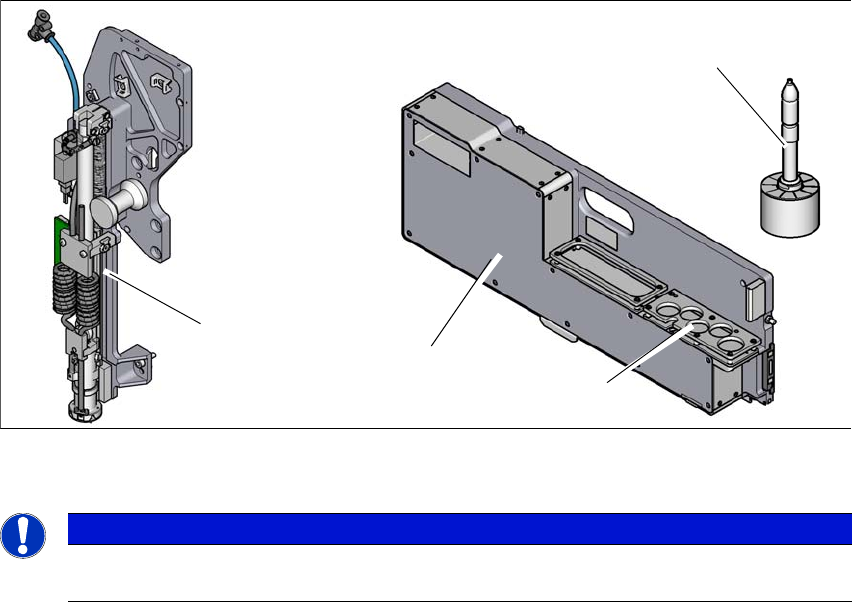
The Smart Pin Support option automatically places support pins on the lifting table. A gripper unit
is used to take the support pins out of the smart pin magazine and place them in the predefined
positions. Before placing the smart support pin, the placement area is cleaned of any impurities
with a gentle blast of air. In addition, the correct position of the support pin is checked after place-
ment with the PCB camera.
Smart pin magazine
There is a smart pin magazine T5 with 5 garages for automatic changing of max. 5 support pins.
The smart pin magazine T5 is fitted to the component trolley in location 1. The gripper unit fitted
to the side, next to the head, restricts the travel range of the head. The area of the changeover
tables which can not be reached is used optimally by the T5 pin magazine. When using smart pin
support, there are 68 x 8 mm tracks available.
6
Fig. 6.9 - 1 Smart Pin Support
6
PLEASE NOTE
For details about the Smart Pin Support option, please refer to the "Smart Pin Support
User Guide", German+English [item no. 00198632-xx].
Support pin
Gripper unit
Garages
Smart pin magazine

Instruction manual SIPLACE TX 7 Maintenance
From software version 714.0 12/2020
301
7 Maintenance
To ensure that your SIPLACE placement machine always runs properly during production, we ad-
vise that you service the placement machine on a regular basis.
The SIPLACE TX maintenance documentation contains recommendations for the maintenance
tasks to be performed at each maintenance interval. Workflows have been defined for each main-
tenance interval. These combine the individual steps to form an efficient sequences of tasks in
order to optimize the "Uptime" for each maintenance task.
7
Maintenance workflows
We differentiate between four workflows which are to be performed independently of one another
per maintenance interval.
– Workflow 1: Weekly maintenance tasks.
– Workflow 2: Combination of weekly and 3-monthly maintenance tasks.
– Workflow 3: Combination of weekly and 6-monthly maintenance tasks.
– Workflow 4: Combination of weekly and 12-monthly maintenance tasks.
Planning workflows
Each workflow is supported with a document (job card), which guides you efficiently through the
maintenance work.
Example for the frequency of individual workflows over a period of one year:
– Workflow 1: 45 times / year
– Workflow 2: 4 times / year
– Workflow 3: 2 times / year
– Workflow 4: 1 time / year
PLEASE NOTE
Job cards for maintenance
All maintenance work is explained in detail in the corresponding job cards and clearly il-
lustrated in the diagrams.
7 Maintenance Instruction manual SIPLACE TX
7.1 Safety instructions for maintenance work From software version 714.0 12/2020
302
7.1 Safety instructions for maintenance work
7
7
7
7
7
CAUTION
Nonobservance of the safety instructions poses a risk of personal injury and also dam-
age to the placement machine!
Observe the safety instructions in chapter 2 Operational safety, page 35 of this in-
struction manual when performing any work.
WARNING
Risk of burns
When performing cleaning tasks using inflammable fluids (e.g. alcohol), never use
a naked flame or open light sources.
Never spray lubricants or cleaning agents in spray cans in the vicinity of open light
sources or naked flames.
CAUTION
Ethanol
Always wear protective goggles and gloves when cleaning assemblies with concen-
trated ethanol.
Immediately rinse your eyes with water if you accidentally get any ethanol in your
eyes.
WARNING
SIPLACE cleansing tissue
The SIPLACE cleansing tissue is harmful to your healthif swallowed and could cause
damage to your lungs.
Do not breathe in the aerosol/mist.
Avoid contact with the skin. If swallowed, do not induce vomiting. Seek medical ad-
vice immediately and show the packaging or label to the doctor.
Wear latex gloves when using the cleansing tissue.
CAUTION
Observe the safety datasheets for materials
Observe the safety datasheets for materials when handling hazardous substances
(e.g. Loctite 241, ethanol)!