00191369-01.pdf - 第128页
4 Placement Functions User’s Manual SIPLACE HS -50 4.1 Setup Display Software Version SR.501.xx Edition 01/99 126 6HWXS'LVSOD\ If the cluste r has bee n speci fied wi th its corres ponding s etup, t hen the se …
User’s Manual SIPLACE HS-50 4 Placement Functions
Software Version SR.501.xx Edition 01/99
125
3ODFHPHQW)XQFWLRQV
4 Placement Functions User’s Manual SIPLACE HS-50
4.1 Setup Display Software Version SR.501.xx Edition 01/99
126
6HWXS'LVSOD\
If the cluster has been specified with its corresponding setup, then the setup of each of the 4
locations can be displayed in this view.
6HWX SORFDWLRQ[9LHZ
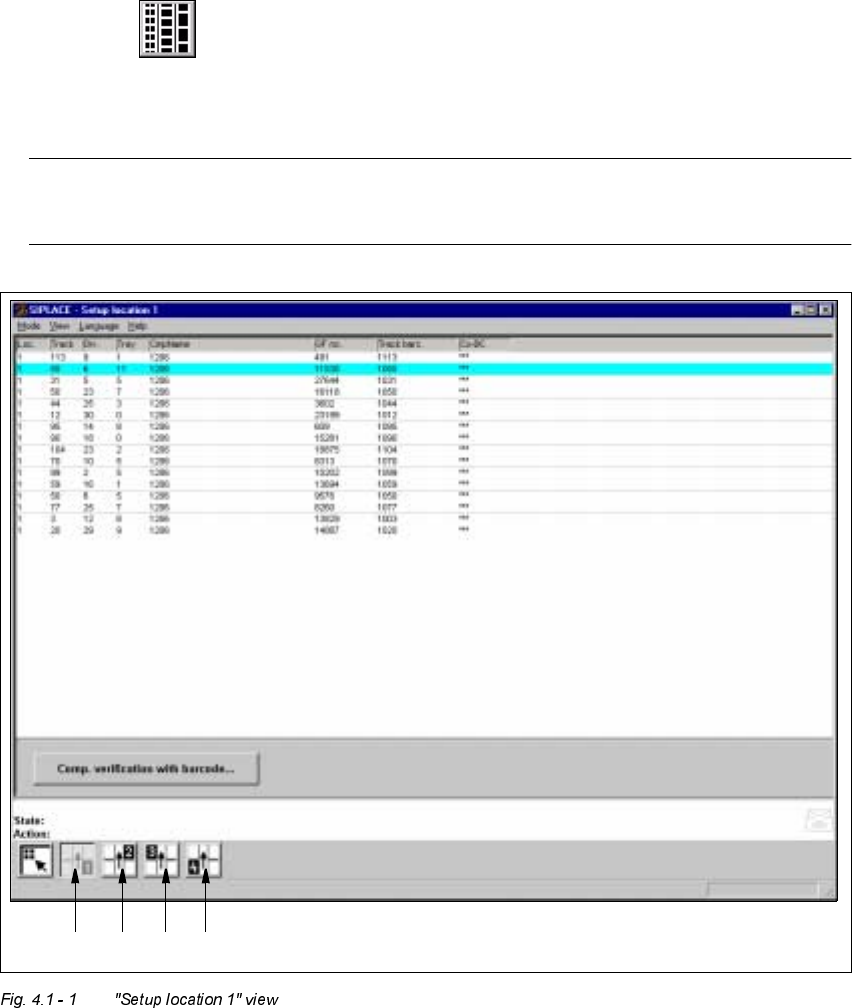
Å Click on the icon in the toolbar in the Main view.
The user interface switches to the "Setup location x" view.
The setup data for the current location is presented in the display area in tabular form.
NOTE
The view is the same for each location.
1234

User’s Manual SIPLACE HS-50 4 Placement Functions
Software Version SR.501.xx Edition 01/99 4.1 Setup Display
127
.H\WR)LJ
(1) Display the setup for location 1
(2) Display the setup for location 2
(3) Display the setup for location 3
(4) Display the setup for location 4
0HDQLQJRIWKH(QWULHVLQWKH6HWXS7DEOH
– /RF
The number of the location whose setup is to be displayed is entered in this column. (See
Chapter 3, Fig. 3.1 - 2
for the position of the locations)
– 7UDFN
The number of the track on which the corresponding feeder is located is entered here.
– 'LY
The number of the feeder division from which the component in the corresponding feeder
is to be picked is entered in this column.
NOTE
The number for a tray division can also be entered here for other types of machines in the
SIPLACE series.
– 7UD\
This column is irrelevant when setting up the locations of a SIPLACE HS-50.
(Only valid for automatic machines with wafflepack changers).
– &PS1DPH
The name of the corresponding component is entered in this column.
– *)QR
The number of the package form for the corresponding component is entered here.
– 7UDFNEDUF
The track barcode assigned to the corresponding track is entered in this column.