00191369-01.pdf - 第137页
User’s Manual SIPLACE HS-50 4 Placement Functions Software Vers ion SR.501.xx E dition 01/99 4.2 Error Display 135 7 UDFN(UURUV9LHZ

4 Placement Functions User’s Manual SIPLACE HS-50
4.2 Error Display Software Version SR.501.xx Edition 01/99
134
)XQFWLRQV
The following functions described below can be executed by selecting the corresponding but-
tons in the views for the corresponding error type.
'HOHWHDOO
All entries in the table for the error type currently displayed are deleted with this function.
Å Click on the 'HOHWHDOO button
The error table is emptied.
(UURULQIRUPDWLRQ
This starts a help system that displays information on the possible causes of error for the sel-
ected error as well as corrective measures.
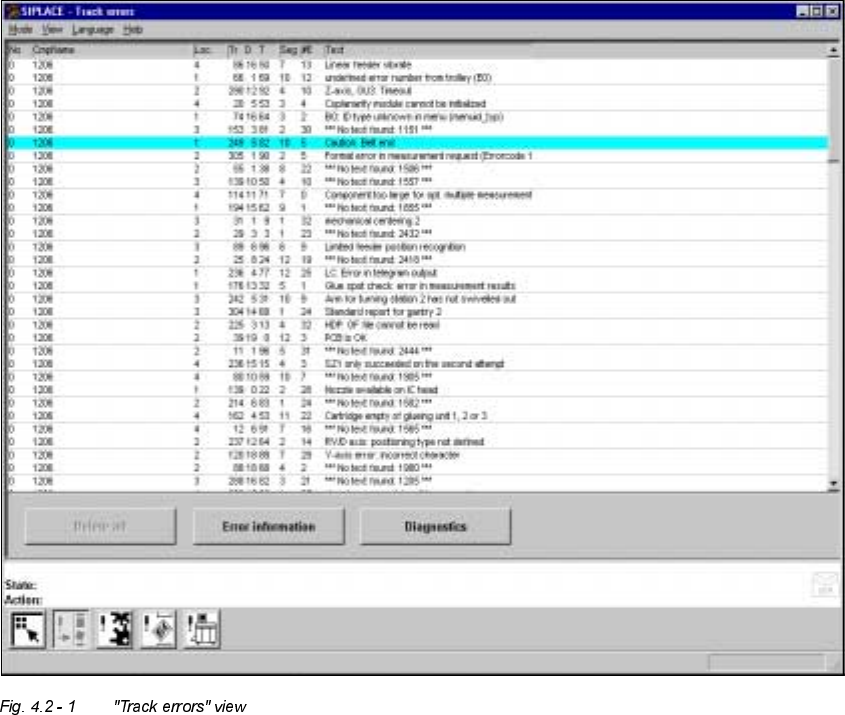
Å Select the entry in the table for the error for which you require additional information. The
line selected is highlighted in light blue in the table. The "Error information" button is now
active (see Fig. 4.2 - 1
, for example).
Å Click on the (UURULQIRUPDWLRQbutton
The help system window is opened.
The further procedure is described in Chapter 8 "Error information".
'LDJQRVWLFV
This starts the diagnostics system. You use this system to attempt to recognize the cause of
the current error and to correct this error together with the operator.
Å Select the entry in the table for the error for which you want to start the error diagnostics.
Å Click on the 'LDJQRVWLFV button.
The user interface switches to the Main view of the diagnostics system.
NOTE
The diagnostics system is not available in the current software version.
User’s Manual SIPLACE HS-50 4 Placement Functions
Software Version SR.501.xx Edition 01/99 4.2 Error Display
135
7UDFN(UURUV9LHZ
4 Placement Functions User’s Manual SIPLACE HS-50
4.2 Error Display Software Version SR.501.xx Edition 01/99
136
0HDQLQJRIWKH(QWULHVLQWK H 7DEOHIRU7UDFN(UURUV
– 1R
The error number of the corresponding error is entered in this column.
– &PS1DPH
The name of the component for which the error has occurred is entered here.
– /RF
The number of the location for which the corresponding component is set up is entered in
this column.
– 7U'7
The number of the track and of the feeder division for the corresponding component is en-
tered here.
The entry for "T" is irrelevant for model SIPLACE HS-50 machines.
(Only valid for automatic machines with wafflepack changers)
– 6HJ
The number of the segment that was used to insert the component is entered here.
– (
This column displays how often the corresponding error has occurred until now.
– 7H[W
The error that has occurred is described in this column.