00191369-01.pdf - 第154页
5 Single Functions User’s Manual SIPLACE HS-50 5.2 Single functions, G antry Software Version SR.501.xx Edi tion 01/99 152 .H\WR)LJ (1) Gantry fun ctions (2) Rev olver h ead functi ons (3) V acuu m test, re…
User’s Manual SIPLACE HS-50 5 Single Functions
Software Version SR.501.xx Edition 01/99 5.2 Single functions, Gantry
151
6LQJOHIXQFWL RQV*DQWU\
NOTE
The travel functions of the x or y axis can only be carried out when the machine cover is
closed. To execute this function, press the start button.
As a rule, the gantries only travel slowly.
Å On the tool bar in the main view, click the symbol which represents the gantry you want to
test the functions of (or select the appropriate item from the "View" menu, e.g. "Gantry 1" for
Gantry 1).
NOTE
The single functions can be called for each of the 4 gantries. The single functions are
identical for all gantries. Each of the 4 symbols used to call the single functions is marked
with the number of the corresponding gantry:
Example for Gantry 1.
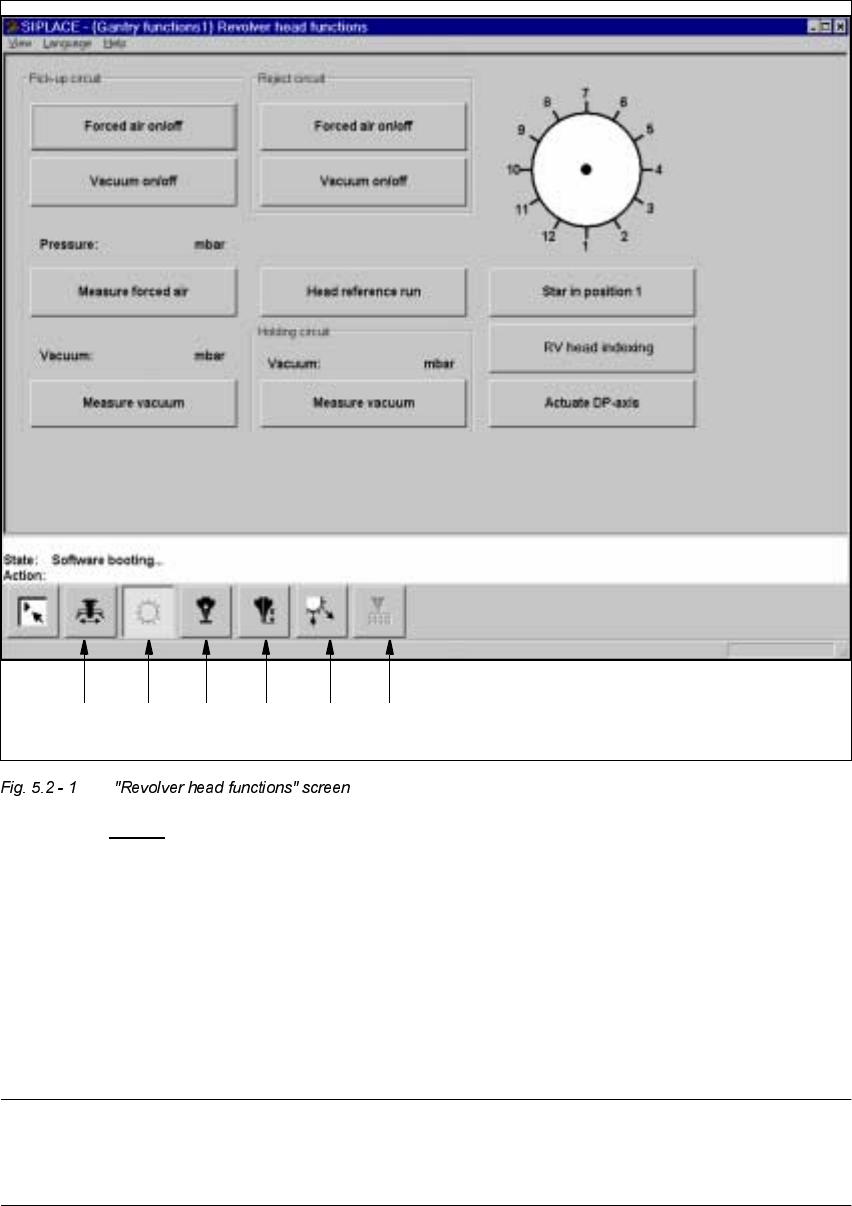
The user interface changes to display the "Revolver head functions" screen for the selected
gantry (see Fig. 5.2 - 1
).
5HYROYHUKHDGIXQFWLRQVVFUHHQ
The revolver head functions can be used to control all functions relating to the revolver head.
NOTE
The revolver head functions can be executed with the machine cover open. To do this the key-
operated switch must be turned to position I.
5 Single Functions User’s Manual SIPLACE HS-50
5.2 Single functions, Gantry Software Version SR.501.xx Edition 01/99
152
.H\WR)LJ
(1) Gantry functions
(2) Revolver head functions
(3) Vacuum test, revolver head
(4) Nozzle offset, revolver head
(5) Nozzle configuration, revolver head
(6) Nozzle changer configuration, revolver head
NOTE
The current position of the revolver head segment is shown by the graphic above the "Star in
position 1" button.
12345 6

User’s Manual SIPLACE HS-50 5 Single Functions
Software Version SR.501.xx Edition 01/99 5.2 Single functions, Gantry
153
)XQFWLRQV
In the "Revolver head functions" screen, the functions described below are available to help
you test the revolver head.
– Vacuum test in the pick-up position
– Vacuum test in the reject position
– Vacuum test in the holding circuit
– Revolver head functions
The functions are triggered by clicking the appropriate button.
3LFNXSFLUFXLW)RUFHGDLURQRII
When this function is activated, the forced air to the nozzle in the pick-up position is either
switched on or off.
Å In the "Pick-up circuit" area, click the )RUFHGDLURQRIIbutton.
This switches the forced air on or off.
3LFNXSFLUFXLW9DFXXPRQRII
When this function is activated, the vacuum at the nozzle in the pick-up position is either
switched on or off.
Å In the "Pick-up circuit" area, click the 9 DFXXPRQRIIbutton.
This switches the vacuum on or off.
3LFNXSFLUFXLW0HDVXUHIRUFHGDLU
When this function is activated, forced air at the pick-up position is measured.
Å Switch on the forced air (using the "Forced air on/off" function in the "Pick-up circuit" area).
Å Click the 0 HDVXUHIRUF HGDLUbutton in the "Pick-up circuit" area.
The forced air is measured and the result displayed in [mbar] above the button.
NOTE
The value displayed after the measurement is taken does not correspond to the actual values
at the nozzle.
When calibrating the machine, you must use a manometer to establish the values (see Adjust-
ment instructions or the Service Manual).
3LFNXSFLUFXLW0HDVXUHYDFXXP
When this function is activated, vacuum at the pick-up position is measured.
Å Switch on the vacuum (using the "Vacuum on/off" function in the "Pick-up circuit" area).
Å Click the 0HDV XUH9DFXXPbutton in the "Pick-up circuit" area.
The vacuum is measured and the result displayed in [mbar] above the button.