00191369-01.pdf - 第230页
6 Vision functions User Manual HS-50 6.5 Teach Fiducial Software-V ersion 5.01 E dition 01/99 228 %XWWRQV Å Acc ept Clic k on th e $ FFHSW button t o save th e settings . The op tion box will th en clos e. Å Cancel Wit…
User Manual HS-50 6 Vision functions
Software-Version 5.01Edition 01/99 6.5 Teach Fiducial
227
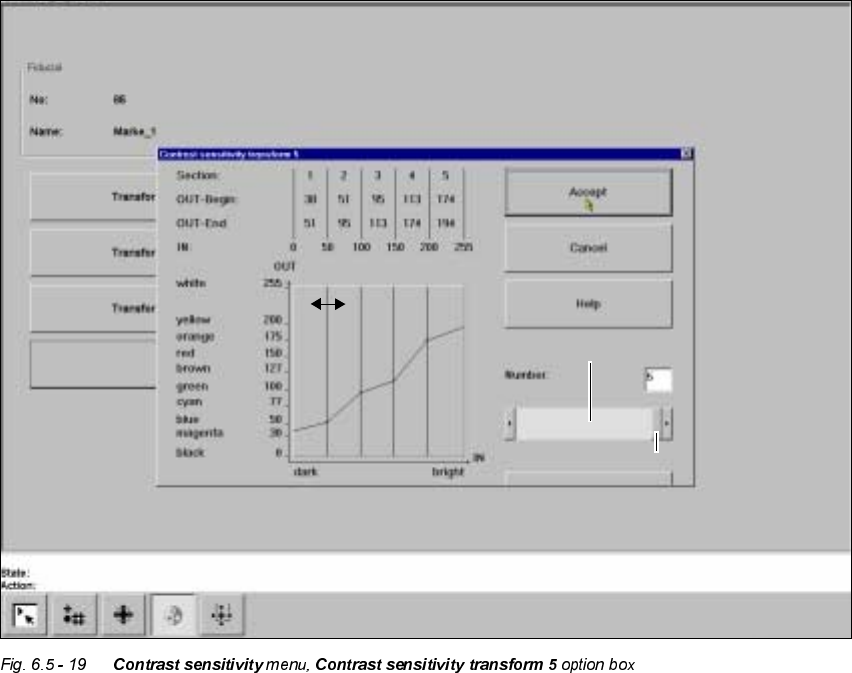
You can select the following parameters:
– Number of sections which the transformation table should have: a number between 1 and 5
– Choice of paired values: with 5 sections 10 value pairs are permitted.
/D\RXWRIWKH&RQWUDVWVHQVLWLY LW\WUDQVIRUPRSWLRQER[
Numerical presentation of Transform 5
The numerical values are indicated in the upper part of the option box. These are:
Section: Number of sections
OUT Begin: OUT End: Ranges of values for the transformation of the individual sections
IN: Range limits of the individual sections
Graphic presentation of Transform 5
In the diagram
– the abscissae (x axis) represent the input value range, subdivided into sections.
– the ordinates (y axis) represent the output values with their color allocation.
Scroll field
Scroll bar
6 Vision functions User Manual HS-50
6.5 Teach Fiducial Software-Version 5.01 Edition 01/99
228
%XWWRQV
Å Accept
Click on the $FFHSW button to save the settings. The option box will then close.
Å Cancel
With &DQFHO you can discard the settings. The option box will then close.
Å Help
With the +HOS button you can access explanatory material regarding the on-screen presenta-
tion.
Å Standard values
Click on the 6W DQGDUG YDOXHV button if programming the transformation table fails. When you
select this option the transformation table will be preassigned default values. After this you can
start over with programming table 5.
Å Numberinput field
You can choose the number of sections
Å by entering the numerical value directly into the display field, or
Å by moving the scroll field in the scroll bar to the right or left using the mouse. In this way you
can run back and forth through the values range (1 - 5), or
Å by clicking on the left-hand or right-hand arrow on the scroll bar. In this way you can in-
crease or decrease the number of selections.
3URJUDPPLQJWKHWUDQVIRUPDWLRQWDEOH
– Specifying the output values
Position the mouse pointer over the ends of the transformation lines of each section. The ends
are marked with small horizontal lines. A vertical double arrow will then appear on the screen.
Click on the left-hand mouse key and move the arrow upwards or downwards. This will move
the selected end of the transformation line and the numerical value will be displayed at 287
%HJLQor 287(QG.
– Selecting the section limits
The graphical representation in Fig. 6.5 - 19 shows equidistant section limits with the ranges
0 - 50, 51 - 100 and so on. You can change these section limits if you wish. However limits 0
and 255 are permanently allocated and cannot therefore be moved.
Position the mouse pointer on a section limit (but not 0 and 255). A horizontal double arrow will
appear on the screen. Hold down the lefthand mouse pointer and use it to drag the section limit
in the direction you want. The corresponding numerical value will be displayed at ,1.
– Once you have programmed your transformation table you can quit the option box by clicking
on $FFHSW or &DQFHO. If you have not managed to obtain a satisfactory result, click on 'HIDXOW.
User Manual HS-50 6 Vision functions
Software-Version 5.01Edition 01/99 6.5 Teach Fiducial
229
7HVW)LGXFLDO0HQX
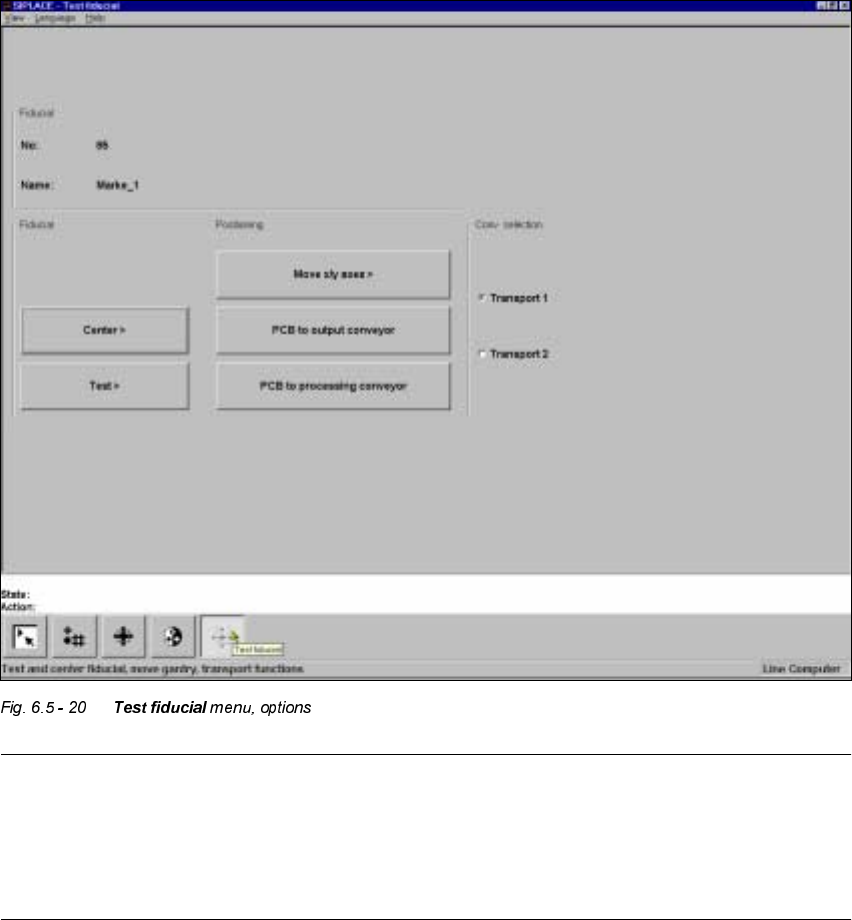
In the 7HVWILGXFLDO menu the following options are available:
– Centering the fiducial (Center)
– Testing the fiducial (Test)
– Positioning the teaching gantry (x/y movement) (move X/Y axes)
– Transporting the board onto the output conveyor (PCB to output conveyor)
– Transporting the board onto the processing conveyor (PCB to processing conveyor)
NOTE
Buttons are active when the text on the button is black (rather than gray). This means that you can
launch the associated function by clicking on the button with the mouse.
The &HQWHUand 7HVWoptions will only be available if you have already loaded a fiducial and a
model already exists for this fiducial.