00191369-01.pdf - 第327页
User’s Manual SIPLACE HS-50 7 What schould you do ... Software Version S R.501.xx Edition 01/99 7.5 When you, as an operator, carry out a walk-through inspection 325 .H\W R) LJ 7.5 - 2 (1) Gui de rail for the di …

7 What schould you do ... User’s Manual SIPLACE HS-50
7.5 When you, as an operator, carry out a walk-through inspection Software Version SR.501.xx Edition 01/99
324
Å Check to see if the additional plastic guides are being used on the feeder modules that are in-
tended for tapes of different widths.
Å Check the position of the stopper on the PCB transport.
Always position the stopper so that it is not placed within any cut-outs or recesses in the PCB.
Å Check the magnetic supports on the lifting table. They must be arranged so that they do not
collide with components on the bottom of the PCBs.
NOTE
Splice the tapes early enough so that the feeder modules do not become empty or you will
experience prolonged down times.
However, do not splice the tapes too early because if you wind the end of the old tape onto
the new reel after splicing, the reel holding the new tape may become overfilled and the tape
will slip off the reel and become tangled up. This will again result in pick-up errors and pro-
longed down times.
Å Place insertable shafts into the tape container when using large tape reels.
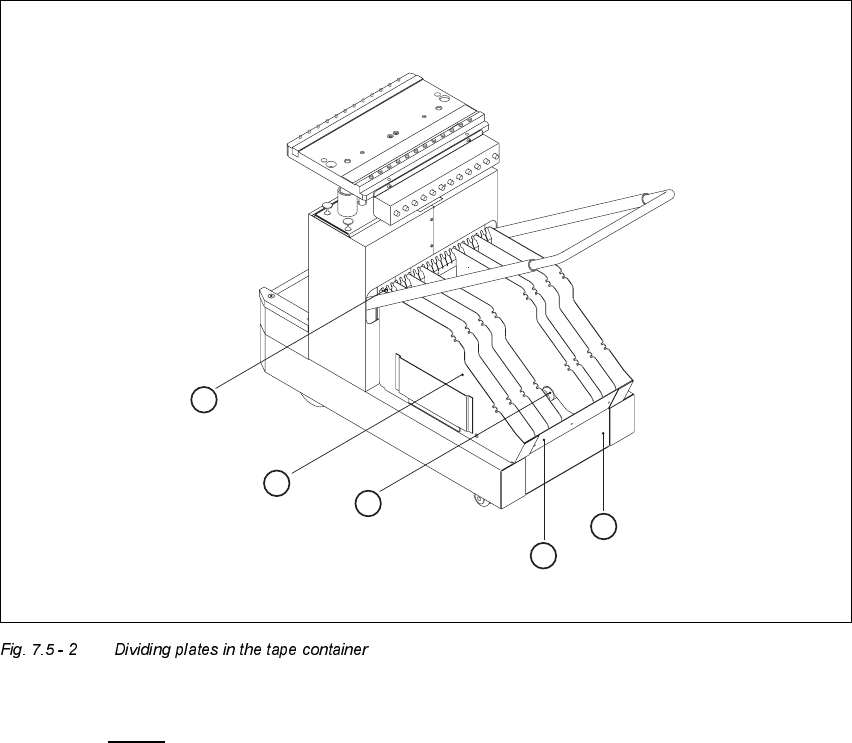
Å Insert the dividing plates as shown in Fig. 7.5 - 2 and remember that the smallest division of the
tape container is a 2x division. This will help avoid placement errors.
User’s Manual SIPLACE HS-50 7 What schould you do ...
Software Version SR.501.xx Edition 01/99 7.5 When you, as an operator, carry out a walk-through inspection
325
.H\WR)LJ
7.5 - 2
(1) Guide rail for the dividing plates
(2) Dividing plate
(3) Supporting rod for the dividing plates
(4) Tape container
(5) Tape waste container
04
6
1
-6
6
1
7
-2
4
3
1
-3
6
2
5
-3
0
4
9
-5
4
5
5
-6
0
4
3
-4
8
+
3
0
V
3
7
-4
2
02
1
-6
7
-1
2
1
3
-1
6
03
01
07 0908
6
7
-7
2
10 11 12
05 06
1
3
5
2
4
7 What schould you do ... User’s Manual SIPLACE HS-50
7.6 Preliminary set-up of the placement station Software Version SR.501.xx Edition 01/99
326
3UHOLPLQDU\ VH WXSRIWKHSODFHPHQWVWDWLRQ
Carry out the following steps to complete the preliminary set-up of the placement station.
Å Remove the tapes from the feeder modules and vacuum the surfaces of the modules and the
area around the tape guide clean with the vacuum cleaner.
Å Remove the cover foil from the tape waste containers.
Å Clean the supporting surfaces of the feeder modules with a cloth moistened with alcohol.
Å Apply a small amount of WD40 corrosion protection to the supporting surfaces with a lint-free
cloth.
Å Use a vacuum cleaner or use a brush with short bristles to remove loose components from the
component tables.
CAUTION
Avoid removing components from the magnetic rail of the component table with your fingers
or you may injure yourself with tiny splinters of metal.
NOTE
The compressed air distributor rail on the component tables is used to connect the bulk case
feeder modules. This rail runs parallel to the PCB transport and has nozzles with the open-
ings on the top. Make sure that the nozzles do not get dirty or come into contact with oil or
grease. Grease, oil and dirt can cause malfunctions in the feeder module or may cause the
components in the feeder module to become unusable!
Å Cover the nozzles on the distributor rail with electrical tape, for example.
Å Check the surface of the magnetic rail for irregularities or damage and smoothen with an oil-
stone when necessary.
Å Clean the magnetic rail with a cloth moistened with alcohol.
Å Apply a small amount of WD40 corrosion protection to the magnetic rail with a lint-free cloth.
Å Clean the supporting surfaces of the component tables with a cloth moistened with alcohol,
and then apply a small amount of WD40 corrosion protection with a lint-free cloth.
Å Clean the tape container with a vacuum cleaner.
Å Make sure that the feeder modules are divided up correctly.
Å Are all the plugs of the feeder module plugged in to the correct location?