00191369-01.pdf - 第379页
User Manual HS-50 10 Component han dling Software-Version 5.0101/99 Issue 10.6 Component changeover tables 377 'RFNLQJWKHFRPSRQHQWFKDQJHRY HUW DEOH W A RNING Check tha t the plac ement h ead is ou tsid…
10 Component handling User Manual HS-50
10.6 Component changeover tables Software-Version 5.01 01/99 Issue
376
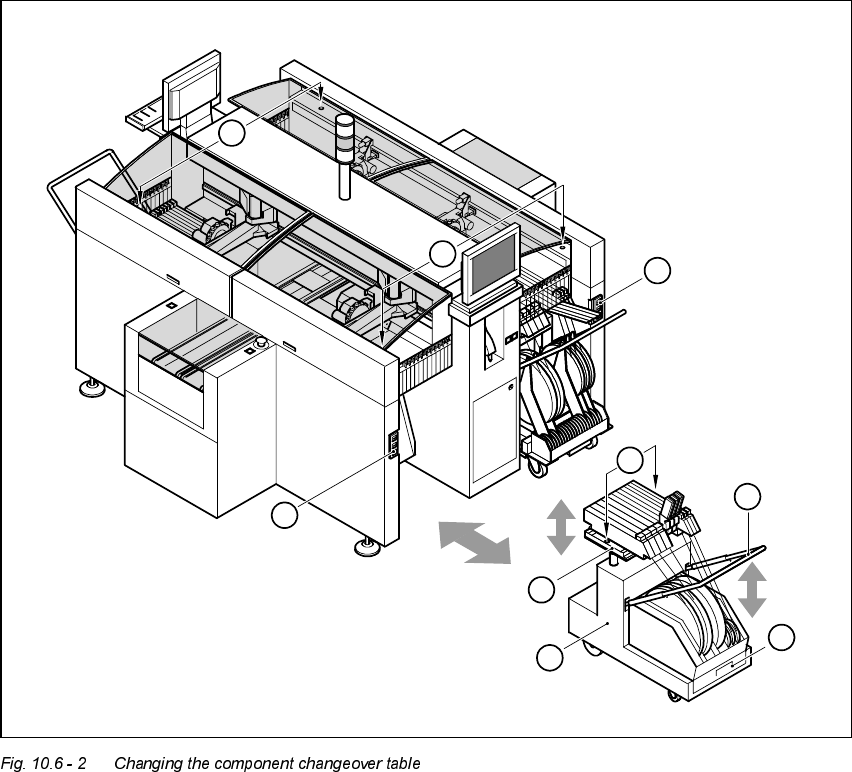
(1) Button for raising and lowering the component table plate
(2) Plug for connecting the component changeover table cable
(3) Component table bed, can be raised and lowered
(4) Component changeover table
(5) Bracket
(6) Used tape container
(7) Centering holes for the centering pins
6
5
4
3
2
1
7
2
1
User Manual HS-50 10 Component handling
Software-Version 5.0101/99 Issue 10.6 Component changeover tables
377
'RFNLQJWKHFRPSRQHQWFKDQJHRYHUW DEOH
WARNING
Check that the placement head is outside the range of the component changeover table.
CAUTION
When docking the component table, ensure that the table bed is in its top end position and the clip
(item 5) is folded up.
Å Carefully push the component changeover table into the placement system.
Å Plug the connecting cable for the component changeover table into the socket (item 2) in the
placement system.
Å Open the flap over the push-button for raising the component changeover table.
Å Hold down the button (item 1) until the component table bed reaches its top end position.
Å Check that the centering holes in the component table bed are exactly over the centering pins
on the placement system.
Å Then fold down the clip (item 5) of the component changeover table to lower the component
table bed.
Å Ensure that the centering pins engage in the centering holes in the component table bed and
that the component table bed is fully lowered.
Å Close the flap over the push-button (item 1).
Å Close the protective cover.
10 Component handling User Manual HS-50
10.6 Component changeover tables Software-Version 5.01 01/99 Issue
378