00191369-01.pdf - 第96页
3 Introduction and Basic Concepts User’ s M anual SIPLACE HS -50 3.1 Machine Displays and Controls Software Version SR.501.xx Edition 01/99 94 flashes (5,20) unchanged unchanged flashes (5,5) unchanged unchanged flashes …

User’s Manual SIPLACE HS-50 3 Introduction and Basic Concepts
Software Version SR.501.xx Edition 01/99 3.1 Machine Displays and Controls
93
/
7RSODPS
/
0LGGOHODPS
/
%RWWRPODPS 0HDQLQJ
6WDWXVGLVSOD\
flashes (1,10) flashes (7,7) flashes (1,10) Reference run
unchanged flashes (1,5) unchanged Waiting until axes in position
unchanged flashes (7,7) unchanged Waiting for setup data
unchanged flashes (7,7) unchanged Waiting for cluster data
unchanged flashes (7,7) unchanged Load table program
unchanged flashes (7,7) unchanged Position recognition
unchanged flashes (1,10) unchanged Ink spot recognition
unchanged flashes (7,7) unchanged Nozzle configuration test
unchanged flashes (7,7) unchanged Feeder posn. recogn.
unchanged flashes (7,7) unchanged One track is empty
unchanged flashes (7,7) unchanged No further track available
unchanged flashes (7,7) unchanged Go to refill position
unchanged flashes (7,7) unchanged Transport being initialized
unchanged flashes (7,7) unchanged Place PCB in input conveyor
flashes (1,10) flashes (7,7) unchanged Remove PCB from output conveyor
unchanged flashes (7,7) flashes (1,10) Remove PCB in output conveyor 2
flashes (1,10) flashes (7,7) flashes (1,10) Width adjustment
unchanged flashes (1,10) unchanged Transport PCB
flashes (1,10) flashes (7,7) flashes (1,10) Both output conveyors are cleared
on flashes (1,10) on Transport errors
on off on Go to service position
on Placement
flashes (1,20) Waiting for processing data
(UURUGLVSOD\
on off unchanged Machine error, right
on off unchanged Track empty, right
on off unchanged Nozzle configuration, right
on off unchanged Transport error, right
on off on Fiducial error, left and right
on off on Fiducial error, left and right
unchanged off on Track empty, left
unchanged off on Nozzle configuration, left
unchanged off on Transport error, left
unchanged off on Machine error, left
3LFNXSHUURUGLVSOD\
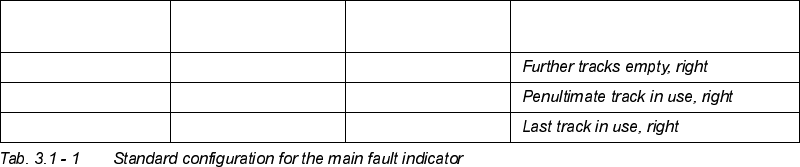
unchanged unchanged flashes (1,20)
unchanged unchanged flashes (5,20)
unchanged unchanged flashes (5,5)
unchanged unchanged flashes (1,2)
flashes (1,20) unchanged unchanged
3 Introduction and Basic Concepts User’s Manual SIPLACE HS-50
3.1 Machine Displays and Controls Software Version SR.501.xx Edition 01/99
94
flashes (5,20) unchanged unchanged
flashes (5,5) unchanged unchanged
flashes (1,2) unchanged unchanged
/
7RSODPS
/
0LGGOHODP S
/
%RWWRP ODPS 0HDQLQJ
User’s Manual SIPLACE HS-50 3 Introduction and Basic Concepts
Software Version SR.501.xx Edition 01/99 3.1 Machine Displays and Controls
95
%DUFRGH5HDGHU
The barcode reader is available as an option. It is very helpful, particularly under production
conditions, since component barcodes on component reels and track barcodes can be read
in quickly and reliably from the barcode strip on the machine.
An acoustic signal sounds each time a data record is successfully read in.
NOTE
For a detailed description of the function, connection and operation of the bar code reader,
refer to chapter 12 "Station Extensions/Hardware".
6WDWLRQ&RPSXWHU
The station computer is located in a midi tower housing and is equipped with a 3 ½" floppy
disk drive and CD-ROM drive.
NOTE
The SC software is installed under the NT 4.0 operating system. To prevent damage to the
operating system in the event of a power failure, the station computer is connected to an
uninterruptible power supply (UPS, see Section 3.1.6).
8QLQWHUUXSWLEOH3RZHU6XSSO\836
The UPS is located directly next to the station computer. It is used to boost insufficient mains
power supplies and bridge over mains voltage failures. This guarantees that the connected
devices can continue to function even if the power supply fails and that a controlled power-
down of the station computer can be performed.
CAUTION
Before the UPS is used for the first time, it must be charged for approximately 24 hours
(because of charge loss due to storage) in order to guarantee secure computer system
operation.
NOTE
A separate manual is supplied with the UPS.
Please refer to this manual for a description of the connections, displays and setting options.