00197787-02_SI_SIPLACE_HeadVerification_EN.pdf - 第10页
2 Safety 10 Software Manual SIPLACE Head Verification 03/2018
2 Safety
Software Manual SIPLACE Head Verification 03/2018 9
2 Safety
DANGER
Nonobservance of the safety instructions may cause injury to personnel and damage
to the machine!
Knowledge of and compliance with the safety instructions contained in the user manual of
the SIPLACE HeadCareStation[00197262-04] and in the user manual of your machine is
a prerequisite for any work on the Head Care Station or machines.
► For the offline head verification, observe the safety instructions in the user manual
of the SIPLACE Head Care Station for all work!
► For the online head verification, observe the safety instructions in the user manual
of the relevant machine for all work!

2 Safety
10 Software Manual SIPLACE Head Verification 03/2018
3 Head verification principles
3.1 Starting the offline head verification
Software Manual SIPLACE Head Verification 03/2018 11
3 Head verification principles
3.1 Starting the offline head verification
NOTICE
Log in as „Machine service”
To enable the standard service functions, it is recommended to log in as Machine service.
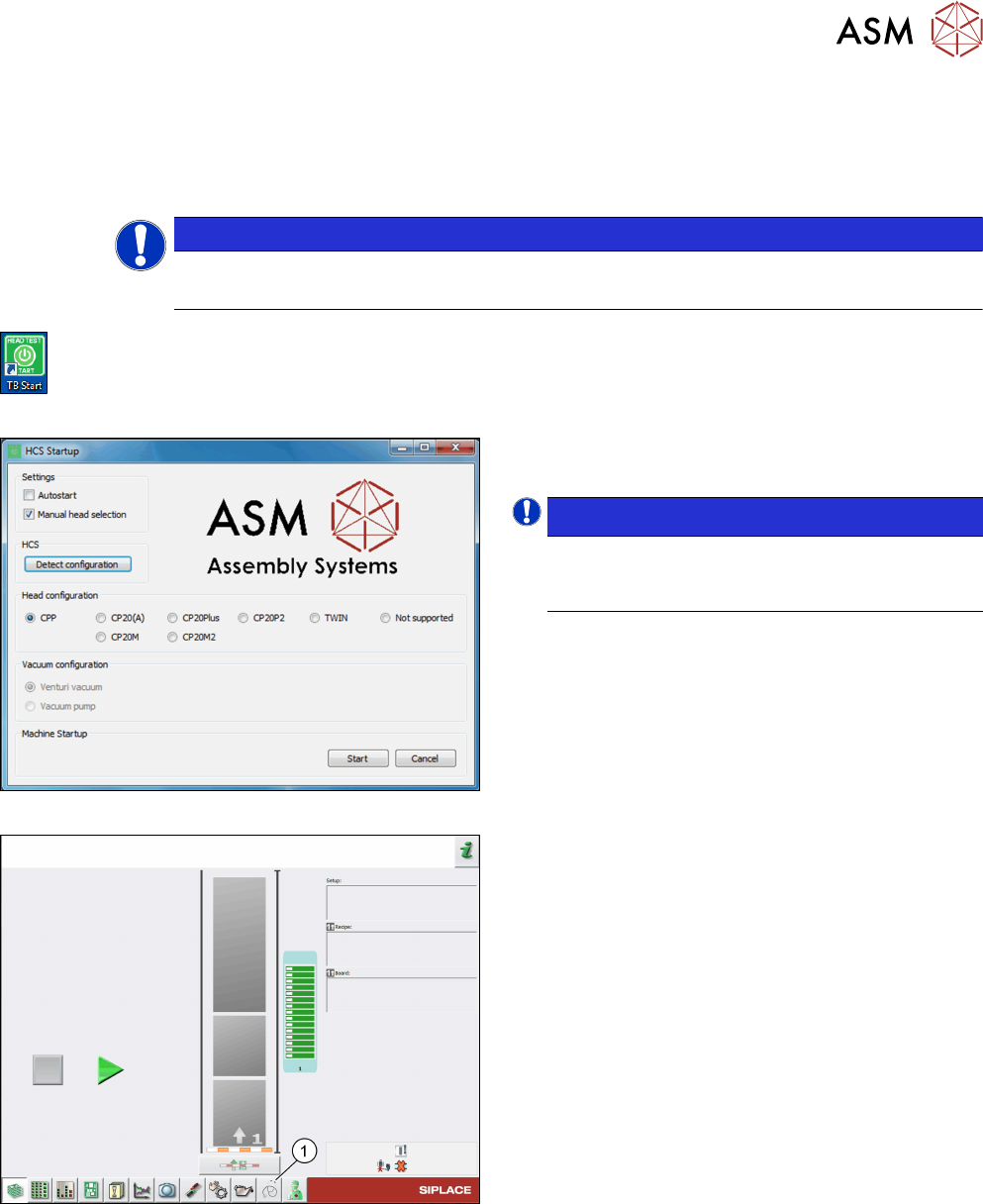
Fig.1: TB Start icon
► On the desktop, double-click the TB Start icon to
start the verification software.
Fig.2: HCS Startup screen
► On the HCS Startup screen, select the head and
vacuum configuration, if necessary.
NOTICE!
If the head was initialized correctly, the head
is automatically detected and selected under
Head configuration.
.
Fig.3: Test bench inspection icon selection
► Click the Test bench inspection icon(1) to start
the head verification workflow.