00197787-02_SI_SIPLACE_HeadVerification_EN.pdf - 第45页
6 Description of the test results 6.5 CS Sensor voltage and z-heights Software Manual SIPLACE Head Verification 03/2018 45 6.5.3 Interpretation of the results obtained ‘Component sensor voltage’ error if lower tolerance …
6 Description of the test results
6.5 CS Sensor voltage and z-heights
44 Software Manual SIPLACE Head Verification 03/2018
6.5 CS Sensor voltage and z-heights
6.5.1 Measurement principle
The CS Sensor voltage and z-heights measurement is used to determine the function of the
component sensor and the Z-axis values during the upward and downward movement.
The component sensor function is checked by verifying the analog voltage value in its uncovered
state to be within the defined limits. Following a height reference run every segment is moved down
and back up again whereby it is checked at which position the nozzle interrupts and releases the
light barrier.
6.5.2 Measurement result
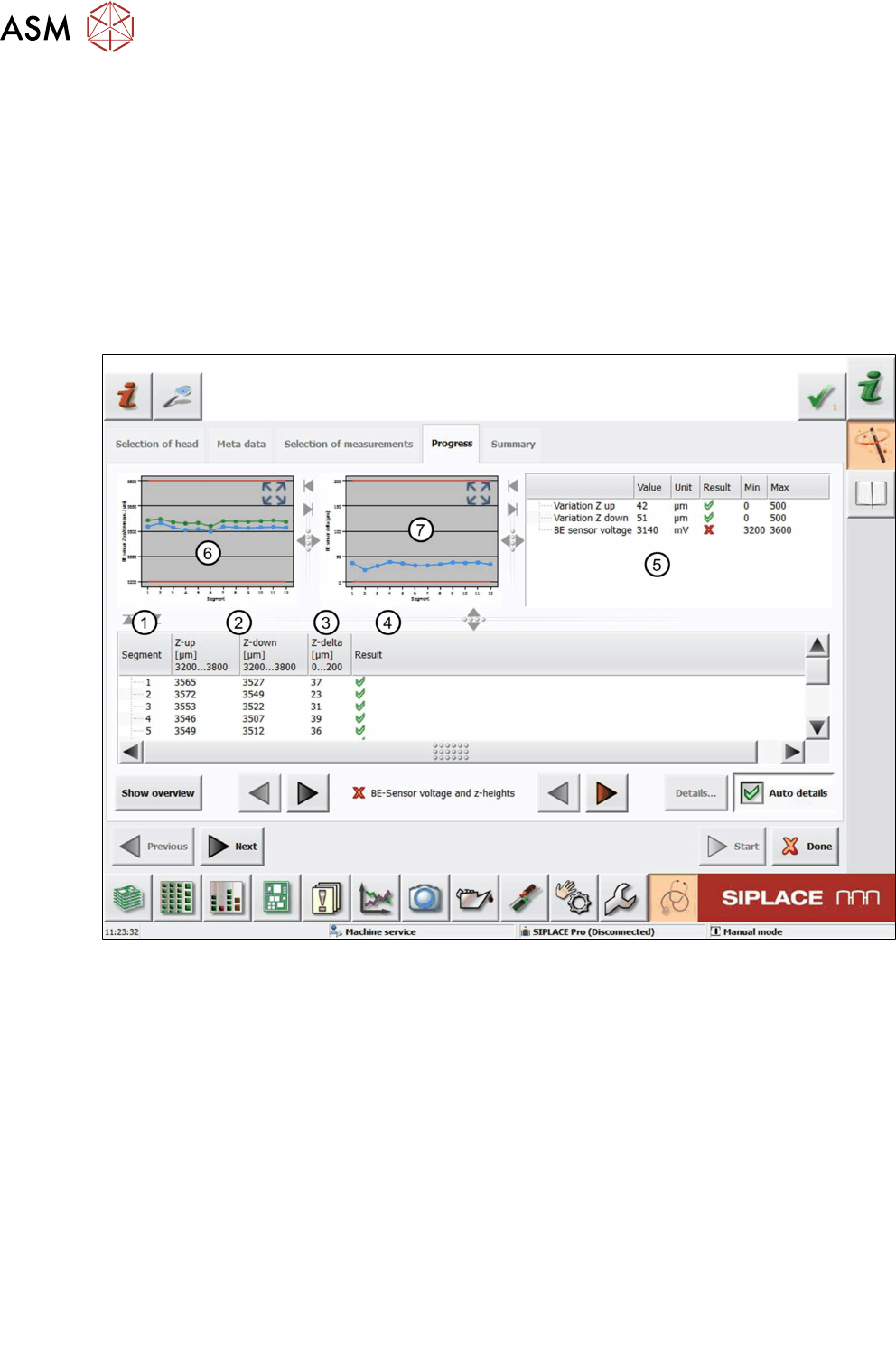
Fig.37: Result view – CS Sensor voltage and z-heights measurement
1 Measured Segment
2 Position that is determined when the light barrier gets interrupted during the downward
movement (Z-down) and released during the upward movement (Z-up).
3 Z-delta shows the difference (hysteresis) between Z-down and Z-up:
●
Z-delta = Z-down – Z-up
4 Results display indicating if the values are within (green tick) or outside (red cross) the lim-
its.
5
●
Variation Z up and Variation Z down show the difference between the largest and
smallest value determined:
Variation Z up = Z-up
max
–Z-up
min
Variation Z up = Z-up
max
– Z-up
min
●
BE sensor voltage shows the analog voltage measured.
6 Graph showing the Z-down (blue) and Z-up (green) values for each segment.
7 Graph showing the Z-delta value (hysteresis) for each segment.
6 Description of the test results
6.5 CS Sensor voltage and z-heights
Software Manual SIPLACE Head Verification 03/2018 45
6.5.3 Interpretation of the results obtained
‘Component sensor voltage’ error if lower tolerance limit not reached
Cause Solution
Prism at sensor polluted ► Clean the prism using a cleaning stick and isopropanol.
Prism at sensor damaged ► Check the lens by holding a sheet of white paper
between the transmitter and the receiver. If no red dot is
shown or the dot appears defused, the sensor or the
prism is damaged and the component sensor needs to
be replaced.
NOTICE
If the ‘component sensor voltage value’ check in the head ‘Single Functions’ is OK, the er-
ror can be ignored.
‘Component sensor voltage’ error if upper tolerance limit exceeded
Cause Solution
Component sensor electric de-
fective
► Replace the component sensor.
‘Z-delta’, ‘Z-down’ and ‘Z-up’ errors for all segments
Cause Solution
The driver (jaws) of the Z-axis has
been displaced or moved.
► CPP: Replace the front plate with the Z-motor assembly.
► C&P20A:
- Readjust the jaws.
- Replace the Z-axis assembly.
► C&P20P: Replace the z-unit assembly.
Component sensor defective or
polluted
► Clean or replace the component sensor.
‘Z-delta’, ‘Z-down’ and ‘Z-up’ errors for individual segments
Cause Solution
Bad nozzle seat ► Replace the nozzle.
► Visually inspect the DP and replace it if necessary.
DP drive bearing displaced ► Replace the DP.
DP linear / segment guide dis-
placed
► C&P20P/A: Replace the DP.
► CPP: Replace the segment guide.
6 Description of the test results
6.6 Component sensor calibration
46 Software Manual SIPLACE Head Verification 03/2018
6.6 Component sensor calibration
6.6.1 Measurement principle
The Component sensor calibration measurement checks the degree to which the Z height of the
nozzle changes when the Z-axis is moved downwards in the ‘axes overlapping’ mode, during the
star rotation and when the component sensor is triggered. When the component sensor switches,
the measurement checks whether the front surface of the nozzle tip triggers the component sensor
eccentrically when the axes overlap. The corner of the front nozzle surface moves slightly down-
wards during a rotation around the star in the lower angles (as in the case of jaw stop left and jaw
stop right). This can also be described as a diagonal tilting effect. This Z-axis change is recorded
during this measurement at the component sensor.
6.6.2 Measurement result
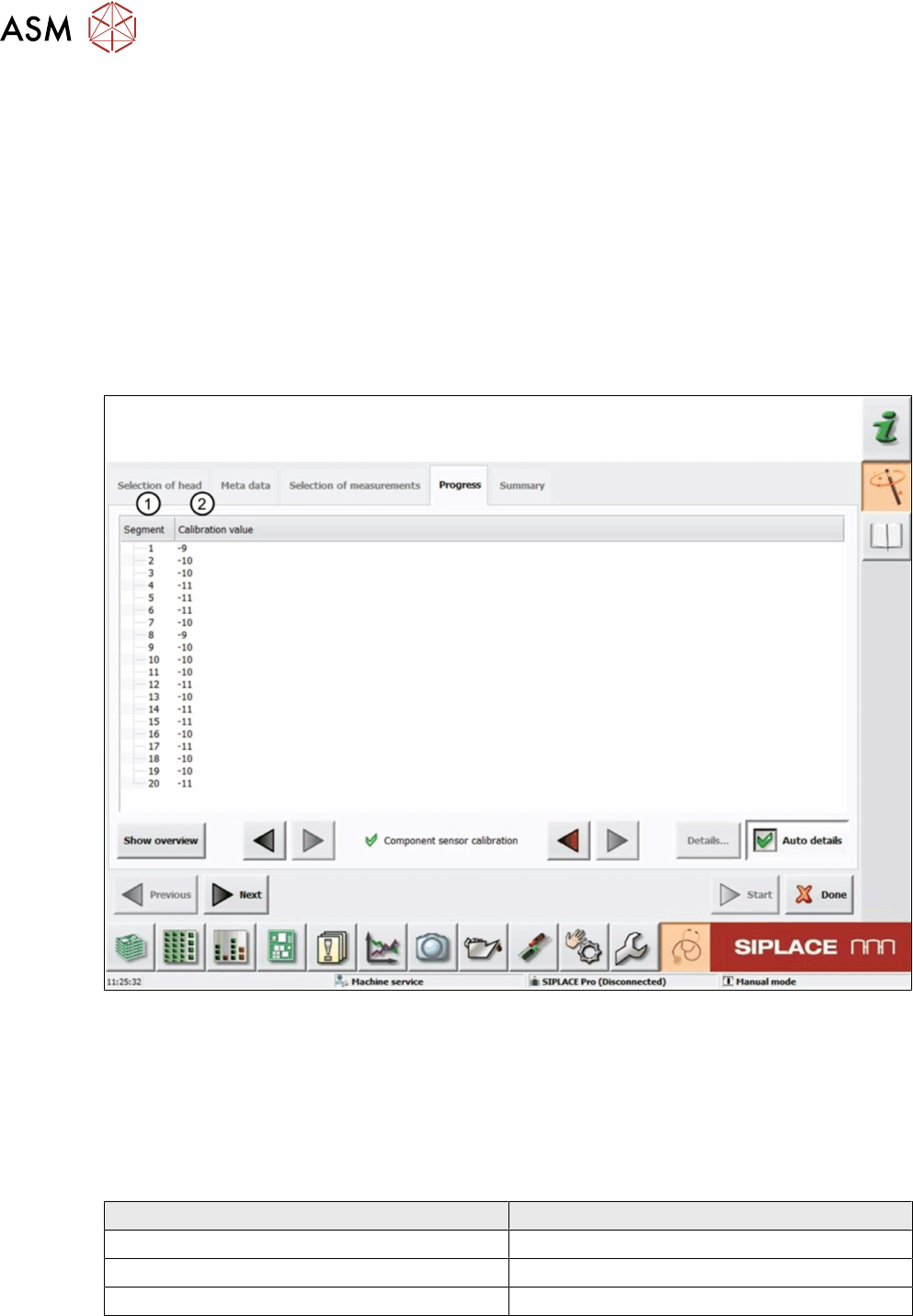
Fig.38: Result view – Component sensor calibration
1 Measured Segment
2 Calibration value calculated from the change in the Z-axis travel path in axes overlapping
mode (star axis to Z-axis) until the component sensor is triggered.
6.6.3 Interpretation of the results obtained
‘Calibration value’ error for all segments
Cause Solution
Component sensor fitted at a slant ► Readjust the component sensor.
Component sensor lens defective ► Replace the component sensor.
Component sensor lens dirty ► Clean the sensor with isopropyl alcohol.
‘Calibration value’ error for individual segments
► Check the nozzles.