Technical_reference - 第128页
Technical Service Manual 128 Revision Dat e: August 2004 Allen Bradley MicroLogix 1200 Ter m inal Detail Procedure fo r testing the SM EM A Mach ine Interf ace on an ov en The SMEMA operation of each lane is independent …

Technical Service Manual 127 Revision Date: August 2004
PLC SMEMA program logic table
Logic states 1=ON (corresponding led on PLC is active), 2=OFF, X=Don’t care
IN 1 (2008) On-load lane #1 sensor
IN 2 (2038) On-load lane #2 sensor
IN 3 (2009) oven ready
IN 4 (2018) Off-load lane #1 sensor
IN 5 (2048) Off-load lane #2 sensor
IN 6 (2014) Downstream lane #1 ready
IN 7 (2044) Downstream lane #2 ready
OUT 0 (2022) Oven ready to lane #1 upstream
OUT 1 (2042) Oven ready to lane #2 upstream
OUT 2 (2023) Product available to lane #1 downstream
OUT 4 (2053) Product available to lane #2 downstream
OUT 6 Lane #1 downstream alarm
OUT 7 Lane #2 downstream alarm
Operation
1 X 1 X X 1 X 1 X X X 0 X Lane #1 Start transfer of product from lane #1 upstream
1X1XX1X0XXX0X
Lane #1 Oven ready to upstream shuts off during transfer
and remains off for additional time based on potentiometer
zero setting on PLC for product spacing
XX1XX0X0XXX1X
Lane #1 on-load product transfer is suspended after
downstream lane #1 ready signal is absent beyond 30
seconds
X X X 1 X X X X X 1 X 0 X Lane #1 transfer of product to downstream
XXX1XXX0X1X1X
Lane #1 product jam alarm occurs after product has been
present at the off-load sensor beyond 180 seconds
X 1 1 X X X 1 X 1 X X X 0 Lane #2 Start transfer of product from lane #2 upstream
X11XXX1X0XXX0
Lane #2 Oven ready to upstream shuts off during transfer
and remains off for additional time based on potentiometer
one setting on PLC for product spacing
XX1XXX0X0XXX1
Lane #2 on-load product transfer is suspended after
downstream lane #2 ready signal is absent beyond 30
seconds
X X X X 1 X X X X X 1 X 0 Lane #2 transfer of product to downstream
XXXX1XXX0X1X1
Lane #2 product jam alarm occurs after product has been
present at the off-load sensor beyond 180 seconds
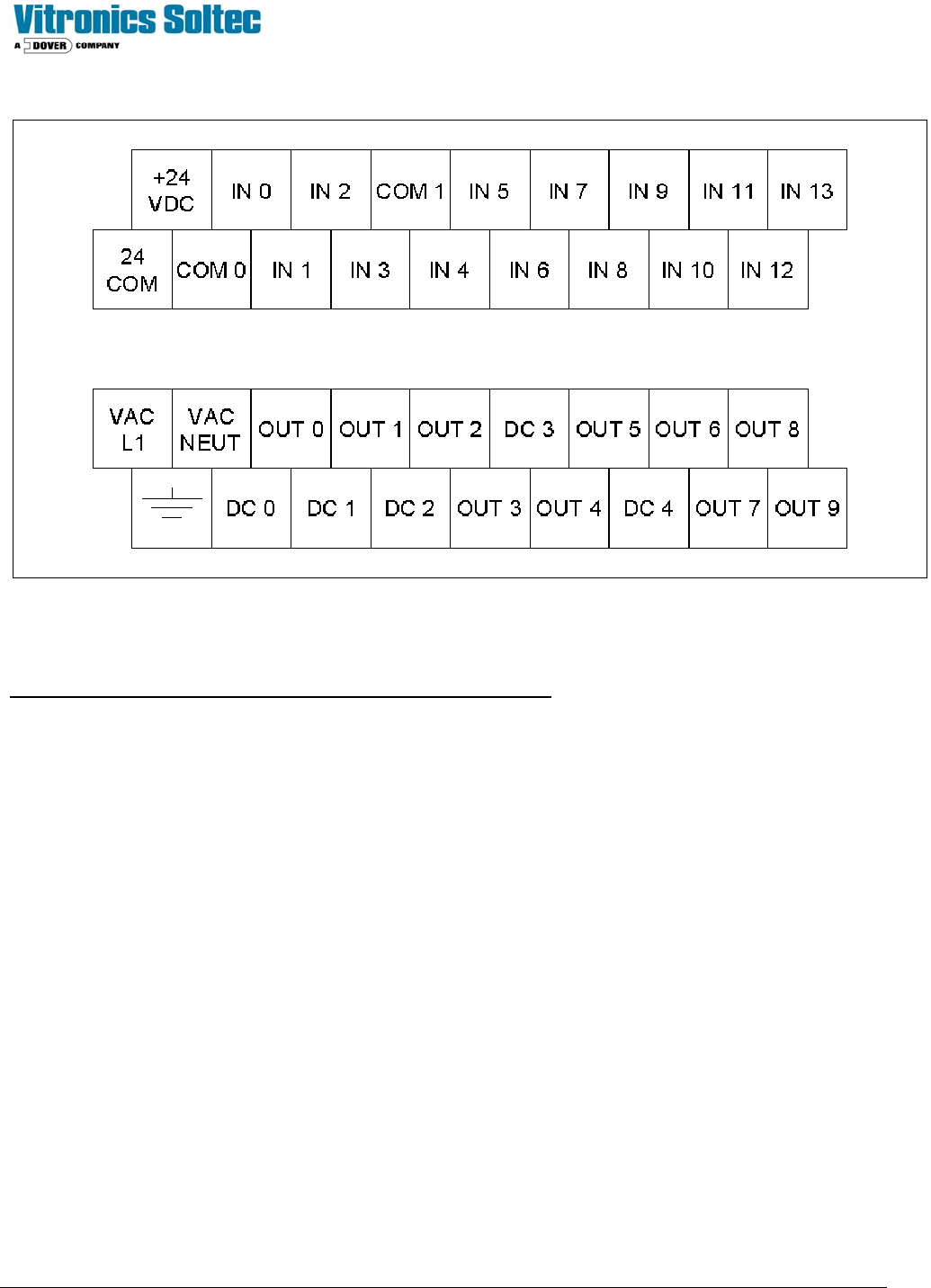
Technical Service Manual 128 Revision Date: August 2004
Allen Bradley MicroLogix 1200 Terminal Detail
Procedure for testing the SMEMA Machine Interface on an oven
The SMEMA operation of each lane is independent in the PLC. Each lane can be tested separately or together without
effecting the other.
1) Allow the oven to get into a process ready state by operating a belt recipe or by installing a jumper wire between the
IN 3 and the 24 COM terminal on the PLC. IN 3 on the PLC should be on.
Lane 1 Testing
2) Install a mating connector on the off-load connector of the oven with a jumper installed between pins 1 and 2, cable
W189A to provide the downstream machine ready signal to the PLC. Or install a jumper wire on the electrical panel
on terminal block X30 between wire numbers 2014 and 2007. IN 6 on the PLC should be on.
3) Connect the flashlight end of the test equipment to the on-load connector of the oven, cable W190A or install 2 wires
in a mating plug connector on pins 1 and 2 and connect the free ends to an external ohm meter or continuity tester.
4) OUT 0 on the PLC should be on and the test equipment on the on-load end of the oven should be on to indicate that
the oven is ready to accept product from the upstream machine lane 1.
5) Turn the top potentiometer (zero) on the PLC fully counter clockwise for minimum product spacing. The
potentiometers on the Allen Bradley PLC are located behind a removable access plate on the front lower left of the
PLC below the Allen Bradley logo.
The test equipment on the on-load of the oven should follow OUT 0 on the PLC in the following tests.
6) Run a test product under the on-load sensor for lane 1 and verify that OUT 0 goes off on the PLC while the product is
under the on-load sensor and remains off for an additional second after the on-load sensor is clear.

Technical Service Manual 129 Revision Date: August 2004
7) Turn the top potentiometer (zero) on the PLC ½ turn clockwise. Run a test product under the on-load sensor for lane
#1 and verify that OUT 0 remains off approximately 30 seconds after the on-load sensor is clear.
8) Return the top potentiometer (zero) on the PLC to the fully counter-clockwise setting.
9) Remove the mating connector on the off-load connector of the oven or the jumper wire that was installed previously in
step 2. Verify that after 30 seconds OUT 0 is off on the PLC to indicate that the oven is no longer ready to accept
product on lane #1.
10) Run a product or object under the off-load sensor for lane #1 and verify that OUT 2 on the PLC comes on and
remains on until the off-load sensor is clear to indicate that product is available to a downstream machine.
Lane 2 Testing
1. Install a mating connector on the off-load connector of the oven with a jumper installed between pins 1 and 2, cable
W189B to provide the downstream machine ready signal to the PLC. Or install a jumper wire on the electrical panel
on terminal block X30 between wire numbers 2044 and 2007. IN 7 on the PLC should be on.
2. Connect the flashlight end of the test equipment to the on-load connector of the oven, cable W190B or install 2 wires
in a mating plug connector on pins 1 and 2 and connect the free ends to an external ohm meter or continuity tester.
3. OUT 1 on the PLC should be on and the test equipment on the on-load end of the oven should be on to indicate that
the oven is ready to accept product from the upstream machine lane 2.
4. Turn the bottom potentiometer (one) on the PLC fully counter clockwise for minimum product spacing. The
potentiometers on the Allen Bradley PLC are located behind a removable access plate on the front lower left of the
PLC below the Allen Bradley logo.
5. The test equipment on the on-load of the oven should follow OUT 1 on the PLC in the following tests.
6. Run a test product under the on-load sensor for lane 2 and verify that OUT 1 goes off on the PLC while the product is
under the on-load sensor and remains off for an additional second after the on-load sensor is clear.
7. Turn the bottom potentiometer (one) on the PLC ½ turn clockwise. Run a test product under the on-load sensor for
lane #2 and verify that OUT 1 remains off approximately 30 seconds after the on-load sensor is clear.
8. Return the bottom potentiometer (one) on the PLC to the fully counter-clockwise setting.
9. Remove the mating connector on the off-load connector of the oven or the jumper wire that was installed previously in
step 2. Verify that after 30 seconds OUT 1 is off on the PLC to indicate that the oven is no longer ready to accept
product on lane #2.
10. Run a product or object under the off-load sensor for lane #2 and verify that OUT 4 on the PLC comes on and
remains on until the off-load sensor is clear to indicate that product is available to a downstream machine.
End of on oven test.
Notes:
When the flashlight for the on-load end is on, the oven is ready to accept product. The flashlight will come on if:
1. The oven is process ready,
2. There is no product under the on-load sensor,
3. The downstream machine is ready, and
4. No downstream alarm conditions have been detected by the PLC.
A downstream alarm condition is indicated by OUT 6 for lane 1 and OUT 7 for lane 2.
The SMEMA interface for each of the two lanes operates independently through shared inputs on the PLC. The
second lane can be left unconnected on an oven with only one lane of SMEMA interface.
If the PLC does not comply with any of the test conditions, then it needs to be
reprogrammed or replaced.