Technical_reference - 第28页
Technical Service Manual 28 Revision Dat e: August 2004 OPEN HEATER ELEMENT A Cell indicates an under tem peratur e condition where the tem perature ris es but does not reac h Set point. This condition m ay be caused by …
Technical Service Manual 27 Revision Date: August 2004
FAILED CONTROL SSR
SYMPTOM # 1
A Cell indicates an under temperature condition where the temperature rises but does not reach set point.
The Cell may not be heating because the control SSR has failed or is failing.
POSSIBLE CAUSES
When an SSR fails open, power is not supplied to the heater. The Cell temperature rise is probably thermal drift from
nearby cells caused by the Cell Fan motor recirculating air in the tunnel between the Top and Bottom Cells in the zone.
Check the Operating Screen for a heater receiving power at a high percentage rate. The opposite heater in the same
Zone probably is receiving extra power to compensate for the nonfunctioning heater.
If the control SSR fails to operate for ANY reason, the default is to not conduct.
If the SSR fails internally, it could fail in the open state it will not conduct AC power to the heater. Replace the faulty SSR.
When replacing an SSR, use adequate amounts of heat sink compound on the back of the new SSR when mounting it to
the electrical panel.
SYMPTOM # 2
A Cell indicates random high temperatures. The Cell can no longer hold set point because the control SSR has failed or is
failing. This condition may occur during normal operation.
POSSIBLE CAUSES
An over-heated SSR can fail in the “ON” (conducting) condition after receiving an “ON” signal from the controller output.
The failed SSR will have to be replaced. Use adequate amounts of heat sink compound on the back of the new SSR
when mounting it to the electrical panel.
SYMPTOM # 3
A Cell indicates random low temperatures. The Cell can no longer hold set point because the control SSR has failed or is
failing. This condition may occur during normal operation.
POSSIBLE CAUSES
The SSR may be over-heated. Replace the SSR with adequate heat sink compound on the replacement SSR when
mounting it.
12
Technical Service Manual 28 Revision Date: August 2004
OPEN HEATER ELEMENT
A Cell indicates an under temperature condition where the temperature rises but does not reach
Set point. This condition may be caused by an open heater element.
POSSIBLE CAUSES
The heater is physically broken (open) and is an interrupted electrical circuit. A complete (uninterrupted) path for the
applied electricity is necessary to generate heat.
The Cell temperature rise is probably thermal drift from the opposite cell caused by the Cell Fan motor recirculating air in
the tunnel between the Top and Bottom Cells in that zone. Check the Numeric Screen for a heater receiving power at a
high percentage rate. The opposite heater in the same Zone probably is receiving extra power to compensate for the
nonfunctioning heater.
HINT: Perform a continuity test on the suspect heater. Turn off power, disconnect the power leads at the Cell terminals to
electrically isolate the heater, then check the resistance of the heater elements.
Refer to the HEATER RESISTANCE AND REPLACEMENT REFERENCE CHART in the HEATER TESTING
PROCEDURE.
(See Table of Contents in this manual)
SPECIAL NOTE: if the oven operates on 200V, 208V, 220V, or 240V, and the resistance measures 18 Ohms or more,
then, one (1) of the parallel heaters is “open”.
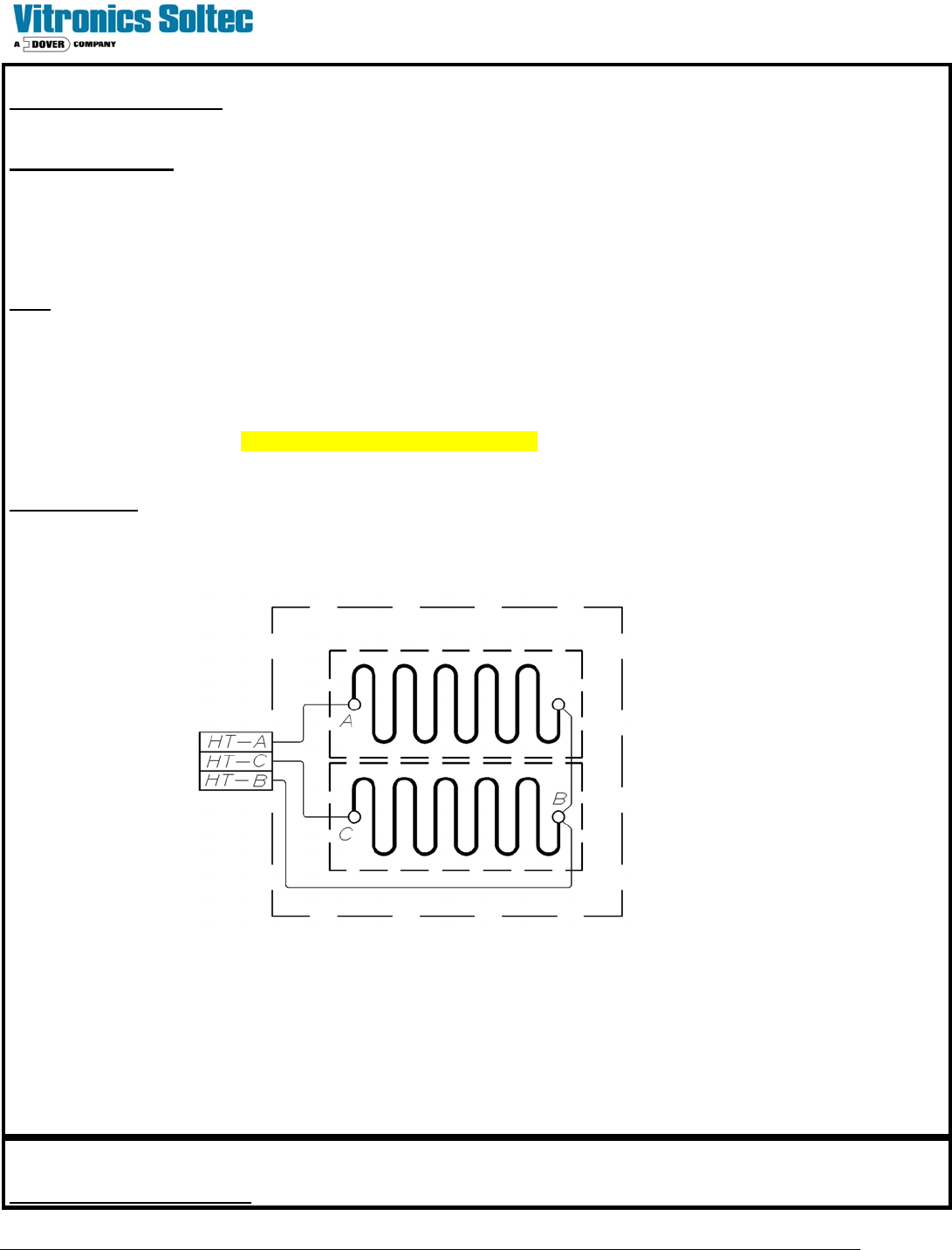
The diagram below represents a heater assembly within a Cell.
If the heater assembly does not resistance check close to the listed values, (or, if any measurement shows “open”), the
heater assembly must be replaced. Resistance values vary slightly between heaters in Air and Nitrogen Ovens.
To replace a heater assembly, refer to “Heater Remove / Replace Procedures”.
EXCESSIVE EXHAUST FLOW
13
Technical Service Manual 29 Revision Date: August 2004
One (or more) Cells is indicating an under temperature condition where the temperature rises, but does
not reach set point. Excessive factory exhaust flow is a possibility.
POSSIBLE CAUSES
If the factory exhaust flow is much too high, then the oven will lose large amounts of heated gas while trying to heat up to
“Process Ready”. Because of this, the oven can only raise the internal temperature to some level lower than the set
point. Throttling the factory exhaust flow will reduce the cooling effect of cold air infiltration to the oven and allow it to
come up to setpoint temperature.
HINT: Check actual exhaust rate and compare it to the recommended exhaust rate in the Site Preparation Manual.
EXCESSIVE AIR ENTERING THE OVEN
One (or more) Cells is indicating an under-temperature condition in which the temperature rises
but does not reach set point. Too much cool air entering the oven is a possibility.
POSSIBLE CAUSES
This condition may be caused two different ways:
1) Incorrect ICB settings. The ICBs must be properly adjusted to bias the airflow correctly on both ends of the oven.
This may mean air coming slightly into the oven at the ends, but not an excessive amount (ICBs can be adjusted to
expel a small amount of air). Whichever setup is selected, it must be correct for the oven and application.
2) Other external sources of cool air are always a possibility. For example, a large fan or room air conditioning blowing
cool air towards the oven opening.
(ICB = Inter Cell Baffle)
LOOSE WIRE
A Cell indicates an under temperature condition where the temperature rises but does not reach set point.
A loose or open conductor supplying electrical power to the heater may cause this condition.
POSSIBLE CAUSES
The heaters all have four connections for AC voltage and ground INSIDE the cell. Any of the four could be loose. The
conductors supplying the heaters run from the circuit breakers to the SSRs, out of the electrical panel, across the 'tops' of
the cells to terminal blocks on the Cells.
If this condition occurred after changing a component, check for captured insulation on wires and terminals. Tighten any
loose connection(s) found, then check the operation of the oven
16
14
15