00197457-01_IM_EDM_2.2_en.pdf - 第16页
EDM V2.2 / I nstal lation M anual 10/2013 Edit ion 16 4.7 File S ystem F older S truc ture By defaul t, the EDM Setup creates the follo wing sub direc tories on th e com puter's file s ystem . 4.7.1 Standard Install…
EDM V2.2 / Installation Manual 10/2013 Edition
15
4.5 Installing EDM Control Tool
If you connect to the Line Server and edit the SIPLACE Pro data from any client, the change dialog
box only appears on the remote client if you have also installed the EDM Control Tool on this
remote client.
► Select EDM Control Tool from the Custom Setup dialog.
The program gets installed automatically.
4.6 Finishing the Installation
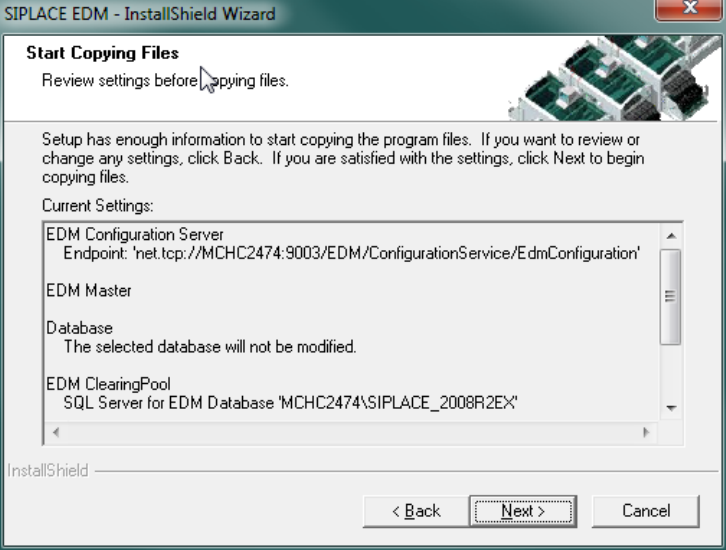
Preparation for the installation is now complete, the files for SIPLACE EDM can be copied and the
configuration can be carried out. The screen below shows a summary of the activities that need to
be carried out for installing a Master Server.
Figure 4-8: Finishing the installation
Depending on the selected options, some configuration dialogs are presented during the last steps
of the setup program:
► On installing a Configuration Server, the Basic EDM Settings dialog (see section 6.2.1.1) is
displayed.
► If no Configuration Server has been installed on the current computer, the Setup tool displays
the Change Line Settings dialog (see section 6.2.1.2).
EDM V2.2 / Installation Manual 10/2013 Edition
16
4.7 File System Folder Structure
By default, the EDM Setup creates the following subdirectories on the computer's file system.
4.7.1 Standard Installation Path
Default value: "%ProgramFiles%\SIPLACE\SIPLACE EDM"
This path points to the installation directories of the EDM files that are considered read-only during
"normal" operation. During installation, the user has the possibility to change this path to another
location (the actual EDM Installation folder can be determined by examining the registry value of:
"HKEY_LOCAL_MACHINE\SOFTWARE\Wow6432Node\Siemens SIPLACE\EDM\SetupLog\CurrentVersion\Path")
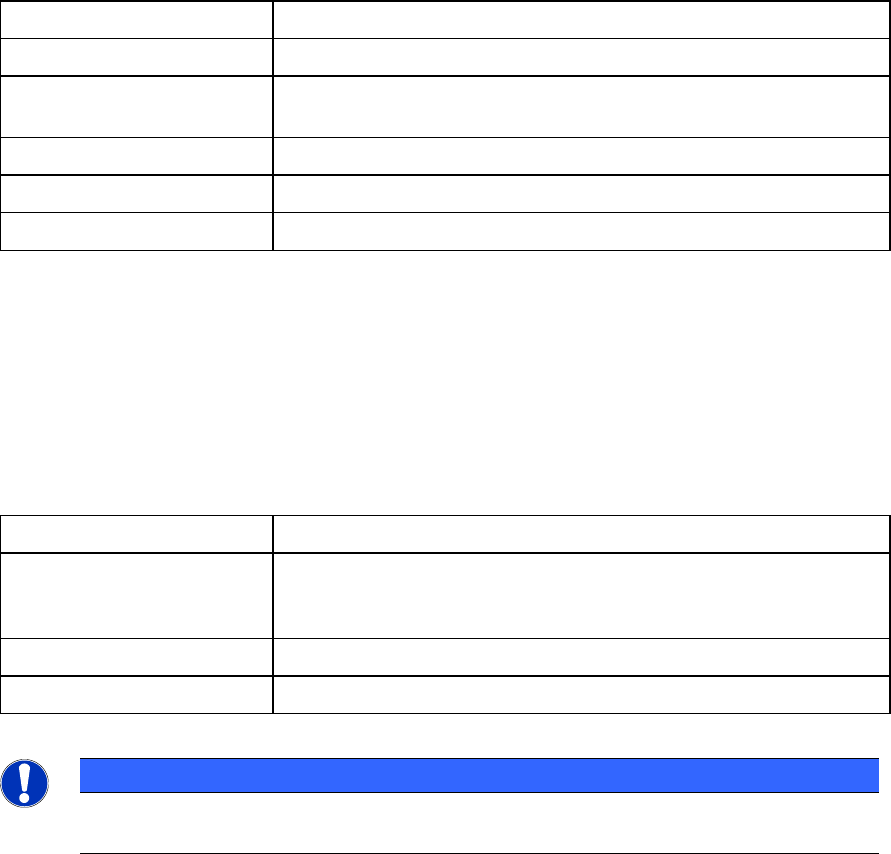
Folder Contents
SIPLACE EDM Applications and libraries
Database Database for change notifications and Clearing Pool
(Master Server only )
DBScripts Scripts to create and access the database (Master Server only)
de, en, … Language-dependent resources
help Online documentation
Table 4-1: Folders of the default installation path
4.7.2 EDM Data Path
Default value: "%ProgramData%\SIPLACE\SIPLACE EDM"
This path is the location where SIPLACE EDM puts its variable data and log files. This location can
be changed by modifying the "DataDir" and "ConfigDir" EDM registry settings, see EDM User
Guide.
Folder Contents
config Application configuration, client workflow configuration, filter
configuration, email configuration and logging configuration.
See EDM User Guide for details about the contents of this folder.
logs Log files (for debugging among other things)
config\templateStorage Storage location for application templates
Table 4-2: Folders of the EDM data path
NOTICE
Under Windows XP, the config, templateStorage and logs folders are located under the
standard installation path.
EDM V2.2 / Installation Manual 10/2013 Edition
17
5 Upgrading to the EDM 2.2 Version
This chapter describes which steps you have to attend when upgrading from previous software
versions.
5.1 Conditions / Downward Compatibility
Installing different versions of EDM on Master and Client should be avoided. If different versions of
SIPLACE Pro are used on the EDM Master and the EDM lines, some restrictions apply because
the format of the data transferred depends on the SIPLACE Pro version used. During an upgrade,
the Master Server, all Line Servers and all Clearing Pools must therefore be converted to EDM 2.2
(and thus to SIPLACE Pro 11.1).
EDM 2.2 can use all templates that were created for EDM 1.1 or later, as well as custom workflows
from EDM 1.1 or later.
CAUTION
Please read section Notifications / Rules… in the EDM User Guide (item no.:
[00197458-xx]) before converting any filter from EDM 2.0 or earlier to EDM 2.2.
Existing filter settings on the EDM Master are retained and updated, but it is recommended that
you manually inspect the converted file (it may be that your own custom changes have been
superseded by improvements to the default configuration).
5.2 Simultaneous Upgrade over All Lines
Where possible, production on all the lines to be upgraded should be suspended for the duration of
the upgrade. As soon as all the components have been converted, production can be restarted.
Perform the upgrade operation as follows:
1. Interrupt production on all the lines to be upgraded.
2. Transfer all notifications from the Line Servers to the Master Server.
3. Accept/reject all notifications in the Clearing Pool.
4. Close all EDM applications.
5. Install SIPLACE Pro and then the EDM Master Server (with Configuration Server) on the
Master Server.
6. Install SIPLACE Pro and then EDM Line Server on all lines. After installing an EDM Line
Server, the production on that EDM Line can be resumed immediately.
CAUTION
To avoid all notifications still in the Clearing Pool from being lost, the EDM database
must not be deleted.
7. Resume production.
Simultaneous upgrade across all the lines is to be preferred to a step-by-step upgrade of individual
lines (insofar as this is possible).