00197457-01_IM_EDM_2.2_en.pdf - 第8页
EDM V2.2 / I nstal lation M anual 10/2013 Edit ion 8 W ith some effor t, it is pos sible t o change the conf iguration server loca tion ( s ee EDM Us er Guide ). C AU T I O N Though f easible, it is not recomm ended to r…

EDM V2.2 / Installation Manual 10/2013 Edition
7
3 Preparations
Typically, you should follow these steps to setup a new SIPLACE EDM installation:
1. Prepare each computer to run SIPLACE EDM
► Run the Support Media DVD.
► Define the computers for the different roles of SIPLACE EDM (i.e. Configuration Server,
Master, Clearing Pool or Line).
► Install SIPLACE Pro where it is required (all setup types except the "EDM Tool" standalone
installation type require an instance of the SPI).
► Install SIPLACE OIB where it is required in order to display the Comment dialog on the
station.
► Install the OIB Display Service Viewer on all stations where the Comment dialog shall be
displayed.
2. Install EDM on each computer, opting for the appropriate setup type (see section 5.7).
It is recommended to start with the Configuration Server (e.g. shared with the Master Service)
and continue by installing the Master Server. With running Configuration and Master Services,
continue by setting up the other EDM Client computers.
NOTICE
If you are migrating from an earlier version of EDM to EDM 2.2, please refer to chapter 6
for details of the installation procedure.
3.1 SIPLACE EDM Configuration
3.1.1 General Considerations
SIPLACE EDM uses a dedicated configuration server to manage the settings of all computers that
EDM connects. Before installing SIPLACE EDM, please choose the best-suited location to run the
central configuration server. The configuration server is an essential component, and any computer
to run any EDM component must provide network access to its computer. You may choose one of
these options:
1. Install the central configuration components onto the EDM Master server (which is the
recommended option).
2. Setup a dedicated configuration server computer.
3. Setup a configuration server along with an EDM Client computer. Choose this option only when
upgrading gradually from former EDM versions (before EDM 2.0, see chapter 5 for more
details).

EDM V2.2 / Installation Manual 10/2013 Edition
8
With some effort, it is possible to change the configuration server location (see EDM User Guide).
CAUTION
Though feasible, it is not recommended to run more than one configuration server in an
organizational unit, e.g. within a plant or on line computers connected to the same EDM
Master server (except during an upgrade scenario, see chapter 5
). Otherwise, there is a
high risk to get an inconsistent EDM environment and a poor overview over the EDM
components.
EDM V2.2 / Installation Manual 10/2013 Edition
9
4 Installing the SIPLACE EDM Software
This chapter describes the steps to be followed to install the SIPLACE EDM system components.
NOTICE
If you are migrating from an earlier version of EDM to EDM 2.2, please refer to chapter 6
for details of the installation procedure.
4.1 Starting the Installation
► Run the Setup.Exe program on the installation media.
► Click on the Next button of the dialog box that appears.
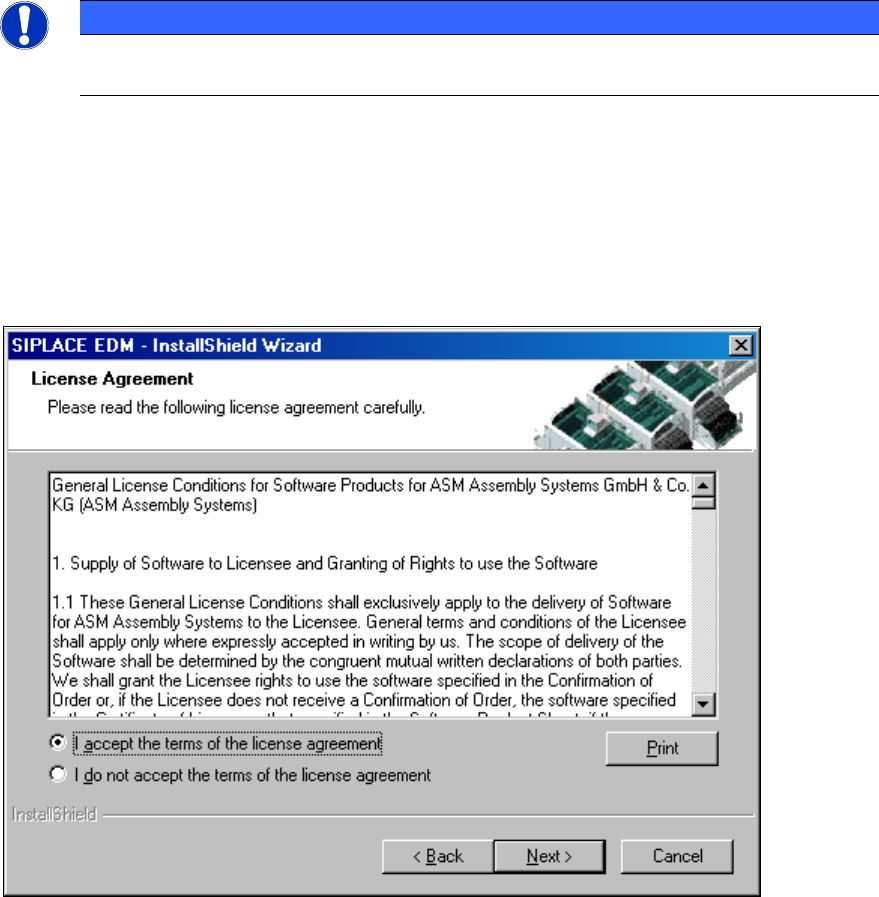
► Read and accept the License Agreement.
Figure 4-1: License agreement
► Click the Next button.
The following dialog box asks you to enter your contact information.
► Enter this information and click the Next button.