1_H24维修手册.pdf - 第122页
E d it io n 5 .0 H 24 H ead R ep ai r T r ai n i n g T ext f o r S er vi ce E n g i n e e r Pro p e r D at a M e asu r em en t 10 .2 E x p l a na t i o n a bout He a d P r o pe r Da t a M e a s ur e m e nt Tool P r es s …
Edition 5.0 H24 Head Repair Training Text for Service Engineer
Proper Data Measurement
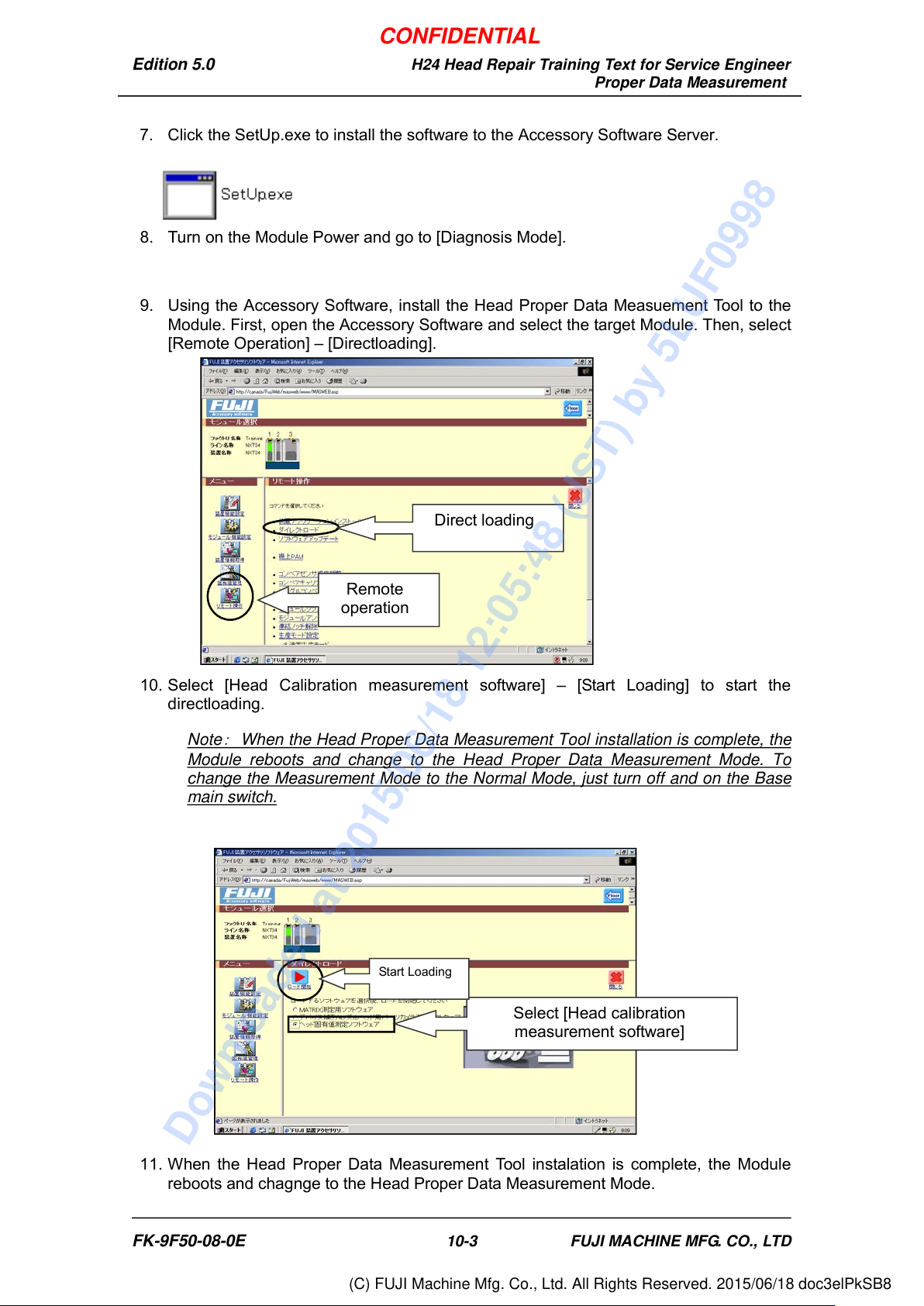
7. Click the SetUp.exe to install the software to the Accessory Software Server.
8. Turn on the Module Power and go to [Diagnosis Mode].
9. Using the Accessory Software, install the Head Proper Data Measuement Tool to the
Module. First, open the Accessory Software and select the target Module. Then, select
[Remote Operation] – [Directloading].
10. Select [Head Calibration measurement software] – [Start Loading] to start the
directloading.
Note
:
When the Head Proper Data Measurement Tool installation is complete, the
Module reboots and change to the Head Proper Data Measurement Mode. To
change the Measurement Mode to the Normal Mode, just turn off and on the Base
main switch.
11. When the Head Proper Data Measurement Tool instalation is complete, the Module
reboots and chagnge to the Head Proper Data Measurement Mode.
Select [Head calibration
measurement software]
Start Loading
Remote
operation
Direct loading
FK-9F50-08-0E 10-3 FUJI MACHINE MFG. CO., LTD
CONFIDENTIAL
Downloaded at 2015/06/18 12:05:48 (JST) by 5LUF0998
(C) FUJI Machine Mfg. Co., Ltd. All Rights Reserved. 2015/06/18 doc3elPkSB8
Edition 5.0 H24 Head Repair Training Text for Service Engineer
Proper Data Measurement
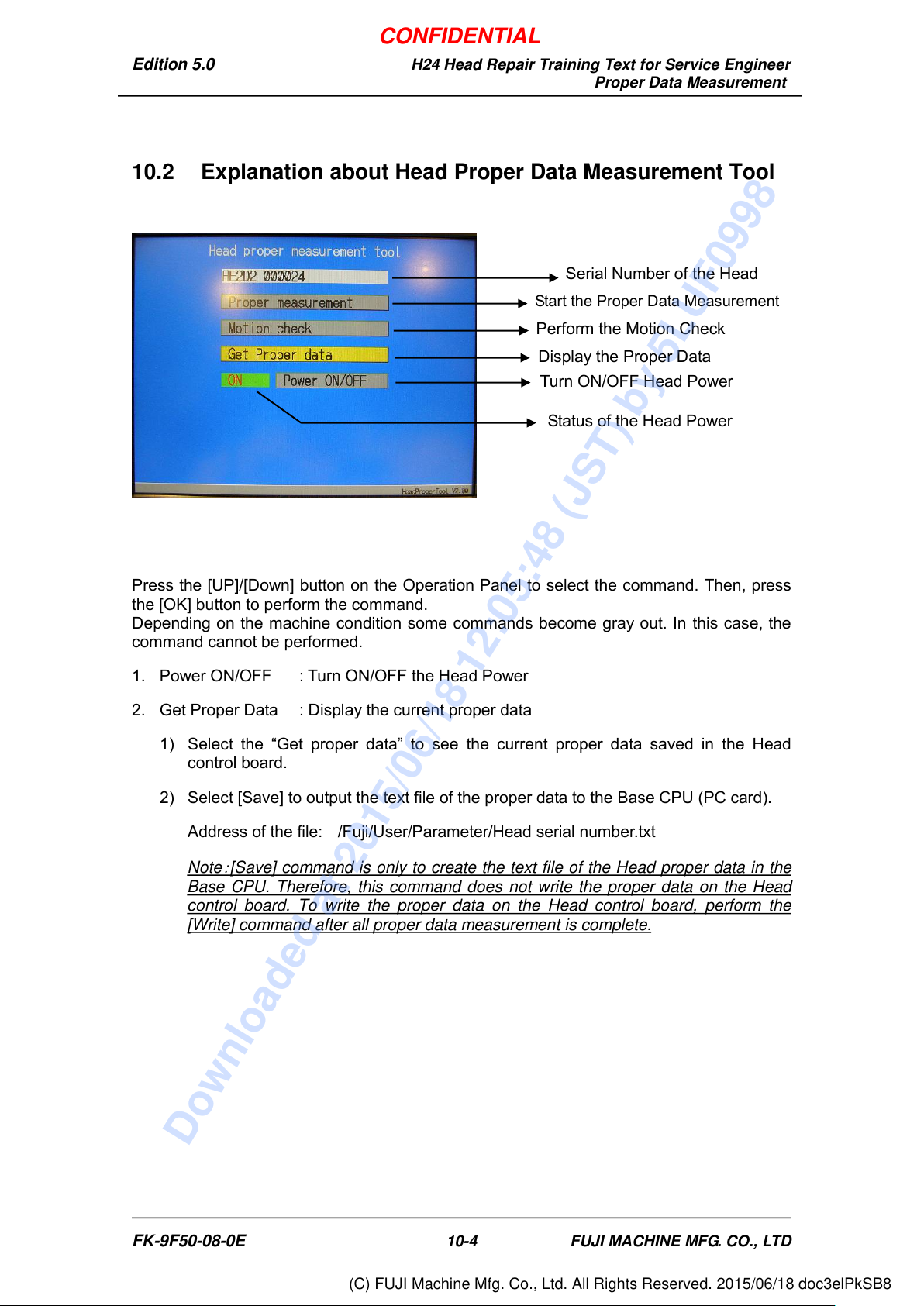
10.2 Explanation about Head Proper Data Measurement Tool
Press the [UP]/[Down] button on the Operation Panel to select the command. Then, press
the [OK] button to perform the command.
Depending on the machine condition some commands become gray out. In this case, the
command cannot be performed.
1. Power ON/OFF : Turn ON/OFF the Head Power
2. Get Proper Data : Display the current proper data
1) Select the “Get proper data” to see the current proper data saved in the Head
control board.
2) Select [Save] to output the text file of the proper data to the Base CPU (PC card).
Address of the file: /Fuji/User/Parameter/Head serial number.txt
Note
:
[Save] command is only to create the text file of the Head proper data in the
Base CPU. Therefore, this command does not write the proper data on the Head
control board. To write the proper data on the Head control board, perform the
[Write] command after all proper data measurement is complete.
Serial Number of the Head
Start the Proper Data Measurement
Perform the Motion Check
Display the Proper Data
Turn ON/OFF Head Power
Status of the Head Power
FK-9F50-08-0E 10-4 FUJI MACHINE MFG. CO., LTD
CONFIDENTIAL
Downloaded at 2015/06/18 12:05:48 (JST) by 5LUF0998
(C) FUJI Machine Mfg. Co., Ltd. All Rights Reserved. 2015/06/18 doc3elPkSB8
Edition 5.0 H24 Head Repair Training Text for Service Engineer
Proper Data Measurement
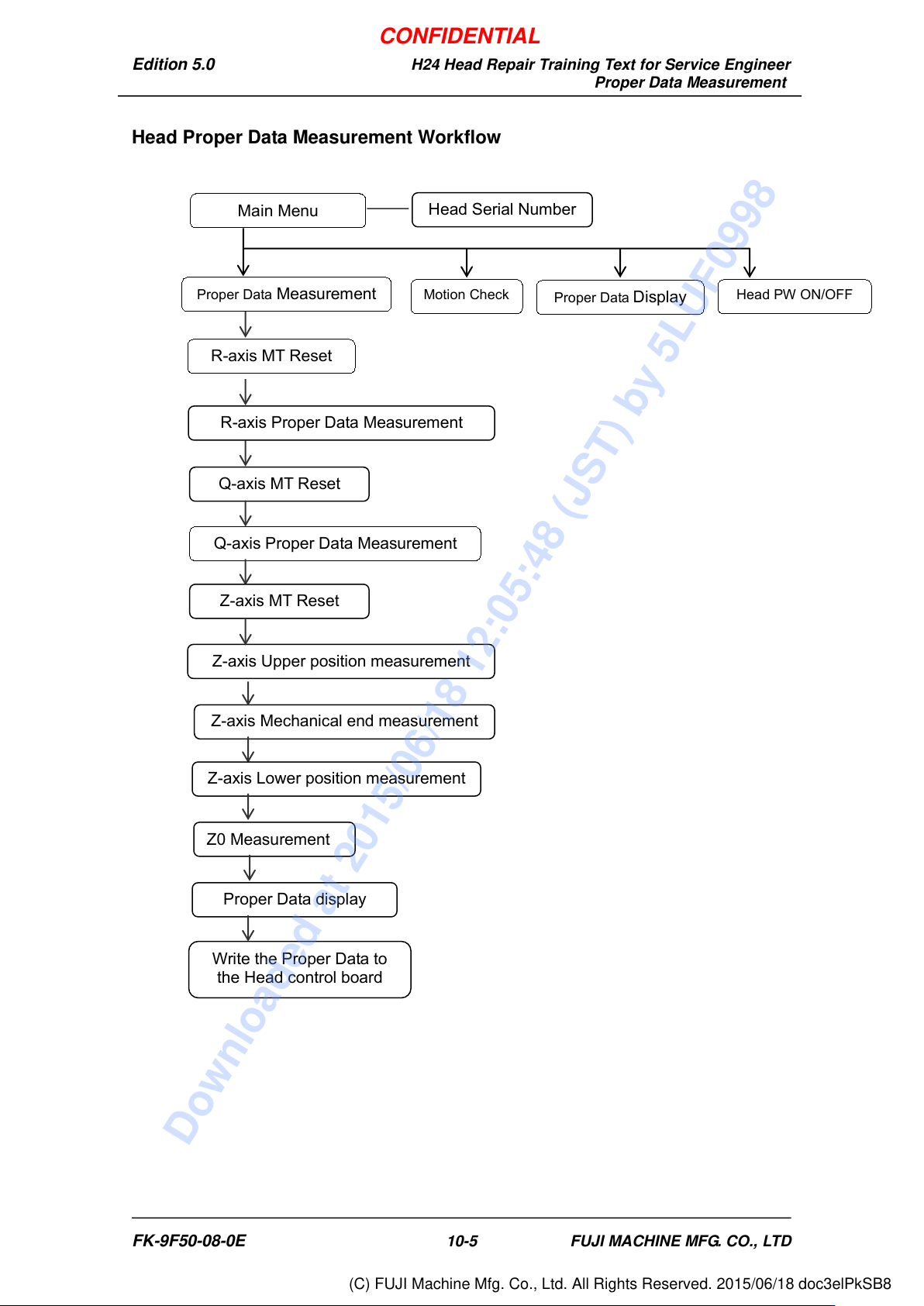
Head Proper Data Measurement Workflow
Main Menu
Head Serial Number
Proper Data Measurement
Motion Check
Proper Data Display
Head PW ON/OFF
Z-axis Mechanical end measurement
R-axis Proper Data Measurement
Q-axis MT Reset
Proper Data display
Write the Proper Data to
the Head control board
R-axis MT Reset
Q-axis Proper Data Measurement
Z-axis Upper position measurement
Z-axis MT Reset
Z-axis Lower position measurement
Z0 Measurement
FK-9F50-08-0E 10-5 FUJI MACHINE MFG. CO., LTD
CONFIDENTIAL
Downloaded at 2015/06/18 12:05:48 (JST) by 5LUF0998
(C) FUJI Machine Mfg. Co., Ltd. All Rights Reserved. 2015/06/18 doc3elPkSB8