1_H24维修手册.pdf - 第197页
E d i ti o n 5 .0 H 24 H ead R ep ai r T r ai n i n g T ext f o r S er vi ce E n g i n e e r s I PS C a m e r a p o s i ti o n a d j u s tm e n t fo r H 2 4 h e a d u s i n g h e a d b e n c h 2 . 4 Conf i gur a t i on S…
Edition 5.0 H24 Head Repair Training Text for Service Engineers
IPS Camera position adjustment for H24 head using head bench
2.3 Component names and explanation of the adjustment
modes
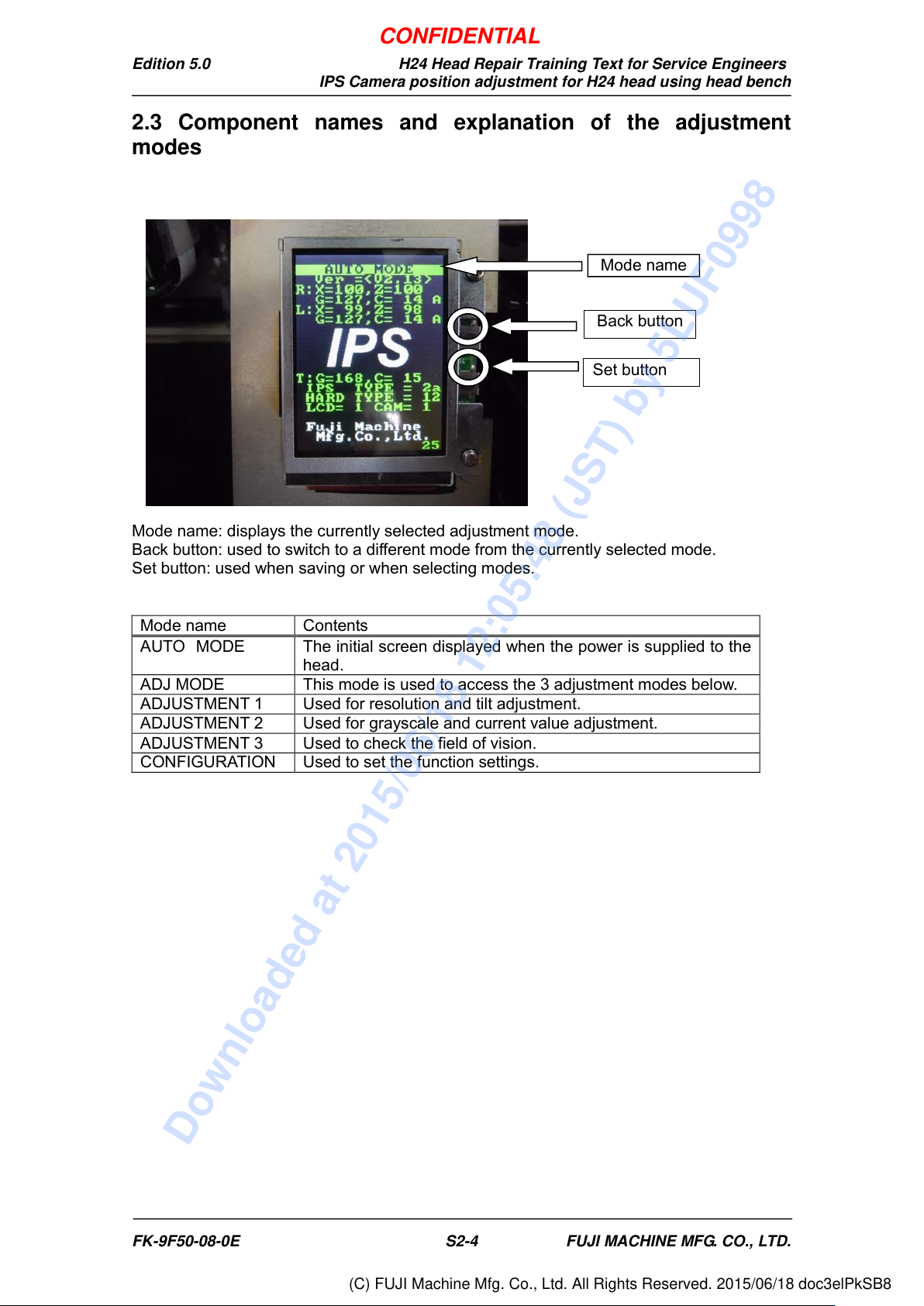
Mode name: displays the currently selected adjustment mode.
Back button: used to switch to a different mode from the currently selected mode.
Set button: used when saving or when selecting modes.
Mode name
Contents
AUTO MODE
The initial screen displayed when the power is supplied to the
head.
ADJ MODE
This mode is used to access the 3 adjustment modes below.
ADJUSTMENT 1
Used for resolution and tilt adjustment.
ADJUSTMENT 2
Used for grayscale and current value adjustment.
ADJUSTMENT 3
Used to check the field of vision.
CONFIGURATION
Used to set the function settings.
Back button
Set button
Mode name
FK-9F50-08-0E S2-4 FUJI MACHINE MFG. CO., LTD.
CONFIDENTIAL
Downloaded at 2015/06/18 12:05:48 (JST) by 5LUF0998
(C) FUJI Machine Mfg. Co., Ltd. All Rights Reserved. 2015/06/18 doc3elPkSB8
Edition 5.0 H24 Head Repair Training Text for Service Engineers
IPS Camera position adjustment for H24 head using head bench
2.4 Configuration Settings
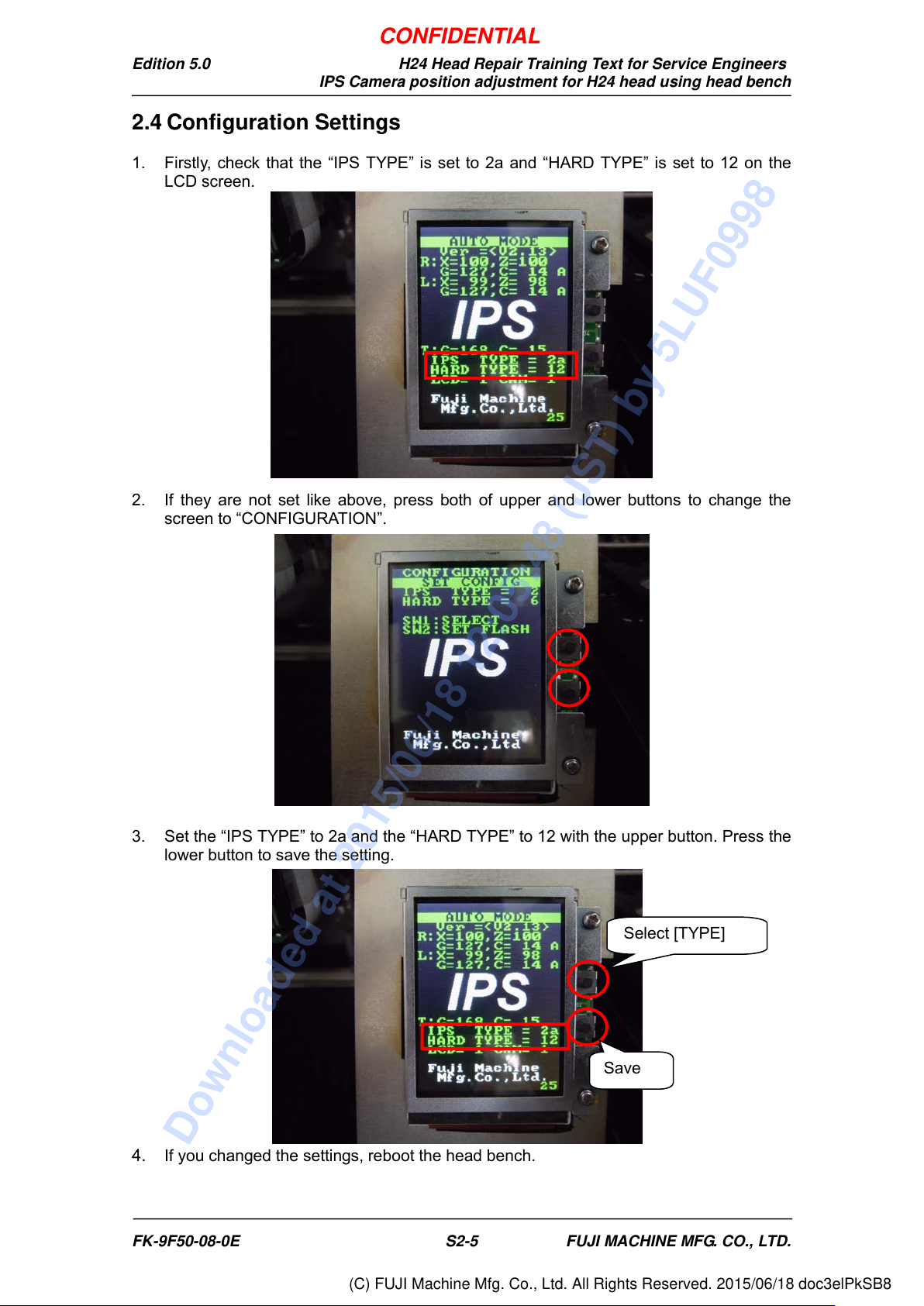
1. Firstly, check that the “IPS TYPE” is set to 2a and “HARD TYPE” is set to 12 on the
LCD screen.
2. If they are not set like above, press both of upper and lower buttons to change the
screen to “CONFIGURATION”.
3. Set the “IPS TYPE” to 2a and the “HARD TYPE” to 12 with the upper button. Press the
lower button to save the setting.
4. If you changed the settings, reboot the head bench.
Select [TYPE]
Save
FK-9F50-08-0E S2-5 FUJI MACHINE MFG. CO., LTD.
CONFIDENTIAL
Downloaded at 2015/06/18 12:05:48 (JST) by 5LUF0998
(C) FUJI Machine Mfg. Co., Ltd. All Rights Reserved. 2015/06/18 doc3elPkSB8
Edition 5.0 H24 Head Repair Training Text for Service Engineers
IPS Camera position adjustment for H24 head using head bench
2.5 Adjusting the Camera Installation Position
1. Move the R axis so that the A-holder faces the front side of the head. (Move manually
or enter the value in Move (absolute pos.), and then click >>.
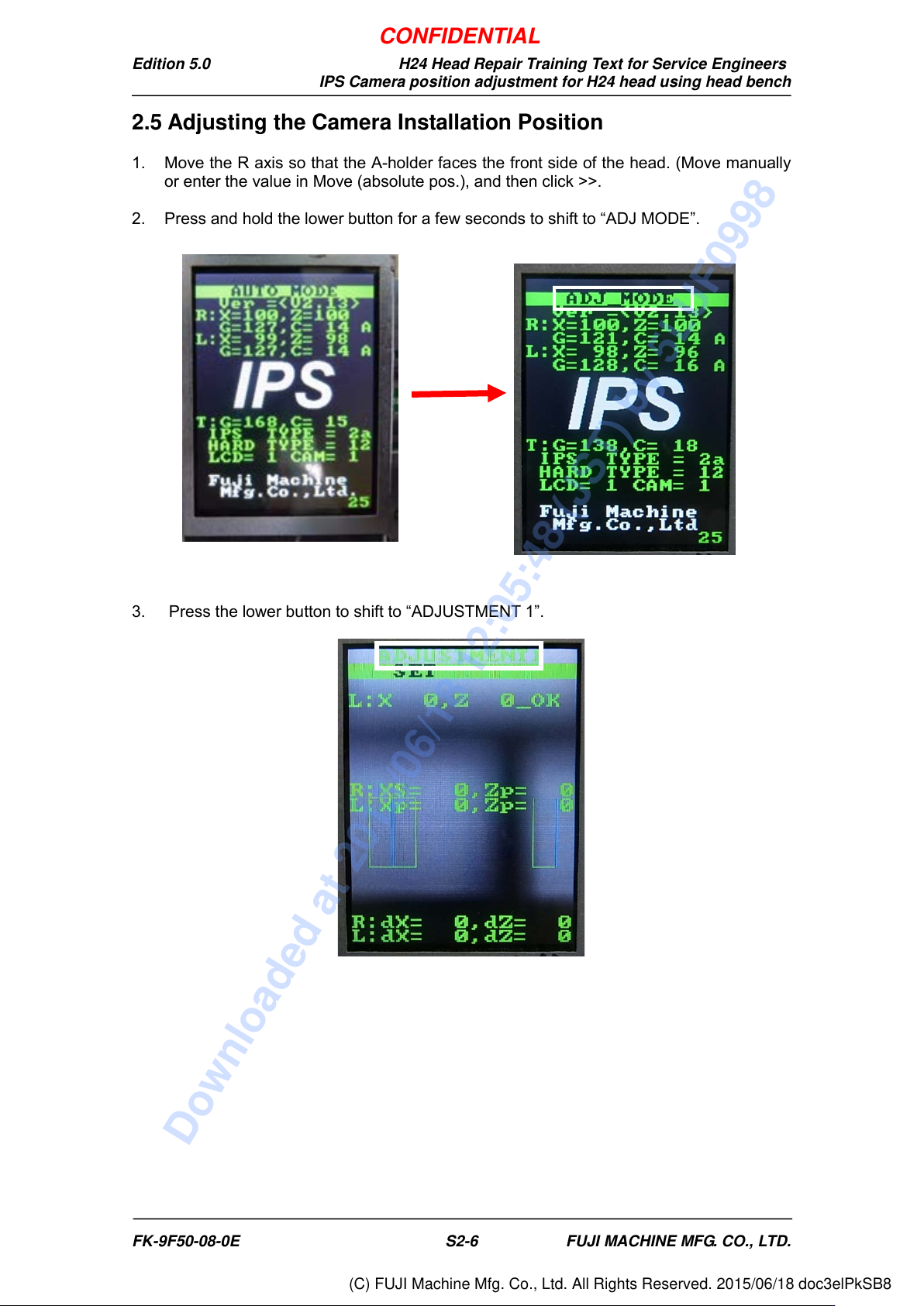
2. Press and hold the lower button for a few seconds to shift to “ADJ MODE”.
3. Press the lower button to shift to “ADJUSTMENT 1”.
FK-9F50-08-0E S2-6 FUJI MACHINE MFG. CO., LTD.
CONFIDENTIAL
Downloaded at 2015/06/18 12:05:48 (JST) by 5LUF0998
(C) FUJI Machine Mfg. Co., Ltd. All Rights Reserved. 2015/06/18 doc3elPkSB8