1_H24维修手册.pdf - 第202页
E d i ti o n 5 . 0 H 24 H ead R ep ai r T r ai n i n g T ext f o r S er vi ce E n g i n e e r s I PS C a m e r a p o s i ti o n a d j u s tm e n t fo r H 2 4 h e a d u s i n g h e a d b e n c h 3. B l oc k t he r i ght -…
Edition 5.0 H24 Head Repair Training Text for Service Engineers
IPS Camera position adjustment for H24 head using head bench
2.6 Adjusting the Current Value (Grayscale Value)
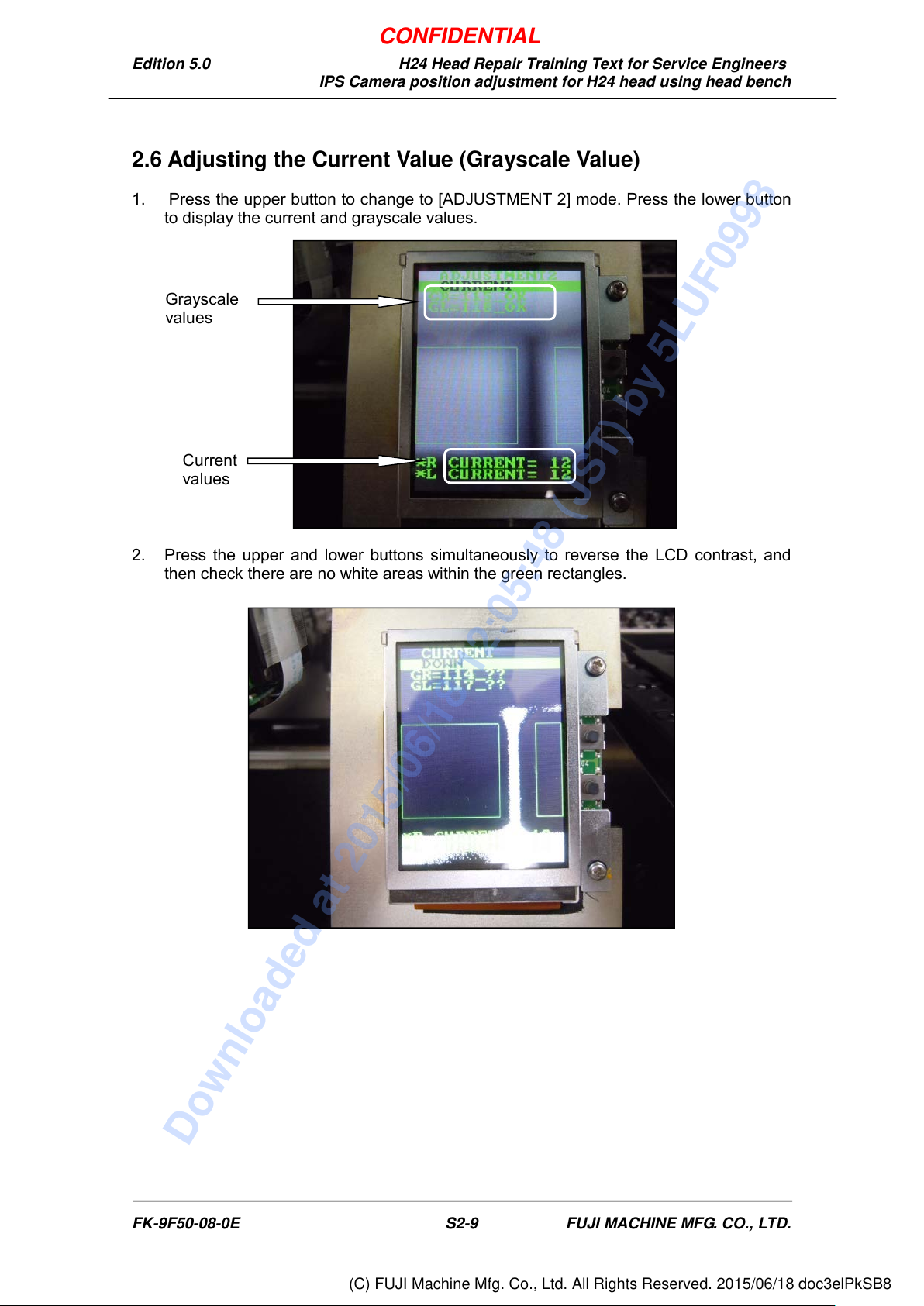
1. Press the upper button to change to [ADJUSTMENT 2] mode. Press the lower button
to display the current and grayscale values.
2. Press the upper and lower buttons simultaneously to reverse the LCD contrast, and
then check there are no white areas within the green rectangles.
Grayscale
values
Current
values
FK-9F50-08-0E S2-9 FUJI MACHINE MFG. CO., LTD.
CONFIDENTIAL
Downloaded at 2015/06/18 12:05:48 (JST) by 5LUF0998
(C) FUJI Machine Mfg. Co., Ltd. All Rights Reserved. 2015/06/18 doc3elPkSB8
Edition 5.0 H24 Head Repair Training Text for Service Engineers
IPS Camera position adjustment for H24 head using head bench
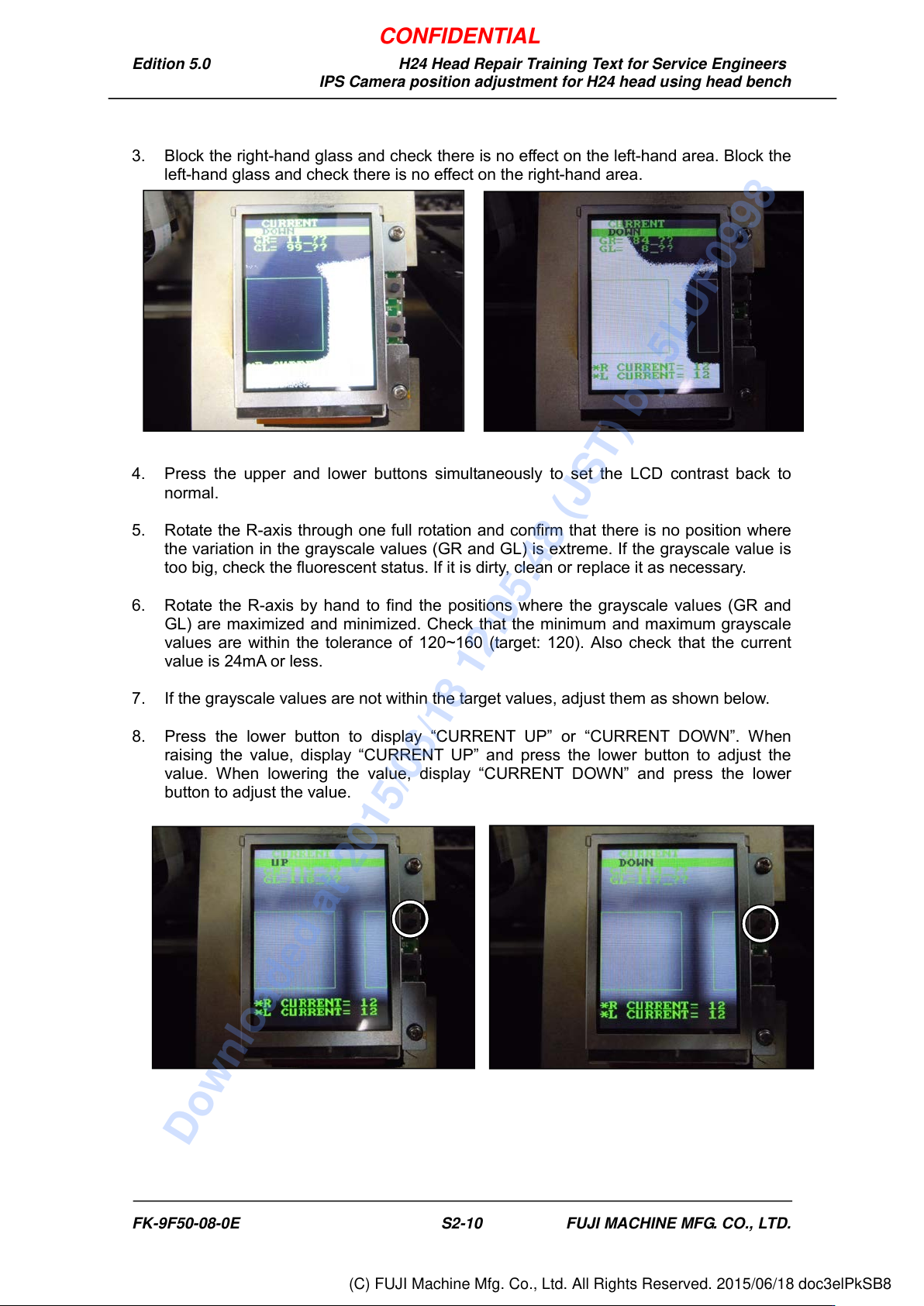
3. Block the right-hand glass and check there is no effect on the left-hand area. Block the
left-hand glass and check there is no effect on the right-hand area.
4. Press the upper and lower buttons simultaneously to set the LCD contrast back to
normal.
5. Rotate the R-axis through one full rotation and confirm that there is no position where
the variation in the grayscale values (GR and GL) is extreme. If the grayscale value is
too big, check the fluorescent status. If it is dirty, clean or replace it as necessary.
6. Rotate the R-axis by hand to find the positions where the grayscale values (GR and
GL) are maximized and minimized. Check that the minimum and maximum grayscale
values are within the tolerance of 120~160 (target: 120). Also check that the current
value is 24mA or less.
7. If the grayscale values are not within the target values, adjust them as shown below.
8. Press the lower button to display “CURRENT UP” or “CURRENT DOWN”. When
raising the value, display “CURRENT UP” and press the lower button to adjust the
value. When lowering the value, display “CURRENT DOWN” and press the lower
button to adjust the value.
FK-9F50-08-0E S2-10 FUJI MACHINE MFG. CO., LTD.
CONFIDENTIAL
Downloaded at 2015/06/18 12:05:48 (JST) by 5LUF0998
(C) FUJI Machine Mfg. Co., Ltd. All Rights Reserved. 2015/06/18 doc3elPkSB8
Edition 5.0 H24 Head Repair Training Text for Service Engineers
IPS Camera position adjustment for H24 head using head bench
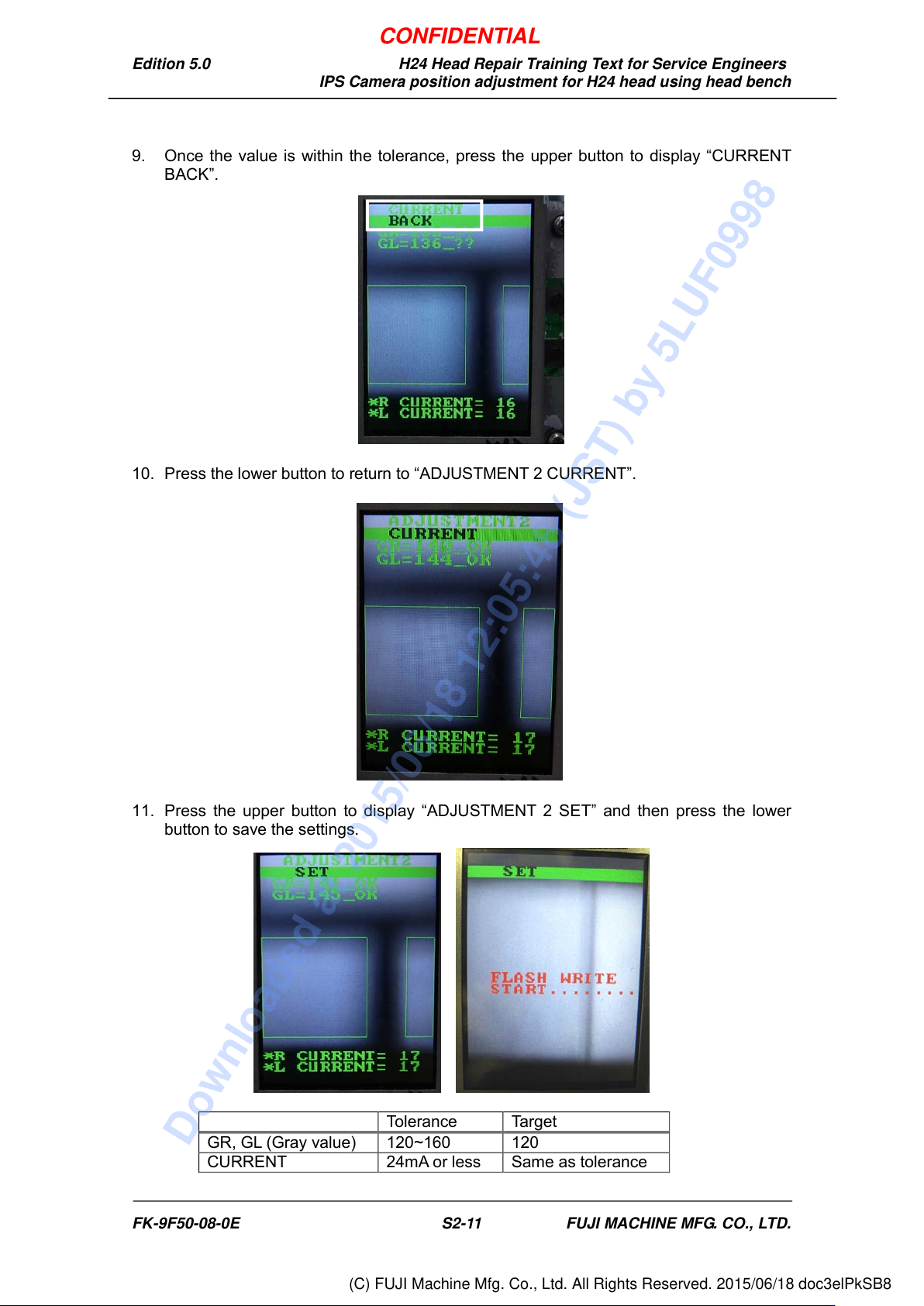
9. Once the value is within the tolerance, press the upper button to display “CURRENT
BACK”.
10. Press the lower button to return to “ADJUSTMENT 2 CURRENT”.
11. Press the upper button to display “ADJUSTMENT 2 SET” and then press the lower
button to save the settings.
Tolerance
Target
GR, GL (Gray value)
120~160
120
CURRENT
24mA or less
Same as tolerance
FK-9F50-08-0E S2-11 FUJI MACHINE MFG. CO., LTD.
CONFIDENTIAL
Downloaded at 2015/06/18 12:05:48 (JST) by 5LUF0998
(C) FUJI Machine Mfg. Co., Ltd. All Rights Reserved. 2015/06/18 doc3elPkSB8