1_H24维修手册.pdf - 第212页
E d i ti o n 5 . 0 H 24 H ead R ep ai r T r ai n i n g T ext f o r S er vi ce E n g i n e e r s I PS C a m e r a p o s i ti o n a d j u s tm e n t fo r H 2 4 h e a d u s i n g h e a d b e n c h 3. P r es s t he u pper b …
Edition 5.0 H24 Head Repair Training Text for Service Engineers
IPS Camera position adjustment for H24 head using head bench
2.9 Checking the Nozzle Existence Field of Vision
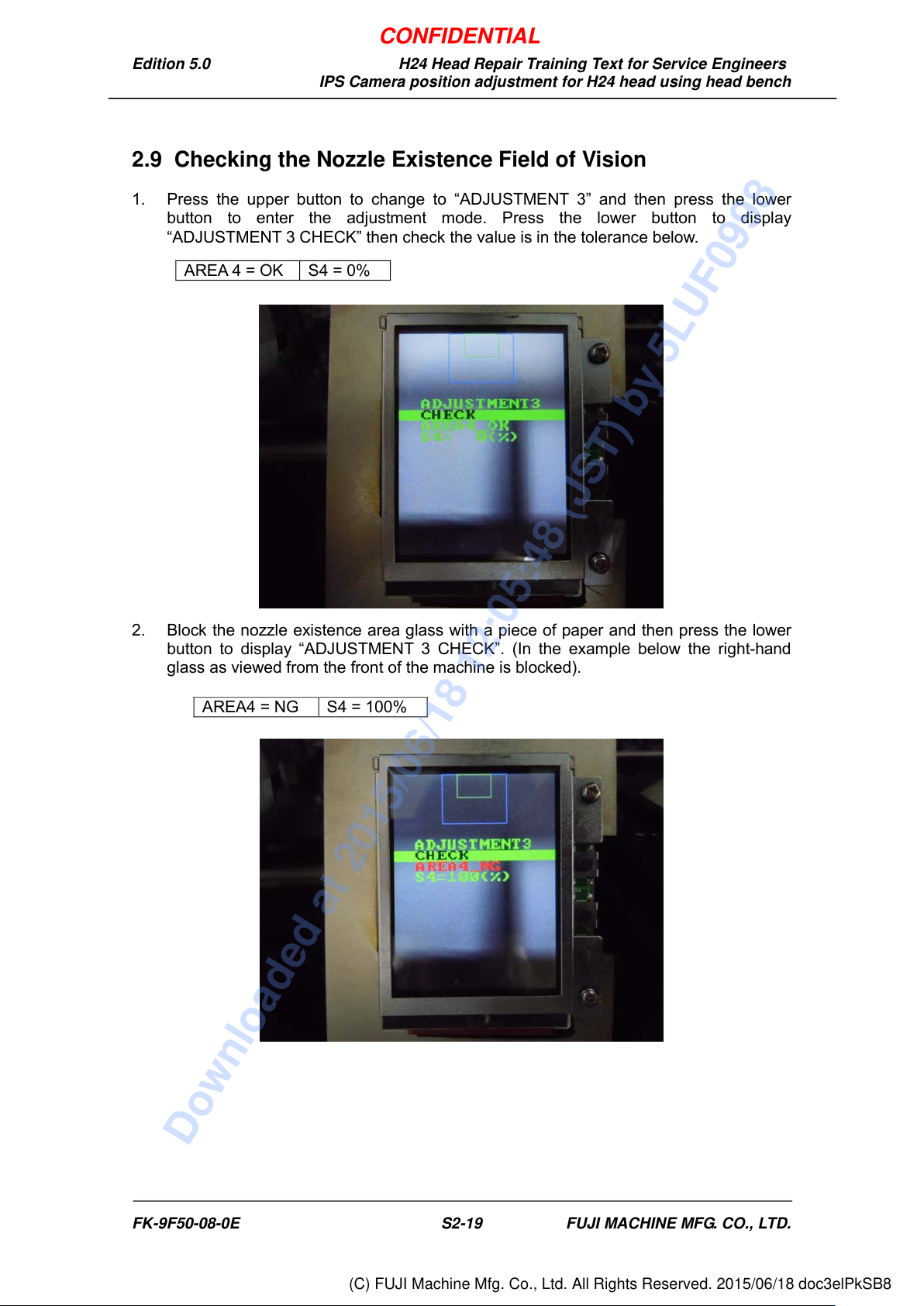
1. Press the upper button to change to “ADJUSTMENT 3” and then press the lower
button to enter the adjustment mode. Press the lower button to display
“ADJUSTMENT 3 CHECK” then check the value is in the tolerance below.
2. Block the nozzle existence area glass with a piece of paper and then press the lower
button to display “ADJUSTMENT 3 CHECK”. (In the example below the right-hand
glass as viewed from the front of the machine is blocked).
AREA 4 = OK
S4 = 0%
AREA4 = NG
S4 = 100%
FK-9F50-08-0E S2-19 FUJI MACHINE MFG. CO., LTD.
CONFIDENTIAL
Downloaded at 2015/06/18 12:05:48 (JST) by 5LUF0998
(C) FUJI Machine Mfg. Co., Ltd. All Rights Reserved. 2015/06/18 doc3elPkSB8
Edition 5.0 H24 Head Repair Training Text for Service Engineers
IPS Camera position adjustment for H24 head using head bench
3. Press the upper button to display “ADJUSTMENT 3 BACK”.
4. Press the lower button to display “ADJUSTMENT 2 CURRENT”.
5. Press the upper button to display “ADJUSTMENT 2 SET”.
6. Press the upper button to display “ADJUSTMENT 2, ADJUSTMENT 3”.
7. Press the upper button to display “ADJUSTMENT 2, BACK”.
8. Press the lower button to display “ADJUSTMENT 1 SET”.
9. Press the upper button to display “ADJUSTMENT 1 ADJUSTMENT 2”.
10. Press the upper button to display “ADJUSTMENT 1 BACK”.
11. Press the lower button to display “ADJ MODE”.
12. Turn the head bench OFF.
13. Remove the IPS monitor jig.
FK-9F50-08-0E S2-20 FUJI MACHINE MFG. CO., LTD.
CONFIDENTIAL
Downloaded at 2015/06/18 12:05:48 (JST) by 5LUF0998
(C) FUJI Machine Mfg. Co., Ltd. All Rights Reserved. 2015/06/18 doc3elPkSB8
Edition 5.0 H24 Head Repair Training Text for Service Engineers
IPS Camera position adjustment for H24 head using head bench
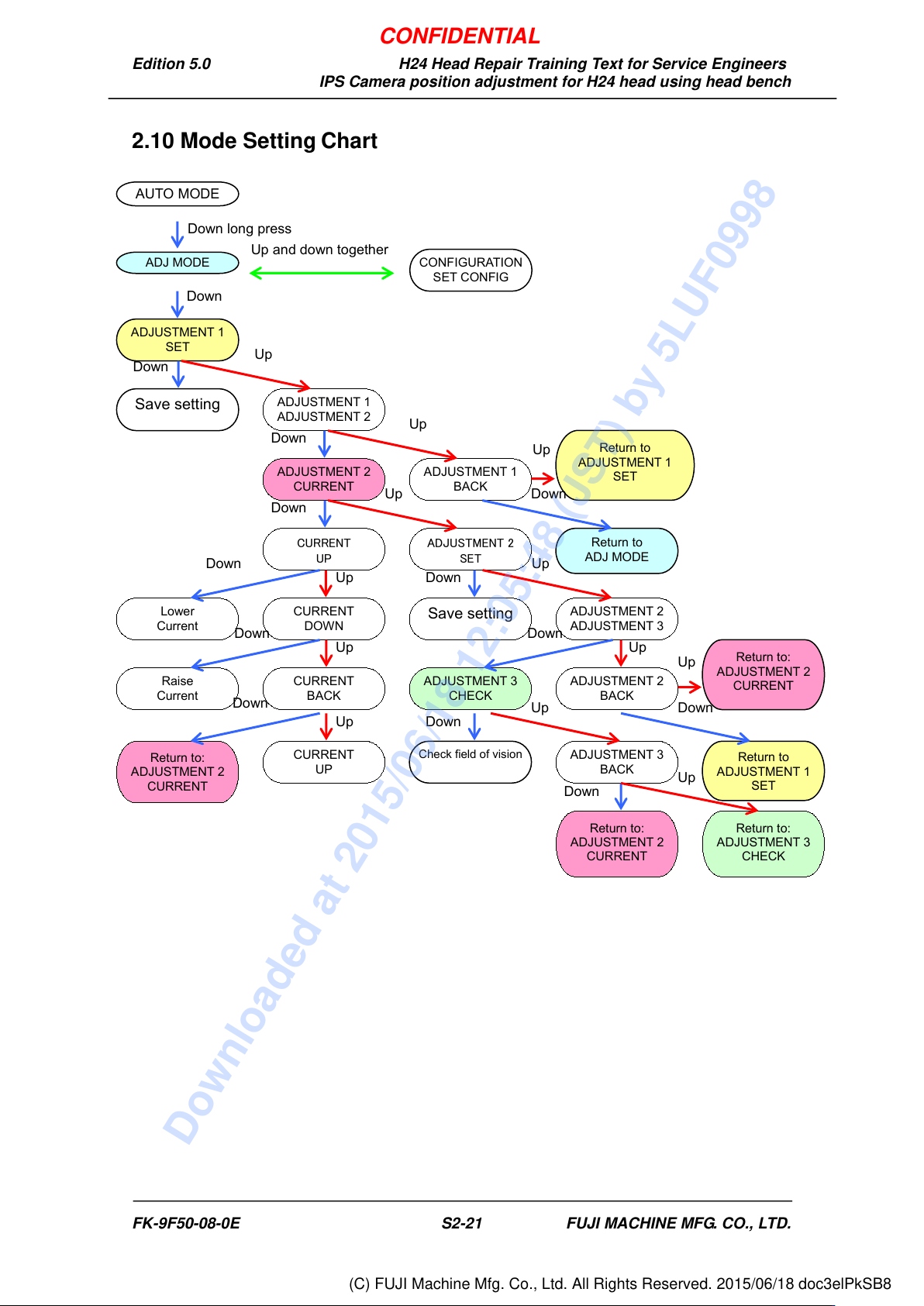
2.10 Mode Setting Chart
ADJUSTMENT 1
ADJUSTMENT 2
ADJUSTMENT 1
BACK
ADJUSTMENT 2
CURRENT
CURRENT
UP
ADJUSTMENT 2
SET
CURRENT
DOWN
Lower
Current
Save setting
ADJUSTMENT 2
ADJUSTMENT 3
Raise
Current
CURRENT
BACK
ADJUSTMENT 3
CHECK
ADJUSTMENT 2
BACK
Return to:
ADJUSTMENT 2
CURRENT
CURRENT
UP
ADJUSTMENT 3
BACK
Return to:
ADJUSTMENT 2
CURRENT
Return to:
ADJUSTMENT 3
CHECK
AUTO MODE
ADJ MODE
ADJUSTMENT 1
SET
Save setting
Check field of vision
Return to
ADJUSTMENT 1
SET
Return to:
ADJUSTMENT 2
CURRENT
Up
Down long press
Down
Down
Down
Up
Up and down together
Up
Up
Up
Up
Up
Up
Up
Up
Up
Down
Down
Down
Down
Down
Down
Down
Down
Down
CONFIGURATION
SET CONFIG
Return to
ADJ MODE
Return to
ADJUSTMENT 1
SET
Up
Down
FK-9F50-08-0E S2-21 FUJI MACHINE MFG. CO., LTD.
CONFIDENTIAL
Downloaded at 2015/06/18 12:05:48 (JST) by 5LUF0998
(C) FUJI Machine Mfg. Co., Ltd. All Rights Reserved. 2015/06/18 doc3elPkSB8