SIPLACE Station Software 7xx to 714 介绍.pdf - 第101页
Station Software 7xx to 714.0 (R20-2) / Feature Description 11/2020 Edition 101 Figure 7- 34 : Periodicall y checking support pin positions Detailed information about Smart Pin Support can be found in the corresponding U…
Station Software 7xx to 714.0 (R20-2) / Feature Description 11/2020 Edition
100
7.34 Automatic Deactivation of the Component Sensor
Compatible mode: Complete
To avoid scattered light, the component sensor of the CPP placement head is automatically
deactivated before the component centering with the stationary camera or the coplanarity
measurement are performed.
7.35 Automatic Deactivation of the Compressed Air
If the compressed air was automatically deactivated for the CPP and C&P20 placement heads in
station software 705, this setting had to be manually deactivated under Settings – Machine
settings, before the embedded software was downloaded to the subsystems.
As of station software 706, this setting is automatically deactivated.
7.36 Automatic Pin Positioning with Smart Pin Support
Compatible mode: Not supported
Smart Pin Support is also supported on the new X3S, X4S and X4Si placement machines. When
Smart Pin Support is used, each gantry must be equipped with a pin picker.
The Auto Configuration has been adjusted to configure the installation location and position of the
pin pickers and the pin magazines correspondingly.
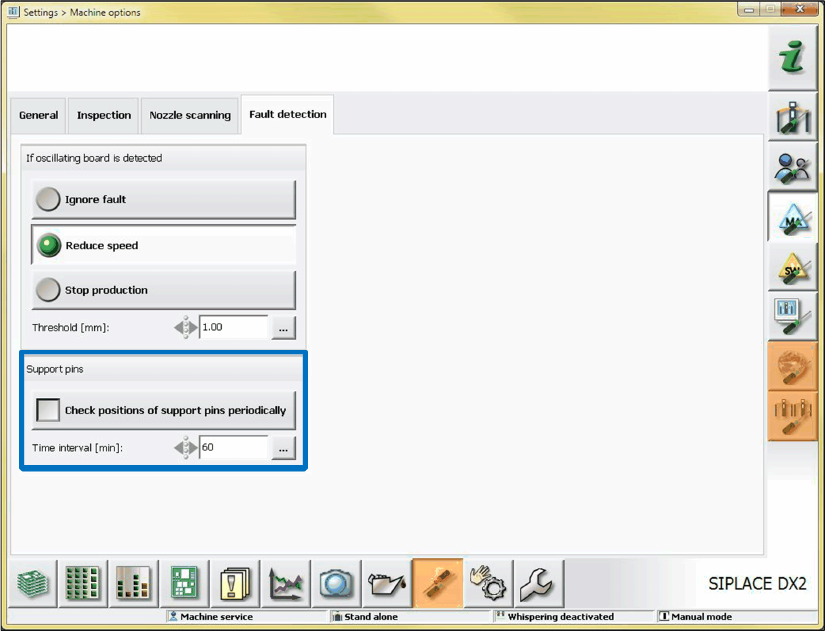
As of this station software version, the support pin positions can be periodically checked. The
setting to enable the check and time interval can be made under Settings – Machine options. If
necessary, the pin positions will be reset automatically.
Station Software 7xx to 714.0 (R20-2) / Feature Description 11/2020 Edition
101
Figure 7-34: Periodically checking support pin positions
Detailed information about Smart Pin Support can be found in the corresponding User Manual, item
no. [00197001-xx], and in the Online Helps for SIPLACE Pro and the station software.
7.37 SIPLACE GlueFeeder Feeder Type
Compatible Mode: Hidden
The station software supports the following new functions for the GlueFeeder feeder type:
– Automatic contamination detection on the jet nozzle
– Displaying an editor on the GUI to edit the process parameters (from XML files). The sets can
be activated, copied, deleted, edited, exported and imported via the GUI.
– Management of different jet nozzle types. In the default XML file at least one default parameter
set is delivered for each jet nozzle type. This set can be copied and modified with the editor.
– After a defined number of shots or after a defined time interval, the jet nozzle must be
maintained. For this, the number of shots is displayed in the Feeder view.
– Improved illumination setting for the glue dot inspection in the Vision system: Components do
not have to be rejected and re-picked anymore when the illumination setting is tested.
Additionally, the system can automatically propose a suitable illumination.
Detailed information about SIPLACE GlueFeeder can be found in the corresponding User Manual,
item no. [00197218-xx], and in the Online Helps for SIPLACE Vision and the station software.
Station Software 7xx to 714.0 (R20-2) / Feature Description 11/2020 Edition
102
7.38 Feeder Parameter Management
The feeder parameter management has been adjusted and improved.
The setting alternatives to change the Feeder parameters (pick-up position, pitch, speed) and the
Position parameters (pickup angle and XY position of the pickup location) are decided by a
combination of handling options and user authorizations at the station.
The features of the new feeder parameter management are explained in the following sections.
7.38.1 Handling Options
Compatible mode: Not supported
The feeder parameter management is realized by three handling options which are set in the
SIPLACE Pro "Line Configuration".
Handling Option 1: Download (DownloadRequired=true, UploadAllowed=false)
The feeder parameters received from SIPLACE Pro are loaded on the feeders.
Default for the Basic production and Advanced Production activity levels:
No feeder parameter and position parameter changes permitted at the station and on the feeders.
Handling Option 2: Download and Upload (DownloadRequired=true,
UploadAllowed=true)
The feeder parameters received from SIPLACE Pro are loaded on the feeders of the active setup.
Default for the Basic production and Advanced Production activity levels:
Feeder parameter and position parameter changes are permitted at the station and on the feeders.
Changed data is uploaded to SIPLACE Pro into the local setup data.
Handling Option 3: No Download or Upload (DownloadRequired=false,
UploadAllowed=false)
The feeder parameters received from SIPLACE Pro are not loaded on the feeders of the active
setup.
Default for the Basic production and Advanced Production activity levels:
Local changes of the feeder parameters and position parameters are permitted at the station and
on the feeders.
7.38.2 Setting and Changing Authorizations
Compatible mode: Not supported
The authorizations for the Basic production and Advanced Produktion activity levels can be set
as of the Machine Service activity level for the three handling options. If necessary, the assigned
activity levels for single or multiple parameters can be changed by selecting the corresponding
button with the right mouse button (please refer to the description in the Version Description for
station software 706.0, item no. [00197043-01]).