SIPLACE Station Software 7xx to 714 介绍.pdf - 第120页
Station Software 7xx to 714.0 (R20-2) / Feature Description 11/2020 Edition 120 Figure 7- 49 : Confirming shutdown The operator must select either the Shut down is regular , or the Shutdo wn is because of an error option…
Station Software 7xx to 714.0 (R20-2) / Feature Description 11/2020 Edition
119
7.46 Requesting Shutdown Reason on the GUI
If the machine reboots unexpectedly, an error event is generated during shutdown. However, with
this event it cannot be detected if the shutdown was scheduled (e.g. for maintenance) or
unscheduled caused by a software or hardware problem.
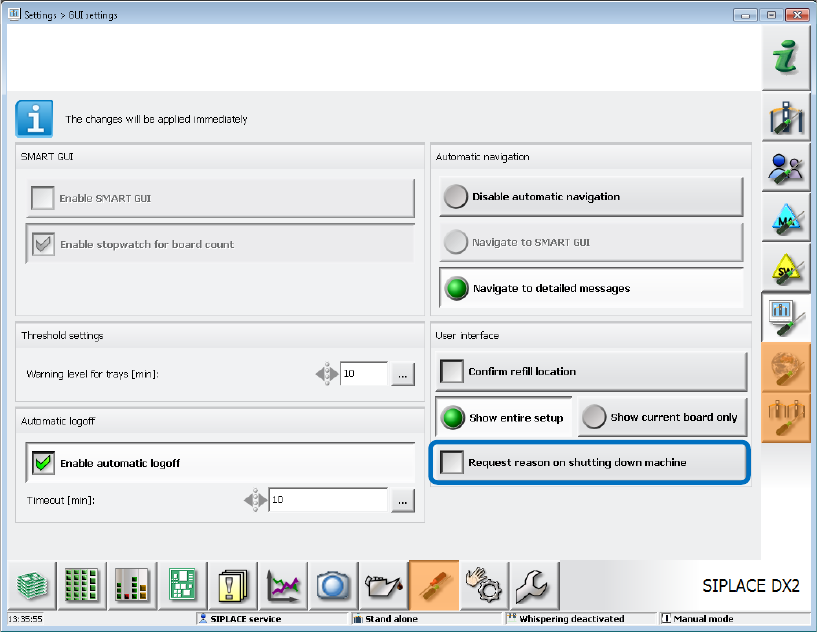
To find out the shutdown reason, a request can be activated under Settings – GUI settings as of
this station software version.
Figure 7-48: Requesting machine shutdown cause
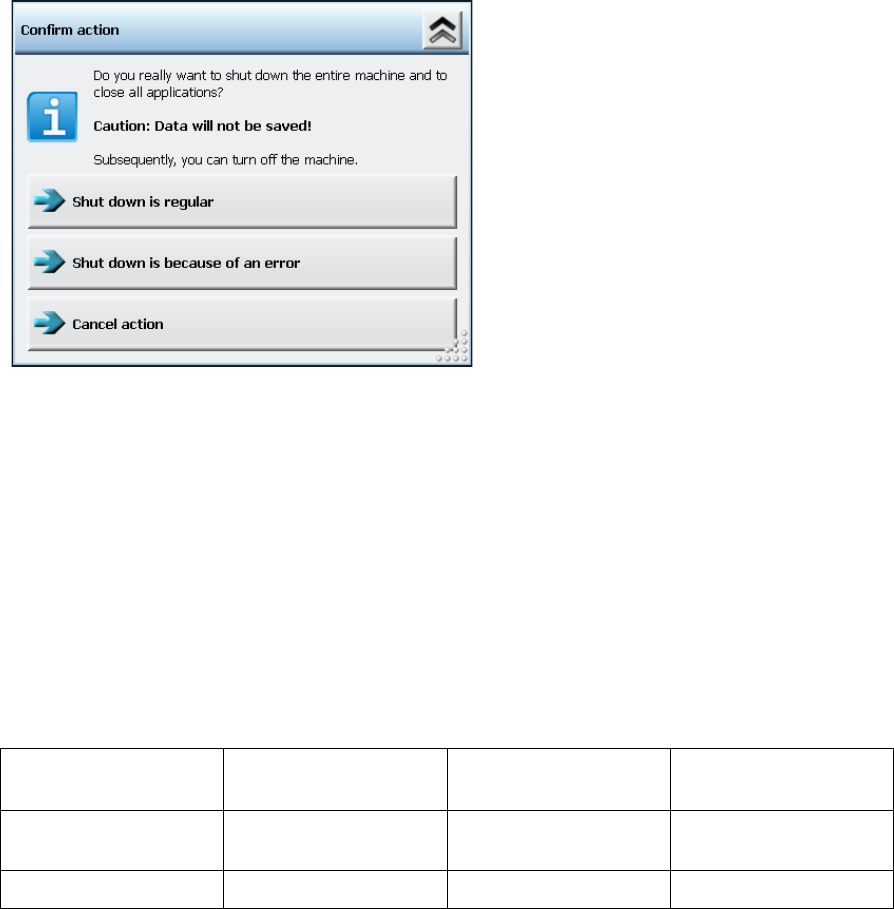
If the Request reason on shutting down machine option is activated, the following dialog is
displayed after the Shut Down button has been clicked.
Station Software 7xx to 714.0 (R20-2) / Feature Description 11/2020 Edition
120
Figure 7-49: Confirming shutdown
The operator must select either the Shutdown is regular, or the Shutdown is because of an
error option. Thereafter, the shutdown will be performed.
If the Shutdown is because of an error option was selected, the station software generates a
new error event that will serve as basis criterion for the decision to perform unscheduled reboots.
This event can be automatically evaluated by tools.
7.47 New Positions for Fixed Rails in SX1/SX2 V2
The following new positions have been implemented for fixed rails in the SX1/SX2 V2 conveyor
system:
Fixed Rail
Fixed Rail Position
PCB Width
Distance of Fixed
Rail
Right/Left
Outer
268
250
286
536
Right/Left
259.7
242
277.2
Table 7-1: Fixed rail positions in SX1/SX2 V2
7.48 Checking Insufficiently Fixed Filter Disks
Some filter disks are not sufficiently fixed on the segments and thus are loosened. Loosened filter
disks may cause placement errors and the suction of small components into the vacuum system of
the placement head.
The fixing of the filter disks can be checked by a blowing off test. A stronger blow pulse that blows
off an insufficiently fixed filter disk is generated in the pressure control valve. The absence of the
filter disk is detected by the component camera of the placement head and a corresponding error
message is displayed.
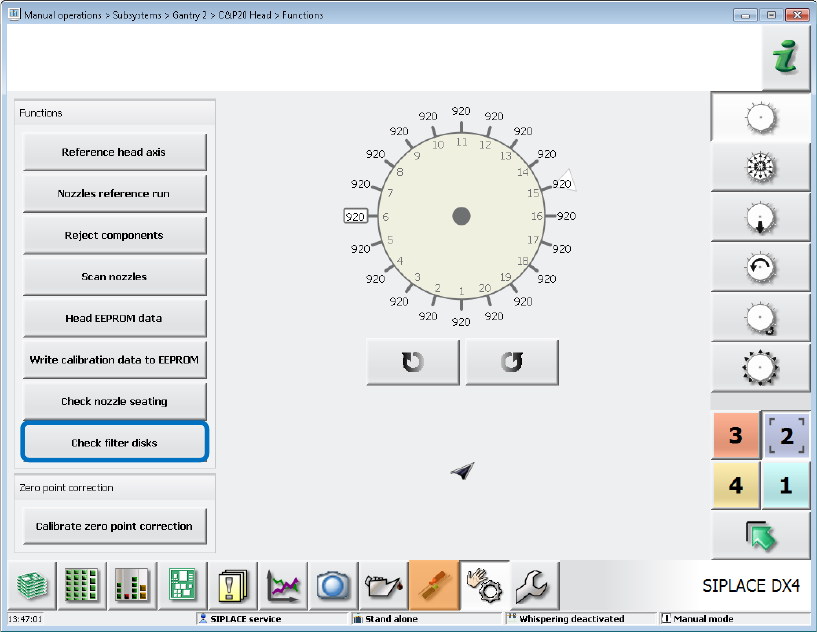
In the station software, this test run can be started in the Manual operations for the placement
heads on the SIPLACE service activity level via the Check filter disks button.
Station Software 7xx to 714.0 (R20-2) / Feature Description 11/2020 Edition
121
Figure 7-50: Checking filter disks
The nozzles must be removed manually before the test run is started. If nozzles are present at the
placement head, the test run will be aborted with an error message.
7.49 Extension of Nozzle Maintenance Intervals by Cyclic Cleaning
Cyclic cleaning of the nozzles can be performed on placement machines with blowing off stations
to extend the nozzle maintenance intervals.
In the overall reference run it will be checked if a nozzle must be cleaned. For this, the new optional
CleanNozzle configuration node is available in the NozzleType.xml file.
As soon as this feature is activated, the CleanNozzle will be performed for all nozzles that must be
cleaned during the overall reference run.