SIPLACE Station Software 7xx to 714 介绍.pdf - 第129页
Station Software 7xx to 714.0 (R20-2) / Feature Description 11/2020 Edition 129 8.7 Teaching Component from Deactiv ated Track A track that has been deact ivated due to an error that may be corrected by the station softw…
Station Software 7xx to 714.0 (R20-2) / Feature Description 11/2020 Edition
128
8.6 SIPLACE X4i S Placement Machine with C&P20 P Placement Head
A new C&P20 P placement head has been introduced. In SIPLACE Pro this placement head is
referred to as C&P20 P 4xxx. Increased placement performance and robustness are achieved with
this placement head. The C&P20 P placement head is supported on the SIPLACE X4i S placement
machine. For this, the SIPLACE X4i S placement machine must be equipped with an MHCU
(Modular Head Control Unit).
The C&P20 P placement head has new DP drives and a new nozzle interface. Therefore, new
nozzles (type 4xxx), new nozzle magazines with 20 garages and a new nozzle changer support are
required. The nozzle magazine has 2 rows with 7 nozzles and 1 row with 6 nozzles. The new
support may also hold the old magazines.
Due to the magazine type enhancement the magazine query has been changed. If a new support
is used no magazine detection is possible anymore. When closing the cover, the safety check will
still be performed (correct magazine height and magazine correctly engaged). An incorrect
magazine type (C&P20 A instead of C&P20 P) will not be detected until a pickup from the
magazine is required. In this case, the machine stops with a Vision error because the magazine
fiducial cannot be found.
The following nozzle types are supported:
– Rubber nozzles: Type 4032-4036; 4133, 4135, 4235
– Ceramic nozzles: Type 4004; 4103, 4105-4109
8.6.1 Vacuum Pump Operation on SIPLACE X4i S
Optionally, two vacuum pumps (1 per placement area) may be operated on the SIPLACE X4i S
placement machine in conjunction with a C&P20 placement head.
In vacuum pump operation two thresholds are defined in SIPLACE Pro that trigger the following
actions if exceeding or falling below the values:
Emergency operation
If the first threshold sent by SIPLACE Pro has been reached, the acceleration of the star axis will
be reduced. Further threshold values may be defined to reduce the acceleration even more.
Additionally, a maximum acceleration reduction may be defined.in the station software.
The acceleration reduction is valid for all travel profiles.
Emergency stop
If the value is below the second threshold sent by SIPLACE Pro, the machine will be stopped, and
no further production is possible.
8.6.2 Temperature Management
If the monitoring detects that the first threshold value has been exceeded a warning is displayed on
the GUI. If the machine still heats and the threshold for the emergency stop has been exceeded,
the machine will be stopped. Once the machine has cooled down sufficiently the placement may be
continued.
Station Software 7xx to 714.0 (R20-2) / Feature Description 11/2020 Edition
129
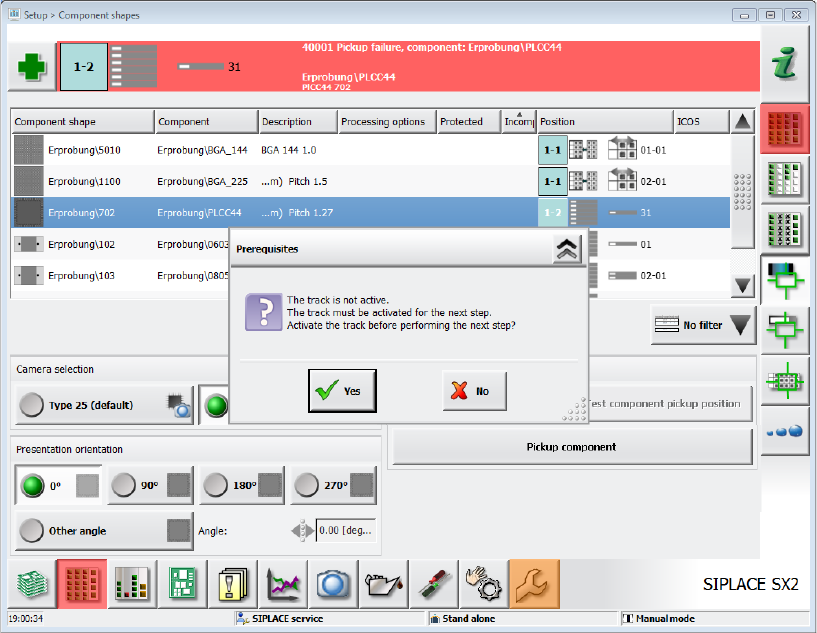
8.7 Teaching Component from Deactivated Track
A track that has been deactivated due to an error that may be corrected by the station software can
be reactivated via the GUI. Thus, it is possible to pick up components from this track without
leaving the GUI menu. Errors that may be corrected automatically by the software are, amongst
others, simple Vision errors, pickup errors or errors caused by a deactivated track in the setup.
Figure 8-4: Activate deactivated track
If the track has been deactivated due to another error, it cannot be activated via the GUI.
8.8 Changing Data without Running Empty
Previously, when data was changed in the setup, the machine always had to be run empty even if
the setup was only slightly changed. I.e. in case that all placement positions could be placed by the
same heads despite of the changes in setup, components or component shapes. For such small
product changes, the machine does not have to run empty when downloading the setup, e.g. in the
following cases:
– Feeder type changed (other reel size, tape feeder → label feeder, label feeder → waffle pack
tray)
– Number of re-picks changed
– Pickup positions, pickup points and tolerance values changed
– Dimensions for component shapes changed
– Acceleration values changed
– Description of a component shape changed in SIPLACE Vision
Depending on the changes in the setup the changes will be effective immediately (= without
running empty) or for the next board (= running empty).
First, the feature must be enabled in SIPLACE Pro.
Station Software 7xx to 714.0 (R20-2) / Feature Description 11/2020 Edition
130
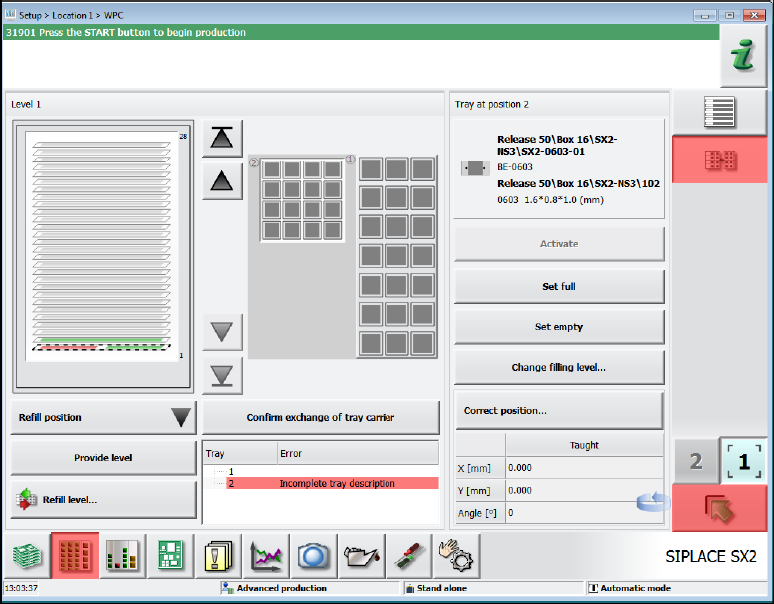
8.9 Editing Incomplete Waffle Pack Tray Descriptions
Waffle pack tray descriptions that are tagged as incomplete in SIPLACE Pro may now be edited at
the station. Waffle pack trays with an incomplete tag must be completed or at least checked at the
station.
However, the machine can place if no components are required from waffle pack trays with
incomplete descriptions. If the machine cannot place (any more) due to an incomplete waffle pack
tray description, the pickup location will be locked, and the waffle pack tray displayed in red in the
setup.
Figure 8-5: Incomplete waffle pack tray description
The Advanced production activity level is required to edit the waffle pack tray descriptions at the
station. If SIPLACE Pro security is enabled, it is also necessary to log in to SIPLACE Pro as an
authorized user.