SIPLACE Station Software 7xx to 714 介绍.pdf - 第136页
Station Software 7xx to 714.0 (R20-2) / Feature Description 11/2020 Edition 136 8.14 Faster Unlocking/Locking of SX Component Changeover T ables Until now, the docking/undocking of a component changeover tabl e could not…
Station Software 7xx to 714.0 (R20-2) / Feature Description 11/2020 Edition
135
8.13 Changing the Feeder Parameters – Enhancements
The feeder parameter change management has been adjusted and improved. The new features
are described in the following sections.
8.13.1 Orientation Check for Components
If the pickup angle was changed for components in a new tape feeder or waffle pack tray and this
is not immediately detected, the components might be placed incorrectly. To avoid such incorrect
placements, it is now possible to check if the orientation of a component is correct or not.
For this purpose, the affected components must be tagged in SIPLACE Pro and the orientation
check enabled. After one of the following cases has occurred, such components cannot be picked
up until the correct pickup angle has been confirmed with the Confirm Pin 1 position button:
– After a new setup has been downloaded
– After recognition of a splice point in the feeder
– After a feeder has been put on a component table
– Continuation after a foil torn
– Exchange of a magazine
An image of the component in the tape pocket and the target position is displayed at the station.
The operator may correct the angular position in error case.
8.13.2 Measuring the Pickup Position before Pickup
For large components, such as connectors, the tolerance for the position within the tape/waffle
pack tray pocket is often high. However, in many cases the pickup range is very small, and this
might lead to high reject rates.
For improved pickup reliability, the component top side can be measured automatically with the
PCB camera before the pickup to determine the exact position of the component within the tape
pocket.
The feature must be enabled for each single component in the Component Editor in SIPLACE Pro.
Then the component position is detected automatically and, if necessary, the pickup position will be
corrected automatically.
8.13.3 Enhanced Measuring Rule for Tape Pockets
Until now, a tape pocket measurement was performed when a tape pocket object was assigned to
a track in SIPLACE Pro or the maximum edge length of the component was <= 1 mm.
This rule has been enhanced so that a tape pocket measurement also will be performed if the
component type is MELF, SOT, SOxx or QFP and the maximum edge length <= 4 mm.
Station Software 7xx to 714.0 (R20-2) / Feature Description 11/2020 Edition
136
8.14 Faster Unlocking/Locking of SX Component Changeover Tables
Until now, the docking/undocking of a component changeover table could not be started on one
side before the docking/undocking of a component changeover table had been performed on the
other side and confirmed by the station software. Meanwhile, the corresponding button on the GUI
was locked.
As of this station software version, there is no waiting for confirmation anymore, the
docking/undocking process can start immediately for the next component changeover table.
8.15 Improved Error Message for Lost Components
The detailed error message for components that got lost on the board has been enhanced by the
following information:
– Component name
– Segment on the placement head
– Nozzle type
– Pickup track
– Placement position
Station Software 7xx to 714.0 (R20-2) / Feature Description 11/2020 Edition
137
8.16 Checking Board Position after Placement
In the station software it can be checked if the board position has been changed during placement.
With this check an additional measurement of each board position (result of the fiducial
measurement) is performed after placement and this measurement is then compared to the original
measured position.
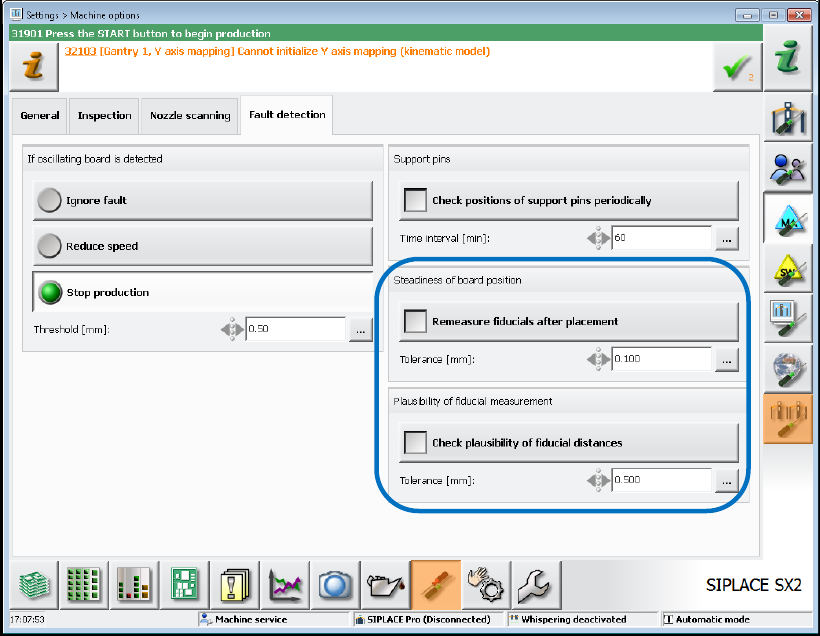
The feature can be enabled / disabled via two new options under Settings – Machine options –
Fault detection.
Figure 8-10: Checking board position after placement
Remeasure fiducials after placement
With this option the two fiducials per board that are placed most distantly from each other will be
measured and compared to their measured values during the first board detection.
If the distance exceeds the set tolerance value (here 0.1 mm) the station software stops with an
error message. The board cannot be released from the processing area until the operator has
confirmed the error.
Check plausibility of fiducial distances
The nominal distances between the fiducials in SIPLACE Pro are compared to their measured
distances. The comparison is performed per panel.
If the difference exceeds the set tolerance value (here 0.5 mm) the machine stops, and the
operator is prompted to teach the fiducials.