SIPLACE Station Software 7xx to 714 介绍.pdf - 第137页
Station Software 7xx to 714.0 (R20-2) / Feature Description 11/2020 Edition 137 8.16 Checking Board Position after Placement In the station software it can be ch ecked if the board position h as been changed during pla c…
Station Software 7xx to 714.0 (R20-2) / Feature Description 11/2020 Edition
136
8.14 Faster Unlocking/Locking of SX Component Changeover Tables
Until now, the docking/undocking of a component changeover table could not be started on one
side before the docking/undocking of a component changeover table had been performed on the
other side and confirmed by the station software. Meanwhile, the corresponding button on the GUI
was locked.
As of this station software version, there is no waiting for confirmation anymore, the
docking/undocking process can start immediately for the next component changeover table.
8.15 Improved Error Message for Lost Components
The detailed error message for components that got lost on the board has been enhanced by the
following information:
– Component name
– Segment on the placement head
– Nozzle type
– Pickup track
– Placement position
Station Software 7xx to 714.0 (R20-2) / Feature Description 11/2020 Edition
137
8.16 Checking Board Position after Placement
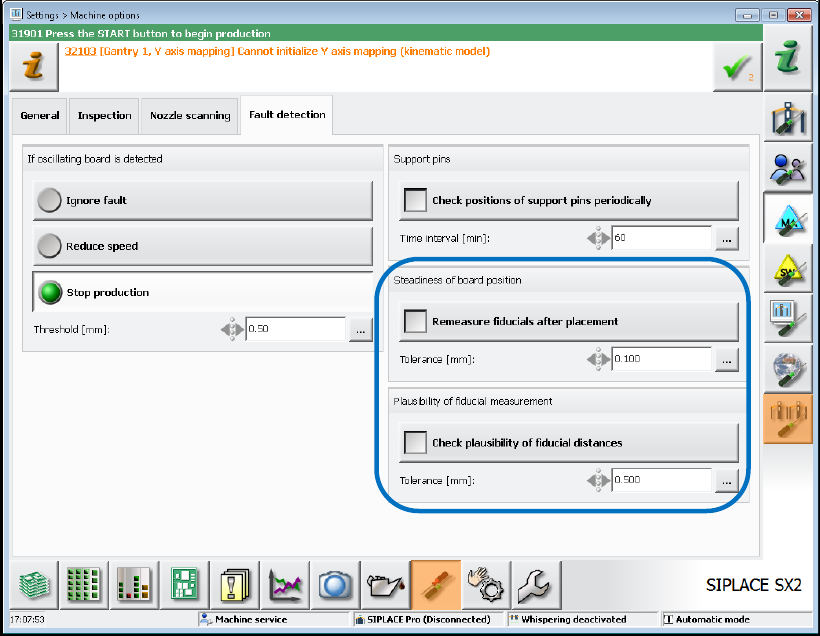
In the station software it can be checked if the board position has been changed during placement.
With this check an additional measurement of each board position (result of the fiducial
measurement) is performed after placement and this measurement is then compared to the original
measured position.
The feature can be enabled / disabled via two new options under Settings – Machine options –
Fault detection.
Figure 8-10: Checking board position after placement
Remeasure fiducials after placement
With this option the two fiducials per board that are placed most distantly from each other will be
measured and compared to their measured values during the first board detection.
If the distance exceeds the set tolerance value (here 0.1 mm) the station software stops with an
error message. The board cannot be released from the processing area until the operator has
confirmed the error.
Check plausibility of fiducial distances
The nominal distances between the fiducials in SIPLACE Pro are compared to their measured
distances. The comparison is performed per panel.
If the difference exceeds the set tolerance value (here 0.5 mm) the machine stops, and the
operator is prompted to teach the fiducials.
Station Software 7xx to 714.0 (R20-2) / Feature Description 11/2020 Edition
138
8.17 Vision Measurement before and after Dipping
As default, the Vision measurement is performed after dipping. As of this station software version,
the Vision measurement can optionally be performed before and after dipping.
Thus, slipped components can be detected and the position corrected after dipping.
The option is set in SIPLACE Pro.
8.18 Smart Pin Support – Fast Configuration Change
If an existing pin configuration on the lifting table shall be replaced by a new pin configuration, the
pins will not be put back into the pin magazine anymore. Instead of that the existing pins will be
moved on the lifting table. This shortens the time for the configuration change.
Detailed information can be found in the User Manual Smart Pin Support, item no. [00197001-xx].
8.19 New Feeder Types
The station software supports the new feeder types that are described in the following sections.
8.19.1 Multiple JEDEC Tray Feeder
The new Multiple JEDEC Tray Feeder is supported by the station software on the SX1/SX2 V2
and the SIPLACE X-series S placement machines. This feeder resembles the "Traystack Feeder
AX" feeder and supports additionally:
– Different component types within one feeder
– 14 or 18 waffle pack trays per cassette
– Retrofitting of the entire cassette
On the SIPLACE X-series S placement machines the Multiple JEDEC Tray Feeder is set up on the
manual MTF 40 X component table.
On the SX1/SX2 V2 placement machine the feeder is set up on the special MTF 60 X table in the
WPC feed device.