SIPLACE Station Software 7xx to 714 介绍.pdf - 第153页
Station Software 7xx to 714.0 (R20-2) / Feature Description 11/2020 Edition 153 9.6 Measuring and Changing the Component Height Compatible mode: Not supporte d Inaccurate component height definitions may cause unnecessar…
Station Software 7xx to 714.0 (R20-2) / Feature Description 11/2020 Edition
152
Additionally, a precedence rule must be defined that the component at the bottom shall be placed
first.
Please also refer to section 7.43.
Detailed information can be found in the Version Description for SIPLACE Pro 12.0, item no.
[00197628-xx].
9.4 Analysis after Machine / Production Stop
Compatible mode: Complete
As of this station software version, the cause for the stop will be displayed additionally to the
35610 Machine stopped error message to better distinguish between machine and production
stops.
9.5 Improved Warnings for Critical Feeder Parameters
Compatible mode: Complete
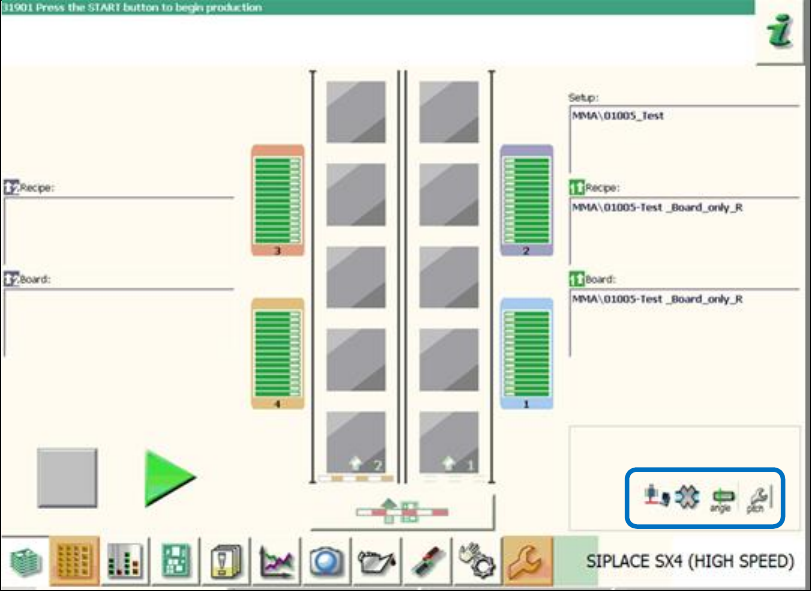
There are new warning icons to avoid that differing, critical feeder parameters are overlooked and
ignored by the operator.
If a feeder pitch is too big or the pickup angle differs, the respective warning icons will be displayed
in the main view on the GUI as follows:
Figure 9-1: Warnings for critical feeder parameters
Station Software 7xx to 714.0 (R20-2) / Feature Description 11/2020 Edition
153
9.6 Measuring and Changing the Component Height
Compatible mode: Not supported
Inaccurate component height definitions may cause unnecessarily high reject rates. This shall be
prevented by measuring the height exactly with the component sensor and transmitting it to
SIPLACE Pro and/or adding it into the Component Shape Editor in SIPLACE Pro.
As of this station software version, the operator can test the component height at the station during
pickup. The placement head must be equipped with a component sensor and the nozzle /
component combination suitable for performing such a measurement.
If necessary, the operator can change the component height and upload it to SIPLACE Pro as of
the Advanced production activity level.
If SIPLACE Pro security is enabled, the operator logs on to SIPLACE Pro with a user account after
having downloaded a recipe. This user account must have write permission for the component
shape in the SIPLACE Pro database and also permission to upload objects to SIPLACE Pro.
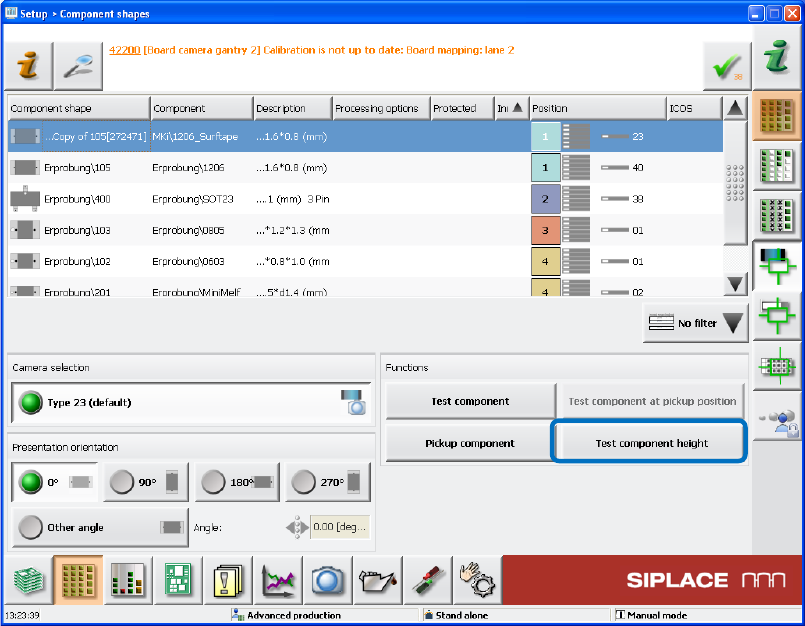
Figure 9-2: Testing the component height
If the new Test component height button is selected when the component shape is taught in the
station software, a new dialog box is opened in which the height measured by the component
sensor is displayed.
Station Software 7xx to 714.0 (R20-2) / Feature Description 11/2020 Edition
154
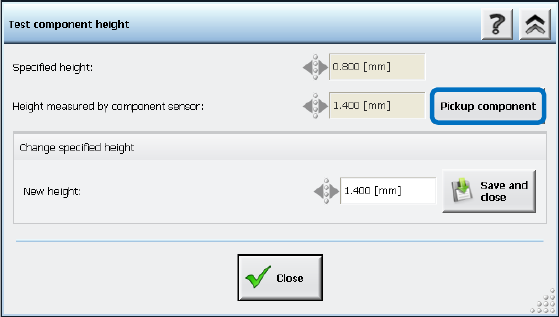
Figure 9-3: Measured height
The pickup of the component with the new measured height can be repeated via the Pickup
component button. If necessary, the measured value can be changed and uploaded to SIPLACE
Pro. The component shape will be updated accordingly in SIPLACE Pro by SIPLACE Pro Line
Control.
Restrictions
– Only for nozzle and component combinations in which the component height is supposed to be
measured with the component sensor.
– The component sensor will not perform any measurement if the component height
measurement is omitted due to SIPLACE Pro rules.
9.7 Logging from Subsystems – Enhancements
Compatible mode: Complete
9.7.1 E Logbook
With the E logbook mechanism (Electronic Card Logging), serial numbers are read from a
subsystem and stored in the ECardLog.xml file. The serial numbers of new modules are listed
under "CurrentMachine" and the old serial numbers of exchanged modules under
"MachineHistory". Thus, the exchange of modules in a machine can be easily detected.
In this station software version, the already available E logbook has been enhanced to include the
recorded data from the following subsystems:
● Complete placement head (with serial number KL-…)
● HCU
● Sensor modules (X, Y)
● FCU
● CAN card
● Box PC
● Power supply (pulse)