SIPLACE Station Software 7xx to 714 介绍.pdf - 第184页
Station Software 7xx to 714.0 (R20-2) / Feature Description 11/2020 Edition 184 10.5 Calibration of C&P20 P Placement Head The new Identify head para meter calibration step has been intro duced for the C&P20 P pl…

Station Software 7xx to 714.0 (R20-2) / Feature Description 11/2020 Edition
183
10.2 Self-healing Fiducial Recognition
If the fiducial recognition fails, the system automatically re-measures the fiducials by using an
increased search area. Tolerances apply as defined for the optional check.
However, if the second measurement or the check fails, teaching is required based on the results
of the first measurement.
NOTICE
– Increasing the search area will only have an impact on geometric fiducials and not on
fiducial pattern.
– The second measurement will not be executed if the tolerance of a fiducial position is
restricted by the "Limited Tolerance" value in SIPLACE Pro.
Restrictions
– Increasing the search area will only have an impact on geometric fiducials and not on fiducial
pattern.
– The second measurement will not be executed if the tolerance of a fiducial position is restricted
by the "Limited Tolerances" value in SIPLACE Pro.
10.3 E Logbook – Enhancements
In this station software version, the E logbook has been enhanced to include the recorded data
from the following subsystems:
– FCU (all new machines)
– Conveyor (TX-series machines)
10.4 Repeated Reading of the Fiducials before Placement
Previously, all fiducials of a board were read before the placement started. If high accuracy is
needed or the board has a high coefficient of expansion, the measurement of the fiducial can be
repeated, to compensate the drift of the placement position of the board. However, the
measurement of the fiducial will not be repeated per default.
For higher accuracy, it is now possible to specify a time for each board side in SIPLACE Pro after
which the latest measurement of the fiducials is obsolete. The fiducials will be read directly before
placing the first components of the subpanel of a board. If the validity time is expired when placing
further components of the subpanel, the fiducials will be re-read. For the re-measurement of the
fiducial, this must be selected so that the fiducial is not covered by any of the placed components!
The feature must be enabled in SIPLACE Pro for the station.
Station Software 7xx to 714.0 (R20-2) / Feature Description 11/2020 Edition
184
10.5 Calibration of C&P20 P Placement Head
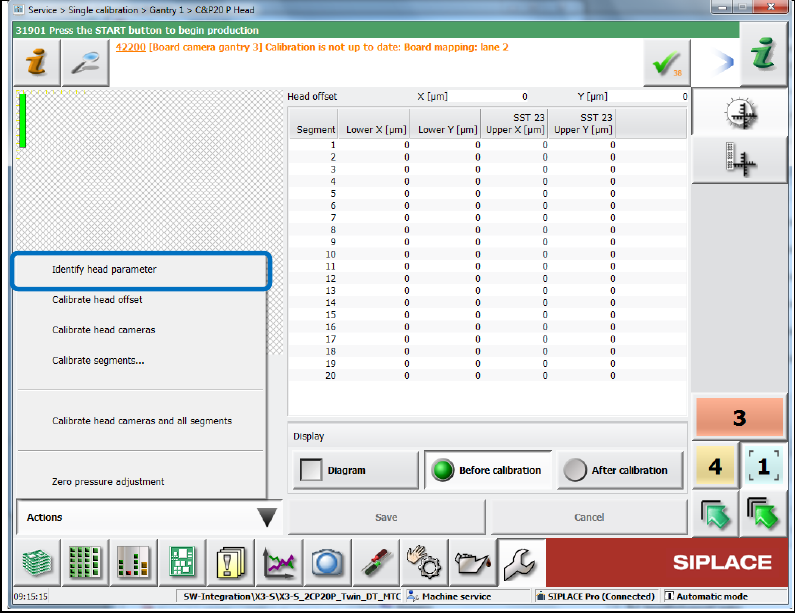
The new Identify head parameter calibration step has been introduced for the C&P20 P
placement head. With this calibration step, the system parameters of the C&P20 P placement head
are identified what makes the calibration robust to external influences.
If the calibration step is missing, a corresponding warning is displayed. E.g., this is the case after
an update from a previous station software version to the 709 version if C&P20 P placement heads
are present.
The calibration step is performed during the automatic calibration of heads and cameras but can
also be enabled under Single calibration on the Machine service level:
Figure 10-8: Identifying head parameter
In case of a placement head change, this calibration step is automatically performed.
10.6 Automatic Orientation Check for Components before Pickup
The position measurement before each component pickup can be combined with automatic
recognition of the Pin 1 mark on the top side of the component. The position measurement before
each pickup must be enabled for the component type in SIPLACE Pro. When teaching the top side
of the component, the operator can select the orientation check option (Pin 1 detection) in the
teaching dialog. If orientation check has been selected, the Pin 1 measurement is executed for
each component.
Station Software 7xx to 714.0 (R20-2) / Feature Description 11/2020 Edition
185
10.7 Heavy Board Option per Board Side
The existing behavior to set a single station into Heavy Board mode for all boards in the setup has
been complemented by a new setting per board side in SIPLACE Pro indicating that this board
shall be produced in Heavy Board mode. Both behaviors coexist, i.e. Heavy Board mode is
always assumed if the option is set in the setup or (if station software version >=709) for the board
side. The setting is sent to the stations by the download. The corresponding license will be checked
by the download. The station software sets all conveyors into Heavy Board mode when this board
is produced. This affects the cycle times for all products of a family setup.
NOTICE
– If the Heavy Board mode is set for the board, no barcode mode is possible.
Barcode mode is only possible if all stations are set into Heavy Board mode.
Otherwise the board will not be produced.
– For Virtual PCB Stack option or boards in synchronous dual conveyor mode:
If the Heavy Board mode is set for at least one board, all boards will be handled as
heavy boards.
10.8 Time Synchronization between Line Computer and Station
Computer
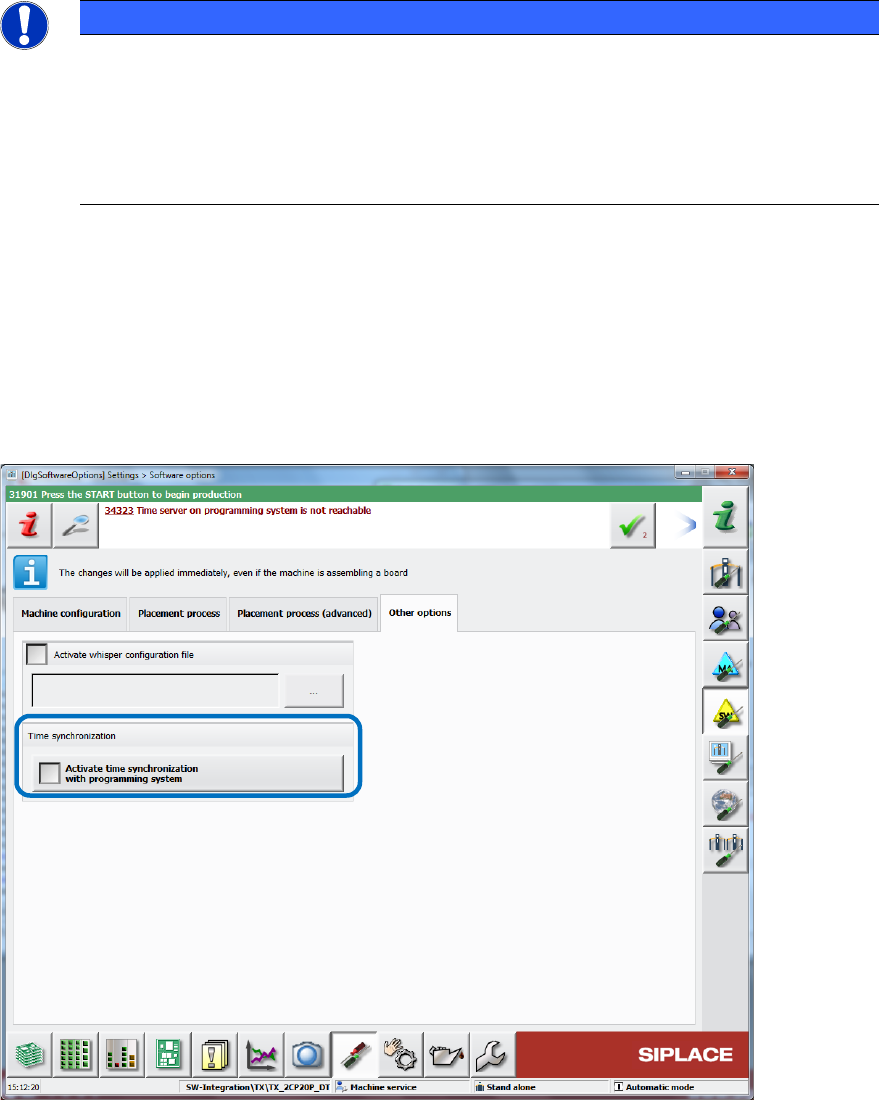
There is a new setting on the station software GUI for synchronizing the time between the line
computer and the station computer. The setting can be enabled under Software Options – Other
options – Activate time synchronization with programming system. If other customer specific
time synchronization tools are used, these must be disabled before enabling this setting.
Figure 10-9: Activating time synchronization
The synchronization will be performed when a new session has been started by SIPLACE Pro.