SIPLACE Station Software 7xx to 714 介绍.pdf - 第207页
Station Software 7xx to 714.0 (R20-2) / Feature Description 11/2020 Edition 207 Nozzle setup for the placement he ad Figure 10 - 32 : Dirty nozzle – Head view Nozzle changer In the Nozzle changer view, there a re three n…
Station Software 7xx to 714.0 (R20-2) / Feature Description 11/2020 Edition
206
10.13.15 Predictive Maintenance – Time-Based Maintenance Cycle
During installation of station software 709.1, the maintenance rating of the placement heads, tape
cutters and X-/Y-axes will be changed to be time-based.
Requirements:
– The system time of the station computer must be set correctly.
– A complete maintenance of the machine and the heads should be performed before the station
software is installed. This is since the station software writes a date stamp in the corresponding
EEPROMs that is used for calculating the maintenance due status.
The maintenance rating is calculated by the difference of the current date and the date of the last
maintenance stored on the machine. The passed time is displayed as a progress bar and a
percentage compared to the maintenance cycle timespan. The maintenance rating at the GUI will
be updated once every 24 hours.
The maintenance rating of the vacuum pumps slider and filter is based on operating hours.
The color of the maintenance icon will change to orange when a percentage of 80% is reached.
10.14 Returning Dirty Nozzle to Nozzle Changer Magazine
Compatible mode: Complete
If a nozzle is detected as dirty, it must not be rejected into the reject bin anymore. Instead, it will be
returned to the nozzle changer magazine from where it was previously picked up.
If a nozzle was put manually on the head segment, it will be returned to a magazine which has the
same target nozzle types as specified by SIPLACE Pro. If the nozzle type does not fit to any target
nozzle type specified by SIPLACE Pro, it will be returned to the next free garage of a magazine.
If a nozzle cannot be returned to any nozzle magazine, because all magazines are full, or there
was an error during placing the nozzle, the head segment will be disabled if the nozzle is marked
as dirty.
However, the operator can still decide to reject a dirty nozzle into the reject bin manually via the
nozzle changer dialog.
A nozzle that is marked as dirty will not be picked up again. Also for the nozzle setup from
SIPLACE Pro, dirty nozzles will be excluded from the current nozzles in the nozzle changer. For
example, if there are twelve nozzles in the nozzle changer and two of them are marked as dirty but
SIPLACE Pro requires twelve nozzles, then the nozzle setup is incorrect.
The dirty state of a nozzle remains after rebooting the station software or the machine. In the
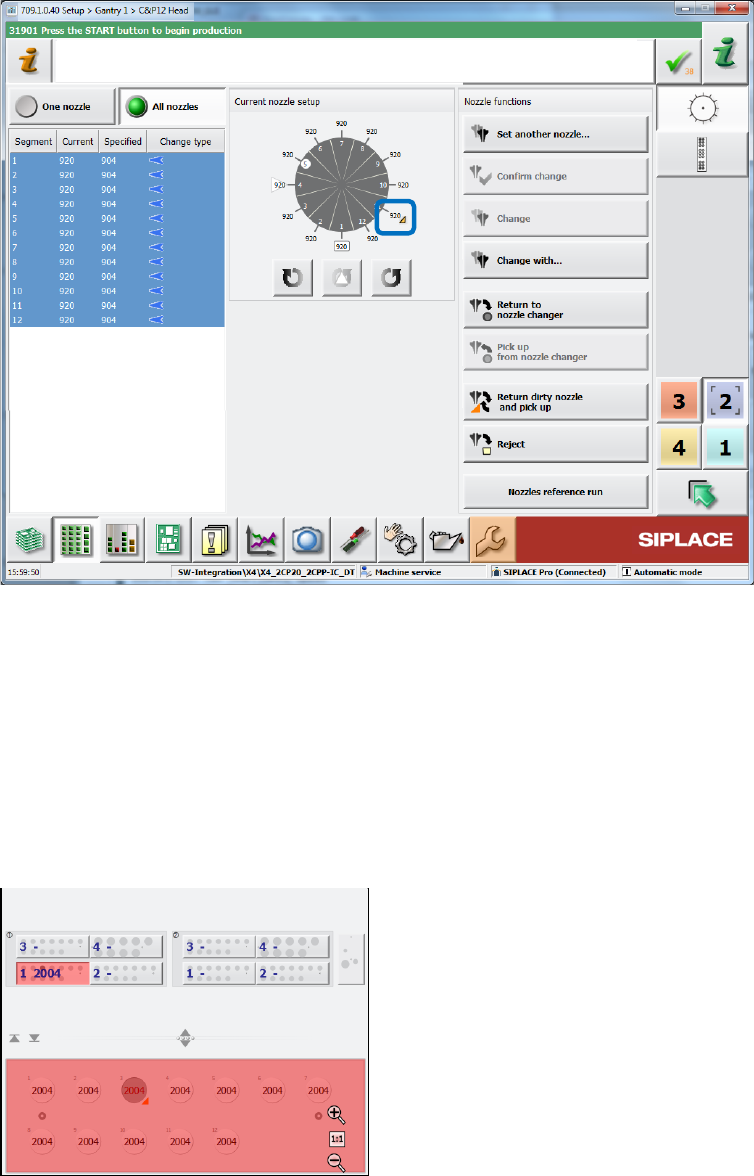
nozzle functions dialogs, a dirty nozzle is marked with an orange triangle.
Station Software 7xx to 714.0 (R20-2) / Feature Description 11/2020 Edition
207
Nozzle setup for the placement head
Figure 10-32: Dirty nozzle – Head view
Nozzle changer
In the Nozzle changer view, there are three new actions to change the nozzle state to "clean":
– Nozzle in garage n is clean (for selected nozzle)
– Nozzles in magazine n are clean (for all nozzles in the selected magazine)
– All nozzles in all magazines are clean (for all nozzles in all magazines at the displayed
location)
Example:
Figure 10-33: Dirty nozzle – Nozzle changer
Although there are twelve 2004 nozzles in the nozzle, the salience is red, and the nozzle setup is
incorrect, because one nozzle (in garage 3) is dirty and not allowed to pick up again. The operator
must clean the nozzle and inform the station software that the nozzle is clean. The operator can
also remove the dirty nozzle via the Empty garage action and set in a new, clean nozzle of the
same type. However, the Confirm nozzle in garage action will not set the nozzle to clean, the
nozzle setup remains incorrect!
Station Software 7xx to 714.0 (R20-2) / Feature Description 11/2020 Edition
208
Nozzle scanning
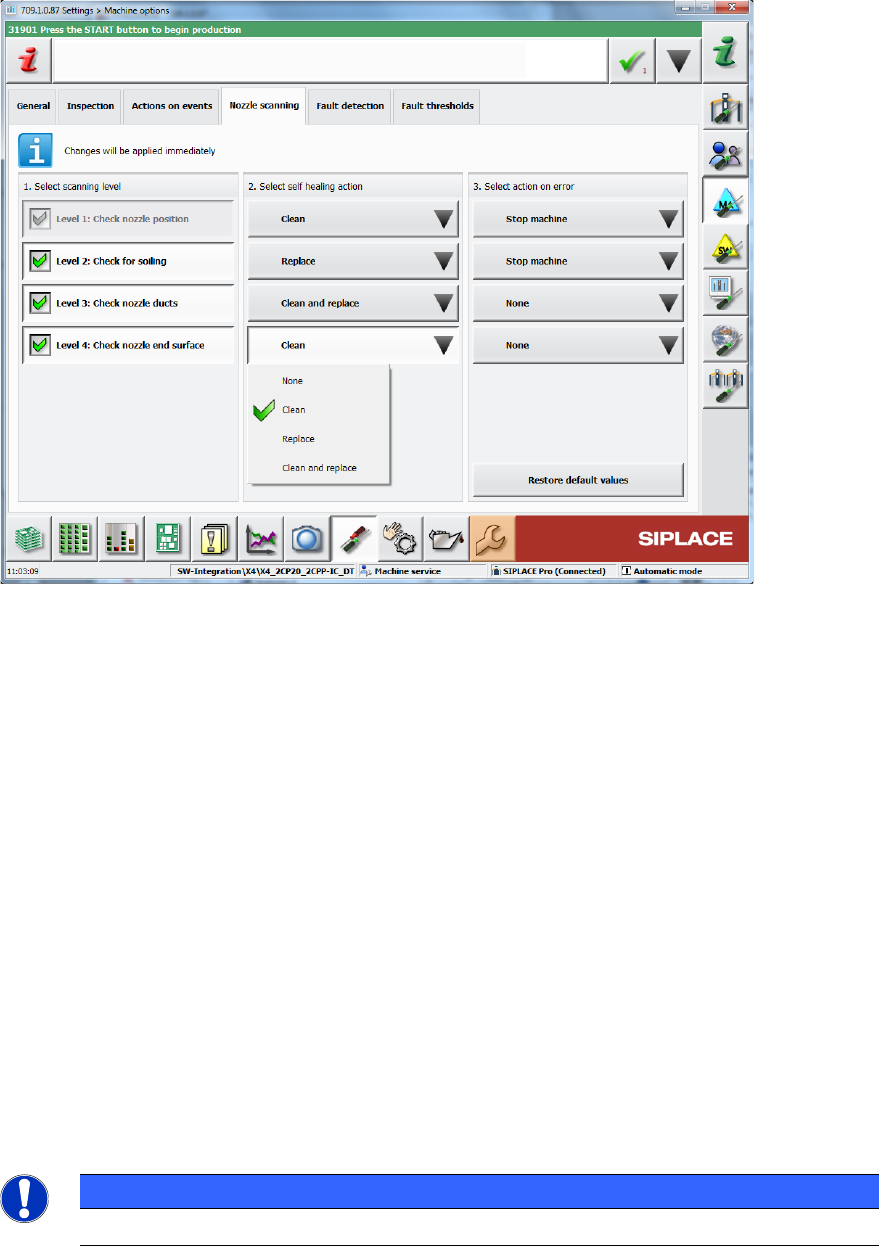
The dialog for configuring the nozzle scanning under Settings – Machine options contains two
new self-healing actions: Replace and Clean and replace.
Figure 10-34: Dirty nozzle – Machine options
State overview of head segments
The State overview dialog for the head segments contains the new state disabled: nozzle dirty.
Preventive maintenance
Additionally to the above changes, the Preventive maintenance view has been extended. Please
refer to section 10.13.13.
10.15 Enhanced Automatic Feeder Pitch Detection
Compatible mode: Complete
The existing Automatic feeder pitch detection function has been enhanced in this station
software version.
The station software can now increase the pitch automatically to the measured value if the
expected pitch is undefined (value 0). The station software performs frequent measurements of the
pitch (every 700 placements) if the expected pitch is undefined, to continuously verify measured
pitch values and to minimize the impact of wrong automatic pitch increases.
NOTICE
This function has an impact on the placement performance.