SIPLACE Station Software 7xx to 714 介绍.pdf - 第210页
Station Software 7xx to 714.0 (R20-2) / Feature Description 11/2020 Edition 210 10.17 Changing Lower Acti vity Level to SIPLACE Service Compatible mode: Complete For any activity on an activity level lo wer than SIPLACE …
Station Software 7xx to 714.0 (R20-2) / Feature Description 11/2020 Edition
209
10.16 Improved Face Down Recognition for Diodes
Compatible mode: Complete
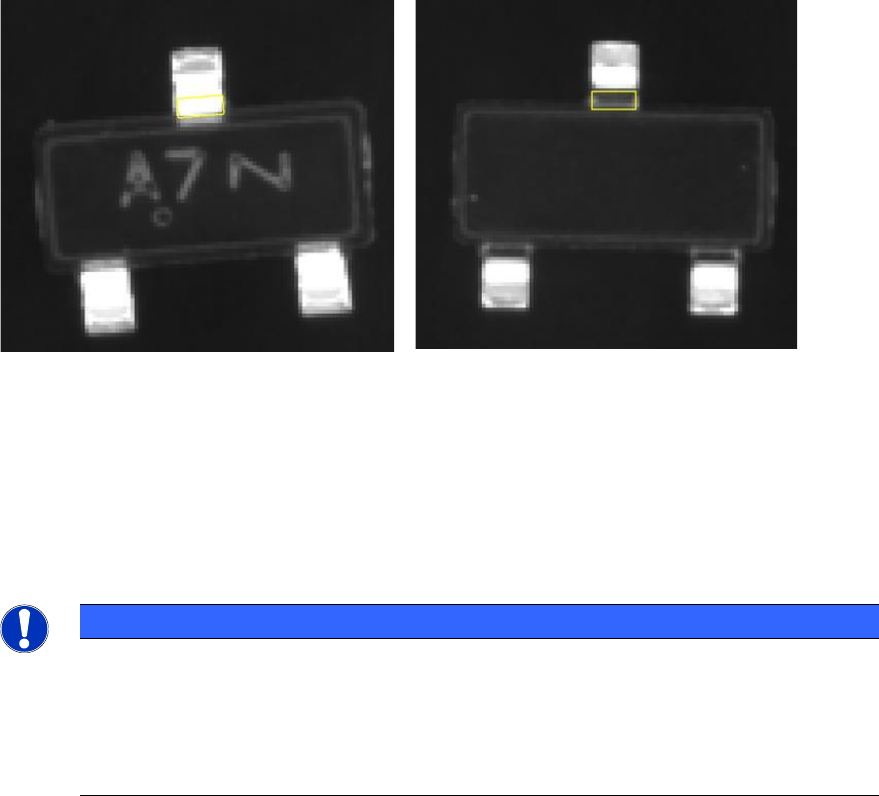
Small SOT and SOD diodes sometimes are placed lying on their back on the boards what may
lead to problems and high reject rates. Therefore, the SIPLACE Vision functionality for the face
down recognition has been improved. As of station software version 709.1, this feature uses the
different appearance of the gullwing leads on the top and bottom of the component to detect which
side is facing the camera. In lower station software versions, this measurement will be ignored!
SIPLACE Vision performs a measurement in two steps, optionally with different illumination
settings. In the first step the position of the gullwing leads is determined; in the second step the
bend of the leads is recognized.
Component face down -> inner lead ends
are bright
Component correct -> inner lead ends are
dark
The face down recognition can be started from the Options list with the Recognition of flipped
components button. A wizard helps guiding the operator when entering the required data.
The feature can be combined with multiple field of view measurements and Pin1 detection but not
with pattern matching and glue inspection.
NOTICE
The face down recognition only works if the inner lead ends have a sufficiently constant
position to the middle of the component. If there are large tolerances for the component
body, it might happen that the component body or the contact area is evaluated instead
of the inner lead ends. This would then lead to faulty results (body to small -> area bright
-> a correct component is rejected; body to large -> area dark -> a face down component
is not recognized).
Station Software 7xx to 714.0 (R20-2) / Feature Description 11/2020 Edition
210
10.17 Changing Lower Activity Level to SIPLACE Service
Compatible mode: Complete
For any activity on an activity level lower than SIPLACE service the activity level can now be
changed to SIPLACE service. To do this modification or changing back to a lower activity level,
the SIPLACE service activity level is required.
In the dialog for changing the activity level, SIPLACE service is always offered. This dialog is
displayed for all functionalities for which the default activity level is not SIPLACE service.
10.18 Different Activity Levels for Handling Segment States
Compatible mode: Complete
Three buttons are now offered for handling segment states in the Manual operation view: Enable,
Disable and Do not use. The accessibility of the buttons changes according to the selected
segment.
Disable is available from the Advanced production activity level. Do not use is available from the
Basic production activity level.
10.19 Improved Board Identification
Compatible mode: Complete
The process for identifying a board when loading it into the placement machine has been improved
and now offers a more reliable barcode reading in the input section of the conveyor.
The X/Y barcode position on the board and the location on the current or opposite board side can
be defined in SIPLACE Pro. This information is sent to the station. The conveyor software
calculates the correct moment to trigger the correct barcode reader and proposes the correct
trigger setting automatically.
The operator can select if the proposed barcode reader setting shall be used. It is also possible to
add a constant offset / time to individually adjust the trigger of barcode reading. This parameter will
be preset automatically and refers to the time it takes to move the board to the input section of the
machine. The parameter is editable on the station software GUI under Service – Conveyor
configuration – Lane x – Parameters.
It is possible to combine an external barcode reader with the board camera for reading the
barcode.
The maximum number of characters for the barcode has been increased to 255.
Restrictions
Barcode fiducials and barcode-controlled production cannot be combined.

Station Software 7xx to 714.0 (R20-2) / Feature Description 11/2020 Edition
211
10.20 Reading Individual Barcode Fiducials with Board Camera –
Enhancements
Compatible mode: Not compatible
Until now, reading the individual barcode fiducials with the board camera was only possible for
components in a tape feeder. From this station software version, the option can be used
independently of the packaging unit (tape, tray, …).
– If a component has a barcode positioned out of the focus height of the board camera and the
barcode cannot be recognized with good quality, the option must be disabled for this
component.
– If reading the barcode fails, the component remains in the tray and will not be picked up.
NOTICE
If this feature is used, there are areas at the tray that the board camera cannot approach.
10.21 Nozzle Magazine with 20 Garages for CPP Placement Head
Compatible mode: Not supported
This station software version supports the new nozzle magazine with 20 garages (nozzle type
20xx) for CPP placement heads. The magazine types 12*20xx, 20*20xx and 9*28xx may be mixed
in one nozzle changer.
Custom nozzles with a length > 16 mm can only be placed in the garages 3, 4 and 5. For standard
nozzles there are no restrictions.
10.22 Long Board Option up to 1500 mm
The licensed Long Board Option (LBO) is now supported for boards up to 1500 mm. The relevant
settings must be enabled in SIPLACE Pro.
Detailed information can be found in the LBO User Manual, item no.: [00197085-xx].