SIPLACE Station Software 7xx to 714 介绍.pdf - 第215页
Station Software 7xx to 714.0 (R20-2) / Feature Description 11/2020 Edition 215 Restrictions Barcode mode and station-wise do wnload are not supported. Detailed information on the shuttl e extension can be found in the S…
Station Software 7xx to 714.0 (R20-2) / Feature Description 11/2020 Edition
214
11.2 Shuttle Extension for SIPLACE TX-Series
Compatible mode: Not supported
To reach the best possible output, shuttles might be required in the SIPLACE line, e.g. when
I-Placement mode is used. For this, the new Shuttle Extension has been introduced for the
SIPLACE TX-series. One machine can have up to two shuttle extensions attached – one input
shuttle and one output shuttle.
The shuttle extension itself and its lane settings has to be configured in SIPLACE Pro. At the
station, the shuttle extension can be selected and configured as described in the following.
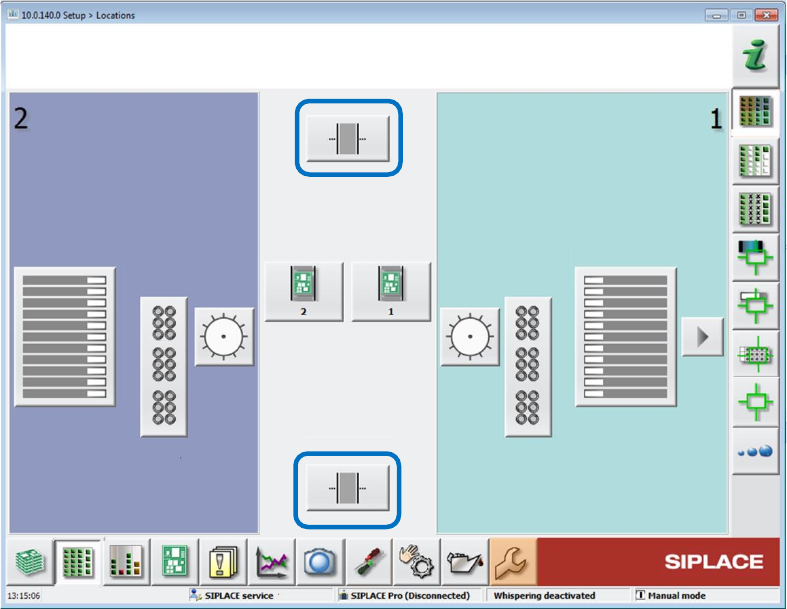
On the station, the Setup view has been extended by an additional button per shuttle extension.
Figure 11-1: Setup with shuttle extensions
The Manual operations subsystems dialog has been extended by a Manual operations shuttle
button for each shuttle extension.
The subsequent Manual operations dialog for the shuttle extension offers the following sections:
Current position / Align shuttle to
Transport width
Signals
Transport board to
Single functions are only available if the shuttle extension is not in automatic mode.
The Service tool has been extended by a Shuttle configuration button. The operator can
configure speed parameters, eSW parameters and single drives in the subsequent configuration
dialogs.
The Single calibration dialog has been extended by one button per shuttle extension.
The shuttle lane width has to be calibrated.
The alignment of the fixed conveyor rails of all lanes adjacent to the shuttle has to be calibrated.
When a lane is selected, the shuttle aligns itself to the chosen lane. The operator can then move
the shuttle in small or big steps to align the fixed rail and save the setting.
Station Software 7xx to 714.0 (R20-2) / Feature Description 11/2020 Edition
215
Restrictions
Barcode mode and station-wise download are not supported.
Detailed information on the shuttle extension can be found in the Shuttle Extension Assembly
Instructions and User Manual, item no. [00198271-xx].
11.3 Precision Value
The desired precision value for the component shape must be specified in SIPLACE Pro. If an
accuracy < 20 µm has been specified, the Micron 15u3Sigma – Machine Connection license is
required at the station.
11.4 Alternative Component Shapes
Compatible mode: Not supported
As of this station software version, alternative component shapes are supported. With this feature,
multiple component shapes can be assigned to one component. An own placement offset can be
assigned to each alternative component shape. An own feeder with pickup offsets (X and Y) and
pickup angle can be assigned to each alternative component shape.
Alternative component shapes must be specified in SIPLACE Pro.
The alternative component shapes process largely independently recognizes which component
shape description is to be used for the measurement. For each component, the SIPLACE Pro user
can select which method is to be used to select the used alternative component shape. Three
selection methods are available:
– Setup Center
The operator verifies the used component shape at the station. For this, ASM Setup Center
transmits additional attributes (e.g. the manufacturer component name) from the barcode label
of the packaging unit reel to the station. This attribute is used to select the appropriate
component shape.
– Station
SIPLACE Vision measures the component at the station and recognizes the used component
shape.
– Operator
The operator at the station determines, selects and confirms the used component shape on the
station software GUI.
Detailed information can be found in the Alternative Component Shapes User Manual,
item no. [00198270-xx].
Station Software 7xx to 714.0 (R20-2) / Feature Description 11/2020 Edition
216
11.5 Odd Shape Components – OSC Package Option
Compatible mode: Not supported
The station software supports a bundle of new features for odd shape components (OSC) as of
station software 710.0. These features have been collected into the OSC Package option. This
option must be enabled in SIPLACE Pro for the station(s) concerned. The option requires the
Vision OSC Package - Machine Connection floating license. The license must be available at
download if any of the supported features shall be used.
Following features are supported by the OSC Package option:
● Vision OSC measuring options:
– User-defined "Odd shape component"
– Stereo measurement for pins
– Special position evaluation – "Alignment" attribute
● Increased placement force of Twin VHF placement head to 100 N
● Improved placement of snap-in components
– Specification of Z-threshold
● Support to find best acceleration
The single features are presented below.
11.5.1 Vision OSC Measuring Options
The following measuring options are available in SIPLACE Vision if the corresponding license is
installed and the OSC Package option enabled.
User-defined Odd shape component
The new Pattern Feature lead type allows the user to describe arbitrary abstract patterns on a
component. These patterns can only be created and taught in the Component Shape wizard of
SIPLACE Vision.
Example
Figure 11-2: Pattern Feature