SIPLACE Station Software 7xx to 714 介绍.pdf - 第248页
Station Software 7xx to 714.0 (R20-2) / Feature Description 11/2020 Edition 248 13.9 Station Behavior When Using Alternative Tracks Compatible mode: Not supporte d Alternative track means that one or more feeders are set…
Station Software 7xx to 714.0 (R20-2) / Feature Description 11/2020 Edition
247
Information on the MeasuringFeeder X, such as counter values and feeder ID can be accessed
under Manual Operations. The counters are used for wear evaluations of the contact module. A
button for a self-test is also offered. During the self-test, the internal wiring of the feeder and the
basic function of the measuring board are checked.
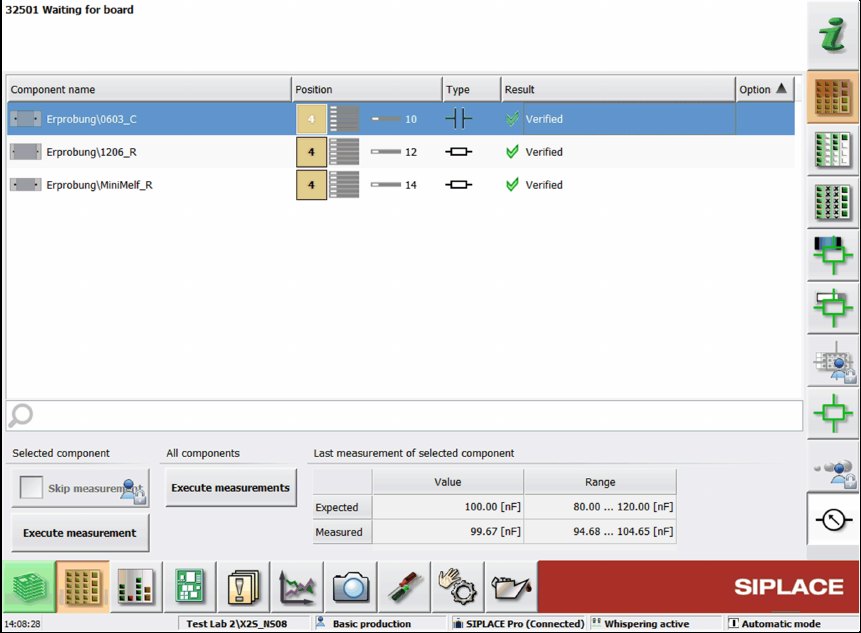
All measurements and options related to the measuring feeder are displayed in an own
Measurement unit setup view.
Figure 13-1: Setup view for MeasuringFeeder X
In this dialog, the state of the planned component measurements can be checked.
When a row in the list is selected, the expected value and tolerance range from the last
measurement are displayed. The expected value is always displayed, even if a measurement
failed.
If the measurement is out of tolerance, a detailed error is displayed and the respective track
disabled. The user can decide to execute a manual measurement for the selected component or to
skip the measurement. For skipping the measurement, the Advanced production activity level is
required.
The measured values of the reference component of one package will be recorded in the trace
data. Each subsequent component from the package has this information attached. If a
measurement failed, the result will also be attached to the package, even if no component will be
picked up afterwards.
By clicking the Generate report button, a report of the measured components is generated in an
HTML file. The report contains the measured value and the expected value of the components and
the feeder ID.
Detailed information on the MeasuringFeeder X can be found in the SIPLACE Measurement
Feeder X User Manual, item no. [00198526-xx].
Station Software 7xx to 714.0 (R20-2) / Feature Description 11/2020 Edition
248
13.9 Station Behavior When Using Alternative Tracks
Compatible mode: Not supported
Alternative track means that one or more feeders are set up with the same component on a feeder
table. Alternative tracks are mainly used to avoid machine stoppages caused by pickup issues on
the main track, e.g. foil torn, late splicing.
To avoid half empty reels or the mixing of components from different reels on the board, the user
can select when the machine shall switch between main and alternative track.
A new option has been introduced to control the behavior of the station if a feeder can no longer
deliver a component, but the track did not run empty. The user can select the behavior for each
component.
Alternative tracks are only supported together with ASM Setup Center.
13.10 "Cracked Die Inspection"
Compatible mode: Not supported
Cracked components can be detected with the new "Cracked Die Inspection". This option is
supported for the following component shapes:
BAREDIE
BGA
CCGA
CHIP
Non-standard
If the "Cracked Die inspection" is enabled in SIPLACE Pro, the components will be measured
with the board camera. If the component is cracked, it will be left in the tray or tape.
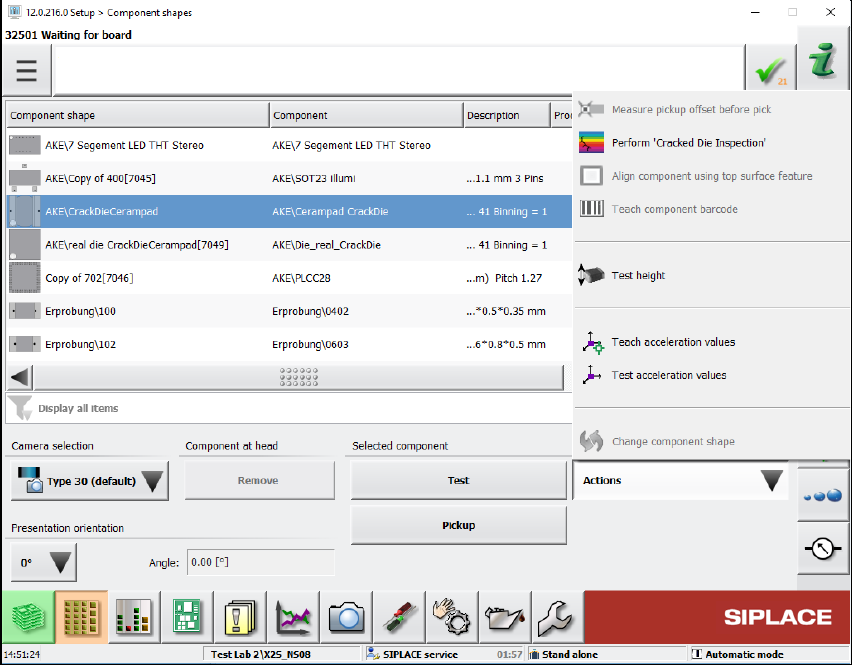
At the station, the inspection can be started under Setup – Component shapes – Actions –
Perform "Cracked Die inspection".
Station Software 7xx to 714.0 (R20-2) / Feature Description 11/2020 Edition
249
Figure 13-2: Perform "Cracked Die inspection"
Cracked components are marked with the rainbow-colored icon in the Processing options column
of the component list.