SIPLACE Station Software 7xx to 714 介绍.pdf - 第257页
Station Software 7xx to 714.0 (R20-2) / Feature Description 11/2020 Edition 257 13.15.2 Detection of Tilted Chips Compatible mode: Complete The new Detection of tilt ed chips option can be used for c omponent shape type …
Station Software 7xx to 714.0 (R20-2) / Feature Description 11/2020 Edition
256
Display message as popup option enabled:
Figure 13-8: Pop-up window enabled
The pop-up window is closed whenever it is clicked. The navigation in the GUI is also possible
when the pop-up window is displayed.
13.15 SIPLACE Vision Functionality – Additional Enhancements
The main additional enhancements in SIPLACE Vision 5.6.1 are listed below.
13.15.1 Contamination Scan
Compatible mode: Hidden
SIPLACE Vision provides a new nozzle scan for customer-specific nozzles to detect contamination
by solder paste. Other defects will not be detected by this scan. The contamination check must be
configured and enabled in SIPLACE Pro and is supported for the following camera types:
SST23, SST25, SST28, SST29, SST30, SST33, SST36, SST38, SST41, SST45, SST48 and
SST49.
The scan will be performed automatically after the specified number of picked-up components per
nozzle. A manual scan can be started in the Check sensors and functions of specific
components – Head – Check vacuum, height and scan values view.
Station Software 7xx to 714.0 (R20-2) / Feature Description 11/2020 Edition
257
13.15.2 Detection of Tilted Chips
Compatible mode: Complete
The new Detection of tilted chips option can be used for component shape type CHIP. The
option is supported for camera types SST41, SST48 and SST49 and must be enabled / disabled
for each camera type in the List of measurement options.
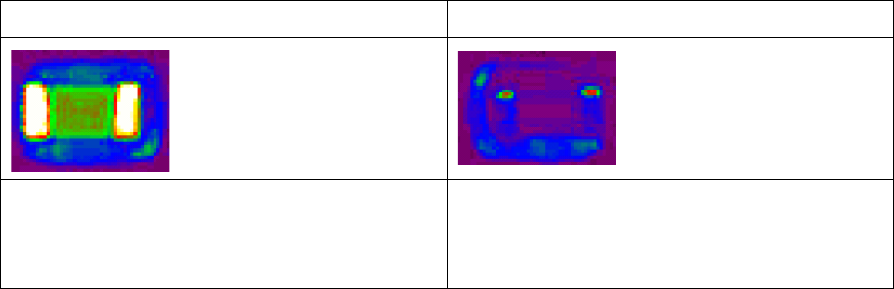
For the detection, the component is always recorded with a second illumination (0° illumination).
The components refer to this illumination.
The more a chip is tilted, the darker the pads appear.
Example
Chip in normal position
Tilted chip
The metallic connections reflect the 0°
illumination into the camera. The connections
are almost visible in full width.
The metallic connections reflect the 0°
illumination to the side. The connections only
appear bright in the lateral edge of the
component
Restrictions
– Among other things, detection of the tilt depends on the brightness, shape and reflection
properties of the components. Since these properties are not strictly specified, a positive
detection of the tilt may not be generally applicable for all component manufacturers and
batches.
– When using the option with camera SST 41, the placement performance is slightly reduced.
13.15.3 Face Down Recognition with Gullwing Leads – Enhancement
Compatible mode: Compatible
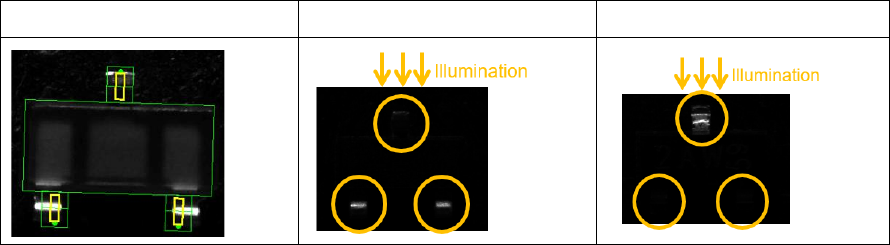
The new Detection using gullwing connections with one-sided illumination option can be
selected under Choose the method to be used to detect flipped components if the following
requirements are met:
– Camera type SST48 or SST49.
– Component shape types: SOT, SOXX, QFP, Connector, Non-standard or Sockets.
– There are at least two gullwing groups, each rotated 180 degrees to each other.
Station Software 7xx to 714.0 (R20-2) / Feature Description 11/2020 Edition
258
Example
SOT23
SOT23 – Face up
SOT23 – Face down
When the face down recognition wizard is started and no other process is selected, the option will
be used automatically if the requirements mentioned above apply.
If a face down recognition has already been taught in the wizard for the current camera type with
an older Vision version, this will continue to be used by Vision version 5.6.1 if you do not explicitly
select the new option.
If the new option is selected for the current camera type with Vision version 5.6.1, older versions
continue to apply the previously set method. This also applies if the option is selected for other
camera types than SST48 or SST49 with Vision version 5.6.1.
13.15.4 Flux Inspection
Compatible mode: Hidden
A new flux inspection has been introduced to check if components have been dipped or not. For
this, a reference image is captured before dipping. After dipping, the inspection compares the
current image with the reference image.
The flux inspection can be enabled in SIPLACE Pro or in the SIPLACE Vision Editor under Special
measurement options for the following component shapes:
– BGA
– Non-standard
– CCGA
The difference between dipped and not dipped components strongly depends on the color of the
flux and the appearance of the ball. A minimum ball diameter is set as default and this value will be
checked during teaching. In individual cases, you can switch off the check and test whether the flux
used can also be recognized with smaller ball diameters.
13.16 Miscellaneous Improvements and Enhancements
– Cover Lock for SX-Series Placement Machines
The existing cover lock configuration for the TX-series placement machines is supported for the
SX-series placement machines, as well. The used I/O port is named Protective cover locked
in the I/O Ports page on the GUI.
Compatible mode: Hidden
– The JTF-ML2 can be combined with the C&P20 P2 placement head on SIPLACE TX V2
placement machines.
Compatible mode: Complete
– If a nozzle is e.g. contaminated or sticky, this affects the placement reliability and may lead to
frequent pickup and Vision errors. The station software now detects such situations and
displays a corresponding detailed error. Possible solutions like cleaning, rejecting, changing the
nozzle or disabling the segment are offered.
Compatible mode: Complete