SIPLACE Station Software 7xx to 714 介绍.pdf - 第270页
Station Software 7xx to 714.0 (R20-2) / Feature Description 11/2020 Edition 270 The tolerance values can b e specified in the Tolerance fields under Resetting the conveyor width in the Width setting s of the respective l…
Station Software 7xx to 714.0 (R20-2) / Feature Description 11/2020 Edition
269
14.17 Support of SIPLACE TX2 V2 HD / SIPLACE TX2i V2 HD
The hardware upgrade kit High Density option package TX, item no. [588510-xx] for the
SIPLACE TX2 V2 / TX2i V2 is supported.
With a conveyor update and corresponding X-Fiducials contained in the hardware upgrade kit, a
SIPLACE TX2 V2 / TX2i V2 can be remodeled to a SIPLACE TX2 V2 HD / TX2i V2 HD. These
upgraded machine types can perform high density placement.
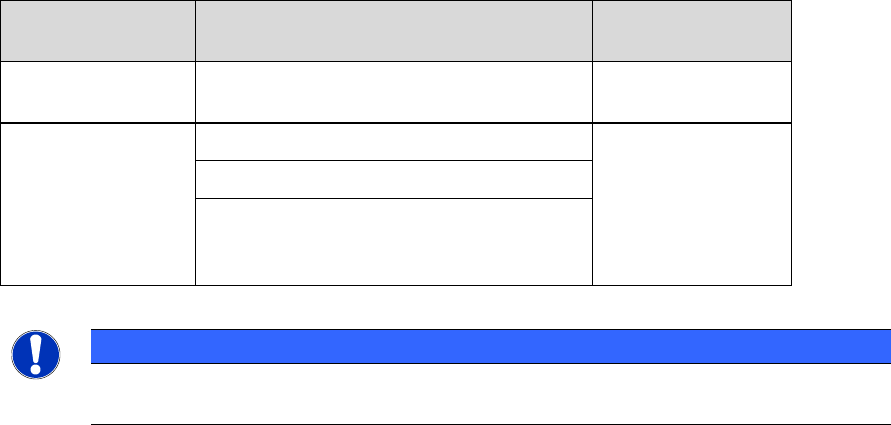
Original Machine
Type
Placement Heads
Upgraded
Machine Type
SIPLACE TX2 V2
2x CPP placement heads
(low position) with SST30
TX2 V2 HD
SIPLACE TX2i V2
2x CP20 P2 placement heads with SST48
TX2i V2 HD
2x CP20 P2 placement heads with SST49
1x CP20 P2 placement head with SST48
+ 1x CP20 P2 placement head with
SST49 (mixed camera configuration)
Table 14-1: Overview of high density placement upgrade option per machine type
NOTICE
When upgrading a machine type, the station software needs to be reinstalled on that
machine.
Restrictions
– The new machine types do not support Smart Pin Support.
14.18 Configuring Tolerance Values for Resetting the Conveyor Width
Compatible mode: Complete
If the Automatic Width Adjustment option has been activated on the Line Control GUI and the
conveyor width of the lane differs from the width specifications in the recipe (e.g. because it has
been manually changed for maintenance), the conveyor width is automatically reset to the width
specifications from the recipe at the start of production.
But even if the Automatic Width Adjustment option is deactivated, the conveyor width is reset to
the width specified in the recipe at the start of production if the conveyor width has been manually
changed further than a configured tolerance allows.
Station Software 7xx to 714.0 (R20-2) / Feature Description 11/2020 Edition
270
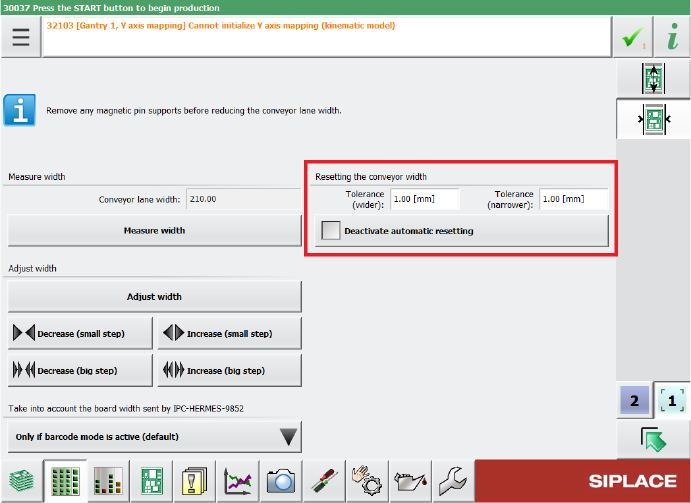
The tolerance values can be specified in the Tolerance fields under Resetting the conveyor
width in the Width settings of the respective lane. If the Automatic Width Adjustment option is
deactivated on the Line Control GUI and you do not want the conveyor width to be automatically
reset at the start of production, you can use the Deactivate automatic resetting option under
Resetting the conveyor width.
Figure 14-3: Configuring tolerance values for resetting the conveyor width
By default, the conveyor width is allowed to differ by 1 mm from the width specifications in the
recipe. The smallest possible value is 0.0 mm (no deviation allowed). Negative values are not
allowed. The biggest possible value is 10 mm.
Restrictions
– The station can only adjust the width while no board is in the respective lane.
14.19 Scan Request Dialog – Enhancements
Compatible mode: Complete
When performing a scan request for a feeder, it is possible to switch between feeder divisions in
the Scan Request dialog.
After clicking the scan request button on the feeder or after ordering a scan request in ASM Setup
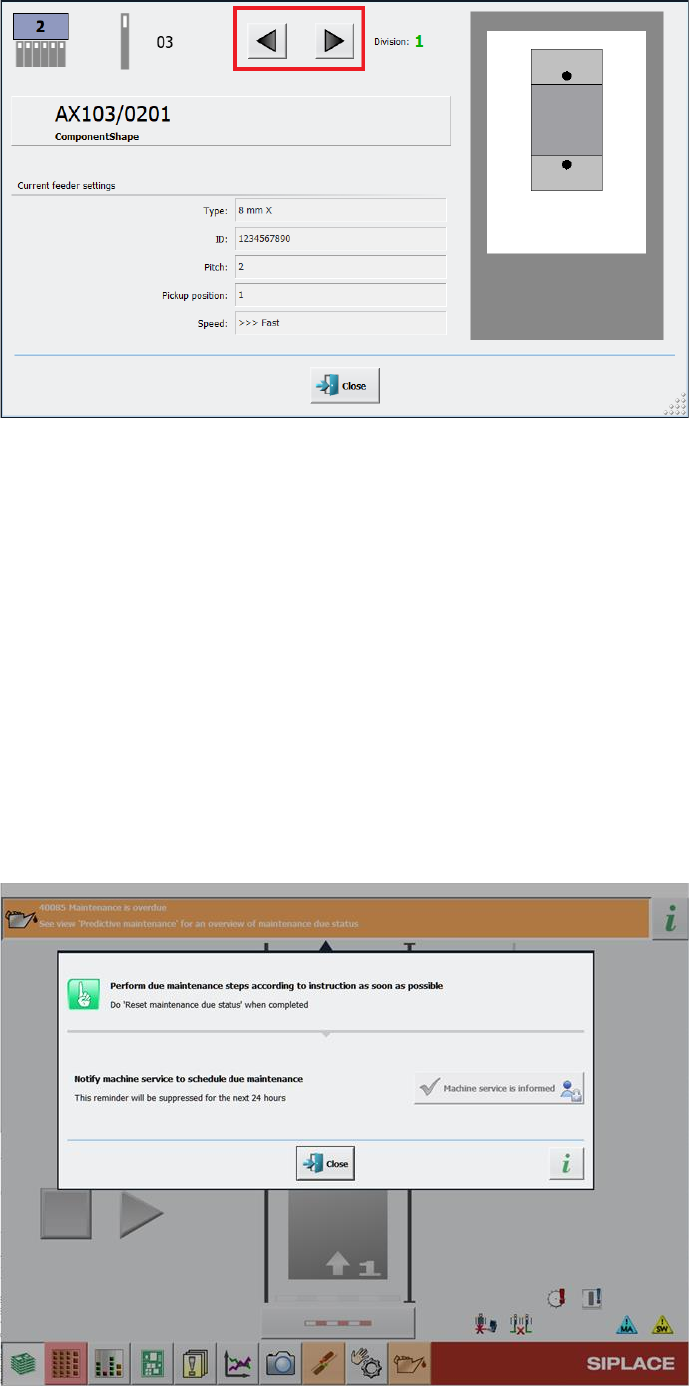
Center, the Scan Request dialog opens in the station GUI. In this dialog, you can navigate
between feeder divisions by clicking on the arrow buttons next to the division number.
Station Software 7xx to 714.0 (R20-2) / Feature Description 11/2020 Edition
271
Figure 14-4: Buttons for navigating between divisions in Scan Request dialog
For easier visibility the number of the currently selected feeder division has been further
highlighted. The division number is now displayed in a bigger font in an extra field and blinks.
Restrictions
– The feature is only supported for the following feeder types that have multiple divisions or
channels:
– Smartfeeder 2x8mm Xi Splice, item no. [00141499-xx]
– Smartfeeder 2x8mm Xi, item no. [00141479-xx]
14.20 Monitoring and Logging of Maintenance Status
To improve machine availability and to prevent unplanned machine failures, hardware components
such as the guide cars, guide rails and loose bearings are monitored and, when their service life
setpoints are reached, a detailed error message is issued at the station.
Figure 14-5: Detailed error message for maintenance status