SIPLACE Station Software 7xx to 714 介绍.pdf - 第34页
Station Software 7xx to 714.0 (R20-2) / Feature Description 11/2020 Edition 34 4.27 Non-Standard Nozzles Can Be Rejected In SIPLACE Pro there is a sett ing for non-standard nozzles to be r ejected or not. The station sof…
Station Software 7xx to 714.0 (R20-2) / Feature Description 11/2020 Edition
33
4.23 Auto Configuration
The station software supports Auto configuration on the SX1/SX2 placement machine. The table
configuration (inside/outside, WPC yes/no) is not automatically detected and has to be selected by
the operator during an initial configuration.
4.24 Reduced Air Consumption with Vacuum Pump
The SX1/SX2 placement machine with C&P20A placement heads can optionally be operated with
a vacuum pump. Therefore it is equipped with fans that enable reduced air consumption.
Features (V703.02 and V703.02 SP1)
4.25 Station-Wise Download (Job Change)
To keep product change times as low as possible, the 703.02 station software version allows you
to specify a new job for each station individually in the line controller (SIPLACE Pro Line Control).
This means that it is no longer necessary to empty the entire line.
1. To keep product change times as low as possible, the 703.02 station software version allows
you to specify a new job for each station individually in the line controller (SIPLACE Pro Line
Control). This means that it is no longer necessary to empty the entire line.
2. When the last board of the current job moves into the input conveyor of the first station in the
line, the operator must click the "Change job by station" icon in the main view of the station
computer interface. The station is emptied. Then the changeover can be performed and once
the changeover process has been confirmed, the new job can be processed at this station.
3. The procedure described in point 2 must be repeated for every other station in the line. The
station is only emptied if the conveyor width or the setup has to be changed.
– The station-wise download can be carried out for a station with or without a setup change:
– with a single conveyor
– with a dual conveyor in asynchronous conveyor mode
– with a “Quad Lane” conveyor in asynchronous conveyor mode.
– After a station-wise download operation has been canceled, a complete line download must
first be carried out.
4.26 Maintenance Due Status for CPP Placement Head and SX Main
Axes
As of this station software version, the maintenance due status can be calculated for the CPP
placement head and the SX main axes. The maintenance due status of the single components is
displayed in the Maintenance due status view on the GUI and informs about the maintenance due
date for the component.
Station Software 7xx to 714.0 (R20-2) / Feature Description 11/2020 Edition
34
4.27 Non-Standard Nozzles Can Be Rejected
In SIPLACE Pro there is a setting for non-standard nozzles to be rejected or not. The station
software version now supports this feature.
Features (V703.03: Compatible Mode to V704.02)
4.28 Settings for Manual Tray Carrier SX
If the manual tray Carrier SX is used, the insert frame with the fold-away tape guide channel is
required. For this, the operator has to make manual settings in the Auto-configuration under
Machine configuration on the Machine service activity level.
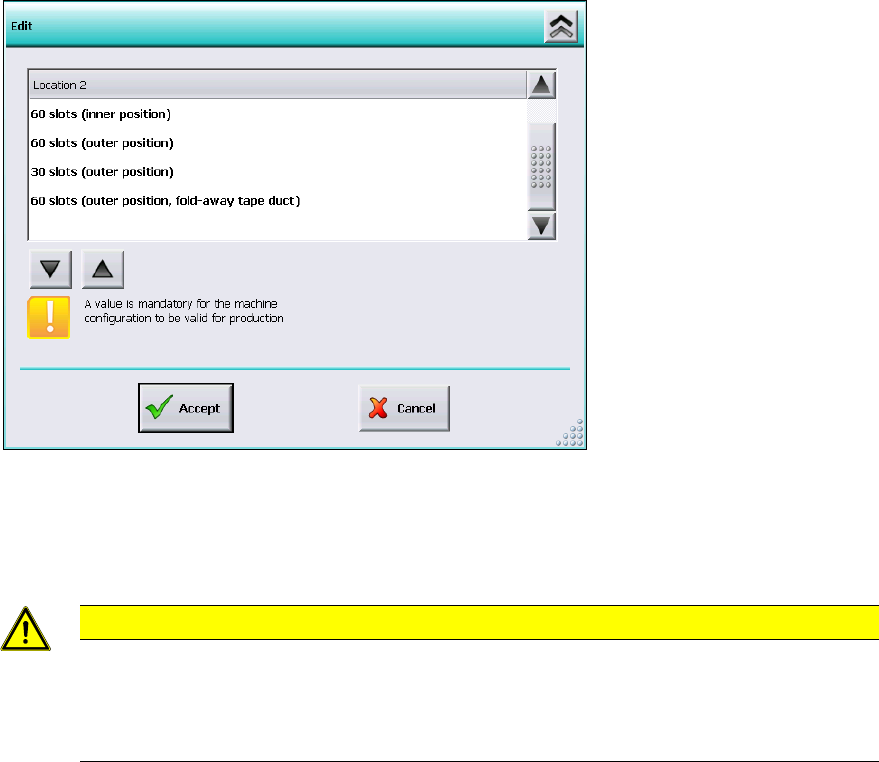
Figure 4-2: Settings for manual tray Carrier SX
The 60 slots (outer position, fold-away tape duct) entry has to be set for the table location.
Thus, the 27x27 reject bin and the left reject channel on the location are excluded from the
configuration.
CAUTION
If this setting is not made the component may be rejected over the tray and the Z-axis
may dash hard against the tray.
On upgrading from station software versions <=704 the settings in the Auto configuration
have to be checked accordingly, if the manual tray Carrier SX is used.
4.29 Two-Row Nozzle Changer on SX1/SX2 for C&P20 and CPP
The two-row nozzle changer is supported for the C&P20 and CPP placement heads on the
SX1/SX2-series placement machines.

Station Software 7xx to 714.0 (R20-2) / Feature Description 11/2020 Edition
35
5 Feature Description – Station Software V704.x
Features (V704.01)
5.1 Support of SX+ Placement Machine
The station software supports the SX+ placement machine. This is an SX placement machine
without gantries, but with changeover tables, moving-in mechanism, tape cutter etc. The placement
machine can be flexibly used, i.e. as a pure conveyor range or together with gantries that can be
added or removed according to the requirements. The SX+ can be upgraded to an SX1/SX2
placement machine by a service engineer.
NOTICE
If the SX+ placement machine shall be used without gantries, this has to be configured in
the Auto-configuration after the machine has been booted for the first time. For this the
"Ignore gantries" entry has to be selected at the processing area in the machine
configuration dialog.
5.2 Support of New Feeders
The station software supports the new "Carrier SX" feeder. The "Carrier SX" is placed on the tracks
1-25 on the changeover table 60 and is displayed as a manual tray on the GUI.
Further the 3
rd
party feeder "Data I/O RoadRunners" and the 3
rd
party LED feeders "HanSan" and
"Top Engineering" are supported via the FFI protocol. The 3
rd
party feeders are displayed as
X-adapter feeders on the GUI.
5.3 Fast Gantry Exchange on SX Placement Machines
For slave gantries with CPP/C&P20A placement heads a fast gantry exchange is possible when
gantries are added, exchanged and removed, due to the fact that neither board camera mapping
nor head mapping has to be performed on site.
5.4 WPC6 with Non Stop Module
With the Non Stop Module for WPC6 a waffle pack tray change without placement stoppage is
supported. The Non Stop Module can be utilized together with the setup verification. The waffle
pack tray change is selected via the "Refill level" button on the GUI and performed via a wizard.