SIPLACE Station Software 7xx to 714 介绍.pdf - 第43页
Station Software 7xx to 714.0 (R20-2) / Feature Description 11/2020 Edition 43 5.19 Setting Build Time on the GUI There are several times describi ng the duration of the prod uction process: Cycle-Time : is a production …
Station Software 7xx to 714.0 (R20-2) / Feature Description 11/2020 Edition
42
5.15 Component Counter – Redundant Storage
On the SX-series placement machines there is no hardware component counter, but the counter
status is stored in the EEPROM of the IO unit. If the IO unit is exchanged the counter status goes
along with it. Therefore, as of this station software the counter states are stored redundantly in the
IO unit and in an individual file on the station computer and are additionally marked with the device
ID of the GCU in order to be robust against the exchange of single sub-systems.
The counter status persists in the following cases:
– The IO unit is exchanged but the GCU and the station computer are not exchanged.
– The station computer is exchanged but the GCU and the IO unit are not exchanged.
– The GCU is exchanged.
Restrictions
If more than one of the three components GCU, I/O unit and station computer are exchanged, a
correct counter status cannot be ensured after the exchange.
5.16 Enhanced Endurance Run Functionality for Test Purposes
During the endurance run all axes and the MTC/WPC are referenced and a nozzle scan is
performed if there are nozzles on the placement head. Additionally, the tape cutter and the
conveyor can be activated. For this a board must have been inserted. When the endurance run is
started, the number of repeats can be entered on the GUI under Manual operations – Endurance
Tests – Machine endurance runs. The Machine service activity level is required to perform the
endurance runs. The single endurance runs are not synchronized, only the reference run and the
tape cutter are executed sequentially.
5.17 Improved Z-Teaching during Pick-Up – Detection of Empty
Divisions
If components are to be picked up with nozzles that have not been vacuum validated and no
component sensor is available (e.g. as for Twin Head), during the Vision measurement this station
software version can detect, whether the component has been picked up or the pick-up movement
went into an empty pocket/empty division. Teaching of the Z-pick-up height is not performed until
the Vision measurement was successful. Thus, a false teaching of the Z-pick-up height can be
prevented and axis errors and machine stops avoided.
5.18 Detection of Component Missing at Nozzle
If components are to be placed with nozzles that have not been vacuum validated and no
component sensor is available (e.g. as for Twin Head), as of this station software version it can
additionally be detected whether a component has not been placed via a statistical evaluation of
the actual Z-positions of a placement position. The component height must be at least 5 mm and
the Z-placement positions of the board must be robustly taught. Further, the nozzle has to be
length validated. In this case the placement position is marked for inspection and the Z-placement
position will not be taught.
Station Software 7xx to 714.0 (R20-2) / Feature Description 11/2020 Edition
43
5.19 Setting Build Time on the GUI
There are several times describing the duration of the production process:
Cycle-Time: is a production line property that exposes the mean time in which a line accomplishes
boards.
Build-Time: Build time is the time it takes to assemble a specified board in a specified processing
area, including the first fiducial measurement, nozzle exchange and the last placement action.
In the "Statistics – Board performance" view the triggers for start time (first fiducial
measurement) and end time (last placement action) of the build time can be set via a button.
5.20 Enhanced SIPLACE Vision Functionality
The Vision system can now also recognize tape pockets in black blister tapes during the feeder
position recognition without having to teach the tape pockets before.
Until now, only tape pockets in white paper tapes could be recognized with the default settings.
Features (V704.02: Compatible Mode V703.03)
5.21 Settings for Manual Tray Carrier SX
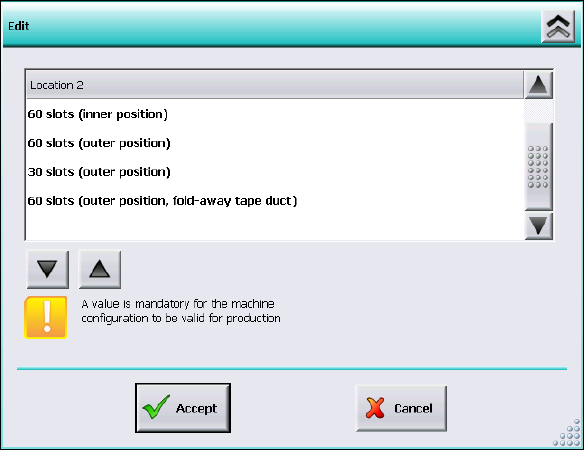
If the manual tray Carrier SX is used, the insert frame with the fold-away tape guide channel is
required. For this, the operator has to make manual settings in the Auto-configuration under
Machine configuration on the Machine service activity level.
Figure 5-3: Settings for manual tray Carrier SX
The 60 slots (outer position, fold-away tape duct) entry has to be set for the table location.
Thus, the 27x27 reject bin and the left reject channel on the location are excluded from the
configuration.

Station Software 7xx to 714.0 (R20-2) / Feature Description 11/2020 Edition
44
CAUTION
If this setting is not made the component may be rejected over the tray and the Z-axis
may dash hard against the tray.
On upgrading from station software versions <=704 the settings in the Auto-configuration
have to be checked accordingly, if the manual tray Carrier SX is used.
5.22 Two-Row Nozzle Changer on SX1/SX2 for C&P20 and CPP
The two-row nozzle changer is supported for the C&P20 and CPP placement heads on the
SX1/SX2-series placement machines.
Features (V704.03: Compatible Mode to V705.04)
5.23 Flexible Usage of Feeder Types
As of this station software version some feeder types can be flexibly used without changing the
setup in SIPLACE Pro. After a feeder type change the machine can immediately start picking up
again.
The following feeder type pair is supported for flexible usage:
2x8mm X-feeder ↔ 8mm X-feeder
The Status display X-feeders topic has been completed accordingly in the online help of the
station software.
5.24 SST38 PCB Camera Replaced by SST30
The SST30 PCB camera now covers the entire functionality of the SST38 PCB camera. Thus, it is
possible to measure 01005 components without any restrictions with the SST30 PCB camera as of
this station software version.
Features (V704.03 SP1 and SP2: Compatible Modes to V705.04
SP1 and V705.04 SP2 resp.)
5.25 Improved Traveling Range Measurement
In this station software version the traveling range measurement has been improved. For this
reason you are advised to recalibrate the traveling ranges during installation of the station software.