SIPLACE Station Software 7xx to 714 介绍.pdf - 第66页
Station Software 7xx to 714.0 (R20-2) / Feature Description 11/2020 Edition 66 NOITCE Filling level view The Filling level view is now a se parate tool and is not displayed in the Setup view anymore. 7.8 Counter for Oper…
Station Software 7xx to 714.0 (R20-2) / Feature Description 11/2020 Edition
65
The component onto which the glue dots will be applied can be manually taught. For this, the
operator selects the component (that is marked accordingly) from the component list. A dialog box
is opened in which the operator can decide, whether the glue dots shall be applied onto the
component before teaching or not.
SIPLACE Vision creates automatic output files for the components with glue dots. With these files
the operator can perform the inspection offline.
The glue dot inspection is optional and can be activated / deactivated in SIPLACE Pro.
NOTICE
Calibration of the Glue Feeder
The Glue Feeder has to be calibrated each time the machine is booted or the Glue
Feeder is inserted or removed.
Detailed information on SIPLACE Glue Feeder can be found in the correspondent user manual,
item number 00197219-01 and in the online help files to SIPLACE Vision and station software.
7.7 Display of Remaining Time in the Filling Level View
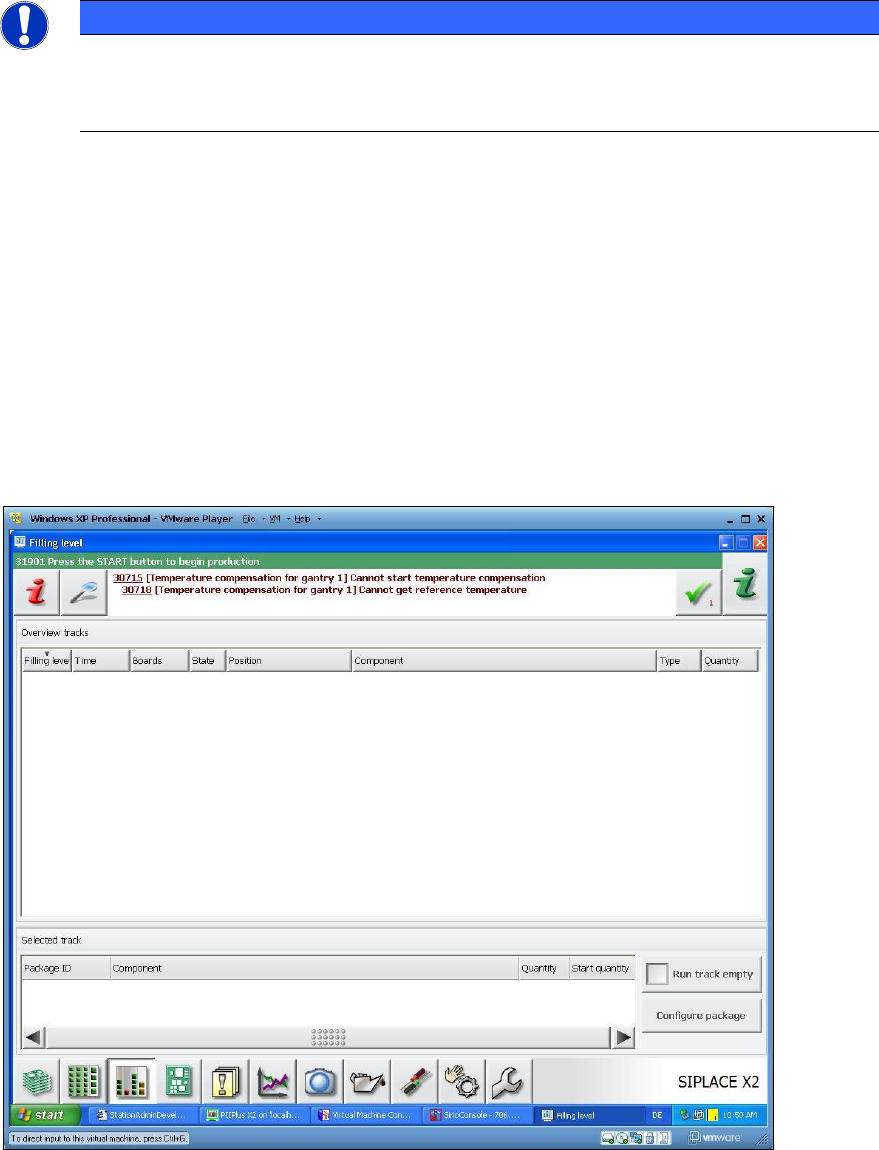
With this feature the remaining time is calculated as for the components required to produce the
boards completely. The remaining time until a feeder gets empty is calculated by means of the
component levels from Setup Center, the job data from SIPLACE Pro and / or the panel at the
station.
The remaining Time in [hh:mm] and the number of boards to be produced are displayed in the
Filling level view on the GUI of the station software. After this time is elapsed, the boards cannot
be completely produced.
Figure 7-1: Filling level view
Station Software 7xx to 714.0 (R20-2) / Feature Description 11/2020 Edition
66
NOITCE
Filling level view
The Filling level view is now a separate tool and is not displayed in the Setup view
anymore.
7.8 Counter for Operating Hours
On the placement machines with GCU (Gantry Control Unit), i.e. on all placement machines of the
DX- and SX-series, a counter for operating hours has been implemented that captures the runtime
of the station software console.
The software counts the operating hours as soon as the station software is started. The value is
stored to the second every five minutes.
On the GUI of the station software the value is displayed in complete hours under Manual
operations and is updated as soon as another complete hour is elapsed.
To prevent that the counter for operating hours gets lost if an I/O module is exchanged, the value is
additionally stored in a file. This ensures that either an I/O module can be exchanged or a new
software version installed without deleting the counter for operating hours.
7.9 Enhancement of the Automatic Calibration
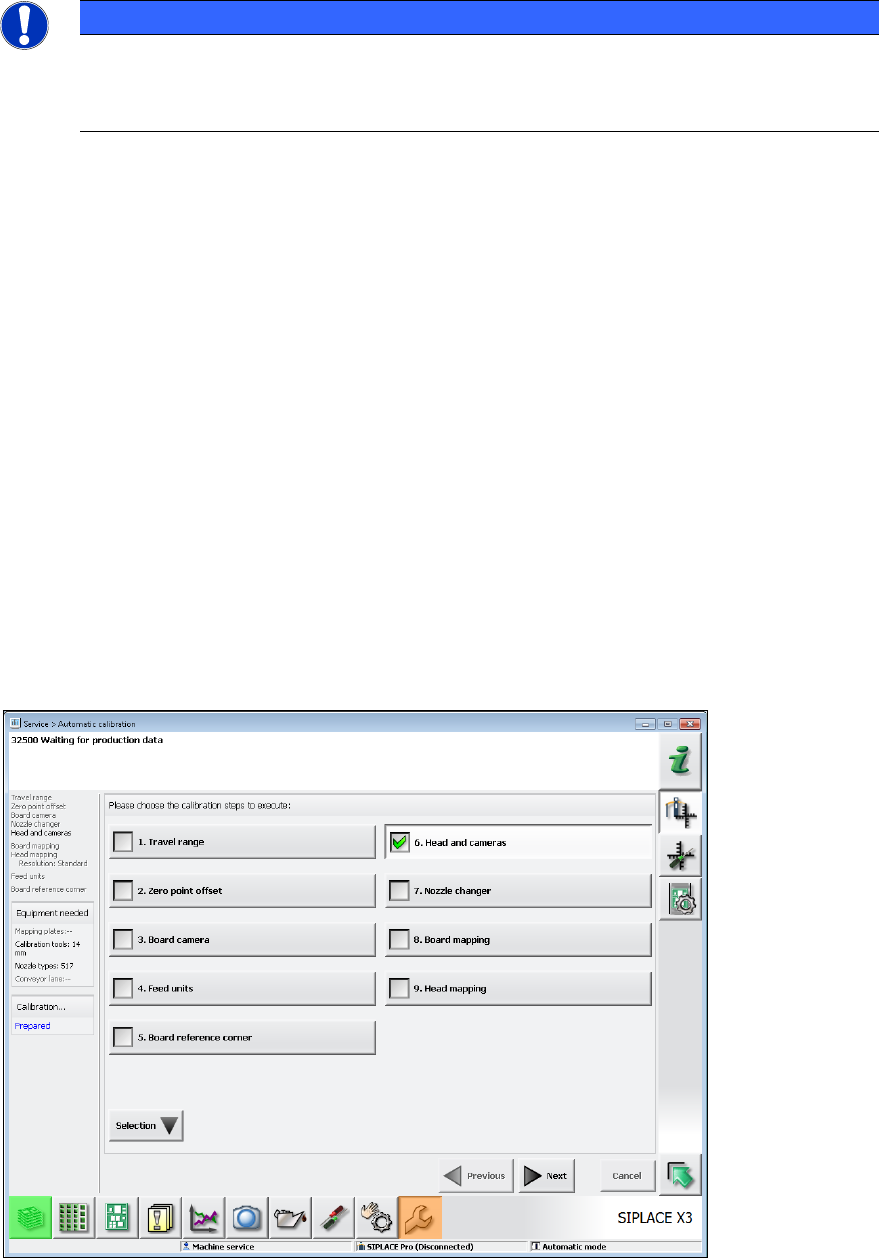
If the Head and cameras button is selected, different calibration steps are included in the entire
calibration depending on the head type.
Figure 7-2: Automatic calibration – Head and cameras
Station Software 7xx to 714.0 (R20-2) / Feature Description 11/2020 Edition
67
To simplify the calibration, the automatic calibration has been enhanced to include the following
steps:
– Zero pressure adjustment (for all placement heads)
– Closed vacuum calibration (for Twin heads only)
Dependence on nozzle changer
● Due to the fact that the closed vacuum calibration for Twin heads has been included in the
calibration, there is a dependence on the nozzle changer. For the calibration, 518 type nozzles
are used that get picked-up during the head calibration. This dependence is eliminated, if the
nozzle changer calibration (if selected in the automatic calibration) is performed before the
sub-step "Calibrate vacuum with closed nozzle". The 518 type nozzles must not be located
in a garage that is required for the nozzle changer calibration (garage 1 of each magazine)! If
the nozzle changer has already been calibrated, the calibration of the heads and cameras can
be performed separately.
If the requirements for the closed vacuum calibration are not fulfilled (nozzle changer not
calibrated AND not selected, 518 type nozzles not available etc.), the head may be calibrated
step-by-step via the single calibration functions.
Partial calibrations that have been successfully performed during the head calibration can be
stored and are valid.
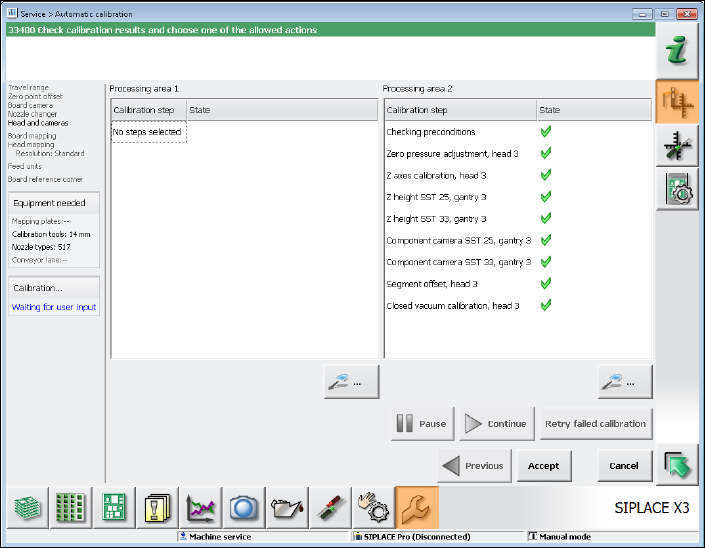
As for the Twin head, for example, the calibration results in the following sub-steps that are
displayed in the calibration sequence window.
Figure 7-3: Calibrating Twin head – Sub-steps